

First impressions of the Apple Studio Display have now been shared by select media outlets and YouTubers, providing a closer look at Apple's latest standalone display. Reviewers praised some aspects such as the display's built-in speaker and microphone setup, while others felt that "the Studio Display in its current state is a confounding miss."
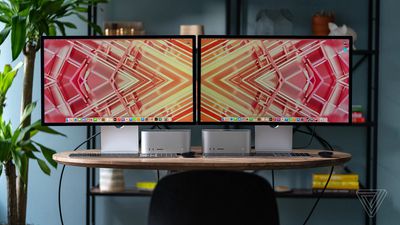 Image via The Verge
Priced starting at $1,599, the Studio Display is Apple's first new external display since the 2019 Pro Display XDR. It features a 27-inch 5K Retina display with up to 600 nits brightness, P3 Wide color, True Tone, one Thunderbolt port, three USB-C ports, a built-in A13 Bionic chip, a three-microphone array, a 12-megapixel f/2.4 Ultra Wide camera with Center Stage, and a six-speaker sound system with support for Spatial Audio.
An angle-adjustable stand is included in the price of the display, but for an extra $400, there is a tilt and height-adjustable stand, and a VESA mount adapter option that lets the display be used in portrait or landscape orientation. There is also a $300 upgrade for nano-texture glass that minimizes glare in workspaces with bright lighting.
Design
Reviewers generally admired the slim, all-aluminum design of the Studio Display. Gizmodo's Phillip Tracy highlighted the Studio Display's passive cooling design elements and criticized the display's rubbber feet:
On the top are vent holes for passive cooling; the rear panel got warm during my testing but never reached concerning temps.
Like those on the Mac Studio, the Studio Display's rubber pads failed to keep the monitor planted to my wooden desk. It slid around as I inserted or disconnected cables from the rear I/O.
Display Quality
CNBC's Kif Leswing felt that the display quality was adequate but unimpressive:
The picture quality on the Studio Display is good, but it won't blow you away. I like that text is nice and sharp thanks to the extra pixels, so people who read on their computer for hours per day might want to consider it. And while it might seem expensive, it's a lot less than the Pro Display XDR Apple also sells, which costs $4,999 before you add in the $1,000 stand.
The Verge's Nilay Patel criticized the Studio Display's lack of HDR and ProMotion:
The real issue is that $1,599 is a lot of money, and here it's buying you panel tech that is woefully behind the curve. Compared to Apple's other displays across the Mac, iPhone, and iPad lineup, the Studio Display is actually most notable for the things it doesn't have.
[...]
The Studio Display is also notable for being an SDR display, with no HDR modes to speak of. Apple's high-end iPhones, iPads, and Mac laptops all support HDR, but the Studio Display tops out at 600 nits, and Apple doesn’t offer a HDR mode in the software at all. Again, this comes back to the ancient backlight tech: true HDR requires local dimming, and the Studio Display doesn’t have it.
The Studio Display also only offers a 60Hz refresh rate, which is both bog-standard and also woefully behind Apple’s other top-tier products like the iPhone 13 Pro, iPad Pro, and MacBook Pro...
Tracy was similarly disappointed at the lack of true blacks due to the Studio Display's LCD panel:
Keep in mind that this is a standard IPS panel so you won't get the perfect black levels found on an OLED screen nor do you get HDR support for greater contrast. I placed the HP Spectre x360 16's OLED display side-by-side with the Studio Display and my eyes were drawn to the laptop. Blacks on the monitor looked dark gray in comparison, and the colors didn’t have the same wet paint-like saturation to them as those on the Spectre. I also wouldn't use the Studio Display as a gaming monitor considering the measly 60Hz refresh rate. That's standard for a screen of this resolution, but part of me was hoping Apple could find a way to add ProMotion.
The specifications of the display were consistently flagged as disappointments by reviewers given the Studio Display's price point.
Microphones and Speakers
Patel praised the Studio Display's built-in microphone and speaker setup:
Let's start with the good stuff: the mic and speakers sound great. Really, really great. You can adjust the three-mic array to do voice isolation or not in Control Center, and you'll sound as good or better on calls as any conference mics I've ever heard... The speakers are loud and deep, and while I am not entirely convinced that spatial audio in music is anything but a gimmick and even less convinced that anything like "spatial" audio can be produced by a stereo speaker system located in front of you, Apple is certainly processing its heart out here — if you play an Atmos clip you'll hear some dramatic swooshing about, which is always fun. These are the best built-in speakers I've ever heard.
TechRadar's Matt Hanson praised the microphones, but found the Studio Display's support for Spatial Audio less impressive:
The spatial audio support was less impressive. We tried a few tracks in Dolby Atmos and didn't really feel like the sound was coming from around us. Virtualized surround sound is always a challenge to get right, and can never compare to physical speaker setups, and that's true with the Studio Display, unfortunately.
Tracy likewise lauded the speaker setup, saying that "the sound quality is better than anything I've ever heard out of a monitor." TechCrunch's Brian Heater said that while the microphone setup is marketed as "studio quality," for users "planning to do much more than just webconferencing, I'd recommend plugging an external mic into one of the aforementioned ports."
Camera
A major area of concern among reviewers was the built-in 12-megapixel camera. Patel said that "the Studio Display's headline webcam feature works so badly that it's virtually unusable."
Apple has a long history of producing amazing images with 12-megapixel sensors and A-series chips, and for some reason this thing just looks awful.
Actually, it looks awful in good light, and downright miserable in low light... it produces a grainy, noisy image with virtually no detail. I tried it in FaceTime, in Zoom, in Photo Booth, in QuickTime – you name it, it's the same sad image quality. Turning off the Center Stage feature that follows you around the room doesn’t help. Turning portrait mode on and off doesn’t help.
Our rule has always been to review products based on what we have in front of us and never against the promise of a future software update, and based on what I have in front of me, I simply wouldn’t want to use this camera. The cameras on the new MacBook Pro and M1 iMac are far superior to what we're seeing here, and an iPhone front camera is even better still. I'm hopeful Apple will improve things via software in the future, but I would not spend $1,599 on this display until that actually happens.
Other reviewers generally agreed with the disappointing results from the built-in webcam, with Heater commenting:
...the image is a surprising step down from recent M1 Macs. The white balance is off and there's more image noise. My first instinct was to try to peel away a protective film I might have left on by accident, but to no avail. That's just how the image is now — a pretty huge disappointment for a monitor that starts at $1,599.
The Wall Street Journal's Joanna Stern agreed:
With a 12-megapixel camera and the A13 Bionic chip, it should be on par with the front-facing camera of an iPhone 11 Pro.
Yet Apple’s camera consistently produced grainy and washed-out images. There was so much missing detail in some of the shots that it reminded me of the camera on my old BlackBerry.
Tracy similarly found the camera to be "fine" but "noisy." Apple told multiple publications that improvements to the Studio Display's camera would be coming in a software update, but it is unclear exactly what aspect of the reviewers' complaints this update pertains to or when it will be released.
Stands and Nano-Texture Option
Patel noted that the "$300 nanotexture option smudges easily and is hard to clean," while Tracy criticized the Studio Display's stand options:
The Studio Display inexplicably lacks height adjustment. For that, you need to pay an extra $400 for a completely different stand. Perhaps Apple thinks some folks won't need it; whatever the case, a height-adjustable stand should be table stakes at the base price. To make matters worse, the stand options aren't interchangeable, meaning what you buy is what you get. What you can do with the standard stand is tilt the screen from -5 degrees to 25 degrees, which was more effective in providing an optimal viewing angle than I had anticipated. That said, if, like me, you need to stretch your legs and stand at various times throughout the workday, then prepare to spend extra or go with a VESA mount.
Hanson said that "it's these kinds of 'hidden' extra costs that try a lot of peoples' patience when it comes to Apple."





















Top Rated Comments
And what was the point of putting an A13 in the monitor... if it doesn't have Apple TV functionality, or airplay, or whatever. $1600 for 60 Hz and subpar webcam???