When watchOS 3 launched alongside iOS 10, it brought a handful of feature additions and speed improvements to the Apple Watch. One of the new social features is a way for users to share their Activity Rings with friends and family through "Activity Sharing."

Mainly focused in iOS 10's Activity app, the ability to share workout data nevertheless requires an Apple Watch updated to watchOS 3, and for you to be comfortable with certain people receiving live updates on your fitness activity. When you're ready to start sharing your Activity Rings, and you've updated to both iOS 10 and watchOS 3, follow these steps:

Activity Sharing on iPhone
activity-how-to-3

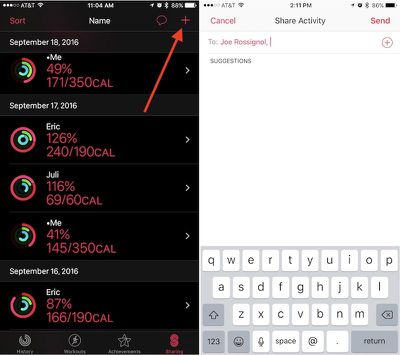
  1. Open "Activity" on your iPhone.
  2. Navigate to the "Sharing" tab on the bottom right.
  3. Tap the "+" icon in the top right corner to add a friend.
  4. The app will offer suggestions from your contacts of users who may own an Apple Watch, so you can tap one of those or type in someone specific in the text box.
  5. You can include multiple invitations at one time, and once you have everyone included in the "To" box, tap "Send."

From there, simply wait for your friend to accept the invitation. Afterwards, you'll begin to see one another's Calorie, Workout, and Standing rings in the same Sharing tab you sent the invite from. Once you amass a group of friends and family members, you can also sort the data in helpful partitions depending on what you'd like to see. Simply tap "Sort" in the top left corner of the Sharing tab and choose from Name, Move, Exercise, Steps, and Workouts as the primary focus.

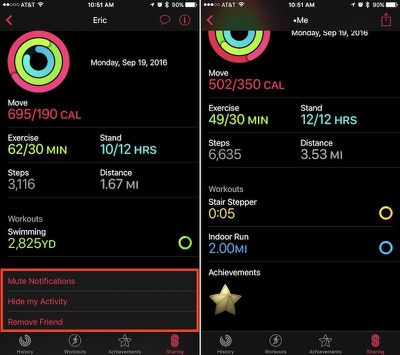
Tapping on anyone in the list will bring you into a deeper menu about that individual's Activity that day. The app will break down each ring, as well as showcase a step count, distance walked, and list any completed workouts or earned achievements. At the very bottom, there's a few options to mute a friend's notifications, hide your Activity from them, or delete them as a friend. Within your main friends list you will see your own Activity as well.
activity-how-to-2

An example of a friend's Sharing card (left), and your own (right)

Activity Sharing on Apple Watch

Although Activity Sharing is more in-depth within Activity on iOS, most of the interactivity of the new social feature takes place on the Apple Watch. Whenever friends begin closing their Activity Rings, completing workouts, and earning achievements, you'll get push notifications about each accomplishment. From these pop-ups, you can send friendly encouragements (or sly digs) about their hard work.
activity-how-to-5

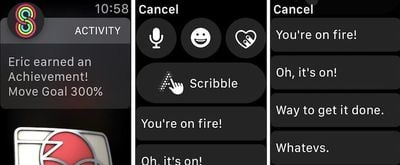
  1. When you receive an Activity notification from a friend on your Apple Watch, scroll down.
  2. Tap "Reply."
  3. You can choose from the traditional speech-to-text, emoji, Digital Touch, and Scribble options, or scroll more for some of Apple's stock Activity responses.
  4. Tap on any phrase to send it.

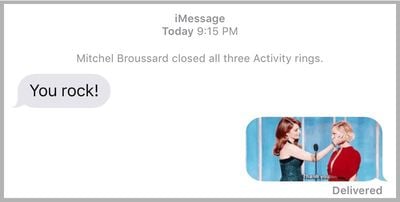
These responses are integrated directly into Messages in iOS 10, so if you sent "You're on fire!" for example, Messages would provide slight context above the message with "Mitchel completed a workout." Until they otherwise mute you for the day, or turn off your notifications completely within Activity on iPhone, each of your friends will receive a notification upon the completion of every workout and earning of every achievement.
activity-how-to-7
If you visit the Activity app on Apple Watch, you can scroll down to get more detailed readouts of each Activity Ring. Swiping right-to-left shows the new Sharing tab, similar to the one on iPhone. You can scroll to see each friend, tap on them for an individualized view, and send a message through a button at the bottom of their profile.

It should be noted that Apple's stock fitness-related phrases will only appear following a Sharing notification from a friend, and then only on Apple Watch. Any other Messages-related prompt outside of a notification from a friend will simply guide you over to Messages with all of the expected features introduced in the app in iOS 10.

There are plenty of other interesting and notable features to discover in watchOS 3, so be sure to check out the MacRumors roundups for both watchOS 3 and Apple Watch Series 2 to find out more information on each.

Related Roundup: Apple Watch 11
Buyer's Guide: Apple Watch (Buy Now)

Top Rated Comments

44267547 Avatar
121 months ago
How to use the most useless feature ever
You must not have any friends to share your activity with. I feel sorry for you.
Score: 2 Votes (Like | Disagree)
Phogro Avatar
121 months ago
How to use the most useless feature ever
^ how to be a shortsighted fool.
Score: 2 Votes (Like | Disagree)
Raineer Avatar
121 months ago
I'm curious to hear if this works for anyone. I've been trying to connect my activity account with my wife's for like 4 days now. We can get to the "accept" prompt to accept the invite, but after that it's just infinite spinning "thinking" icon. Have rescinded the invite and resent several times, trying both directions.
Score: 2 Votes (Like | Disagree)
Watabou Avatar
121 months ago
How to use the most useless feature ever
I think it's pretty fun, myself. I get to see how my friends and family are doing with their activity, and if they beat me on a day, it really motivates me to do better. But we do have a competitive side so that also helps.

Just because you think it's useless, doesn't make it so.
Score: 2 Votes (Like | Disagree)
tliede20 Avatar
121 months ago
I'm curious to hear if this works for anyone. I've been trying to connect my activity account with my wife's for like 4 days now. We can get to the "accept" prompt to accept the invite, but after that it's just infinite spinning "thinking" icon. Have rescinded the invite and resent several times, trying both directions.
You're not going to like my answer.... but I had to RESTORE my iPhone to make that work, I've seen this 3 times now. That seems to be the ONLY solution. Apple Support had me try the following which didn't work...

- Unpair / Repair watch
- Restore Watch

Checked diagnostics on both and they were clear.

Restoring the phone and THEN repairing the watch worked.

Good Luck!
Score: 2 Votes (Like | Disagree)
chitoac Avatar
121 months ago
I'm curious to hear if this works for anyone. I've been trying to connect my activity account with my wife's for like 4 days now. We can get to the "accept" prompt to accept the invite, but after that it's just infinite spinning "thinking" icon. Have rescinded the invite and resent several times, trying both directions.
its working for me. only problem i got was that my gf didnt update her watch, but after both have ios 10 and watch os 3 its working. sometimes it takes a little long to load.
but im loving it! specially the days i beat my her LOL
Score: 1 Votes (Like | Disagree)

Popular Stories

iOS 26

iOS 26.4 and iOS 27 Features Revealed in New Leak

Friday December 12, 2025 10:56 am PST by
Macworld's Filipe Espósito today revealed a handful of features that Apple is allegedly planning for iOS 26.4, iOS 27, and even iOS 28. The report said the features are referenced within the code for a leaked internal build of iOS 26 that is not meant to be seen by the public. However, it appears that Espósito and/or his sources managed to gain access to it, providing us with a sneak peek...
iOS 26

Apple Releases iOS 26.2 With Alarms for Reminders, Lock Screen Changes, Enhanced Safety Alerts and More

Friday December 12, 2025 10:10 am PST by
Apple today released iOS 26.2, the second major update to the iOS 26 operating system that came out in September, iOS 26.2 comes a little over a month after iOS 26.1 launched. ‌iOS 26‌.2 is compatible with the ‌iPhone‌ 11 series and later, as well as the second-generation ‌iPhone‌ SE. The new software can be downloaded on eligible iPhones over-the-air by going to Settings >...
Apple Foldable Thumb

Leak Reveals Foldable iPhone Details

Monday December 15, 2025 9:09 am PST by
The first foldable iPhone will feature a series of design and hardware firsts for Apple, according to details shared by the Weibo leaker known as Digital Chat Station. According to a new post, via machine translation, Apple is developing what the leaker describes as a "wide foldable" device, a term used to refer to a horizontally oriented, book-style foldable with a large internal display....
iOS 26

iOS 26.2 Coming Soon With These 8 New Features on Your iPhone

Thursday December 11, 2025 8:49 am PST by
Apple seeded the second iOS 26.2 Release Candidate to developers earlier this week, meaning the update will be released to the general public very soon. Apple confirmed iOS 26.2 would be released in December, but it did not provide a specific date. We expect the update to be released by early next week. iOS 26.2 includes a handful of new features and changes on the iPhone, such as a new...
macOS Tahoe 26 Thumb

Apple Releases macOS Tahoe 26.2 With Edge Light

Friday December 12, 2025 10:08 am PST by
Apple today released macOS Tahoe 26.2, the second major update to the macOS Tahoe operating system that came out in September. macOS Tahoe 26.2 comes five weeks after Apple released macOS Tahoe 26.1. Mac users can download the macOS Tahoe update by using the Software Update section of System Settings. macOS Tahoe 26.2 includes Edge Light, a feature that illuminates your face with soft...
AirPods Pro Firmware Feature

Apple Releases New Firmware for AirPods Pro 2 and AirPods Pro 3

Thursday December 11, 2025 11:28 am PST by
Apple today released new firmware designed for the AirPods Pro 3 and the prior-generation AirPods Pro 2. The AirPods Pro 3 firmware is 8B30, up from 8B25, while the AirPods Pro 2 firmware is 8B28, up from 8B21. There's no word on what's include in the updated firmware, but the AirPods Pro 2 and AirPods Pro 3 are getting expanded support for Live Translation in the European Union in iOS...
ipados 26 1 slide over

Apple Releases iPadOS 26.2 With Multitasking Improvements

Friday December 12, 2025 10:09 am PST by
Apple today released iPadOS 26.2, the second major update to the iPadOS 26 operating system released in September. iPadOS 26.2 comes a month after iPadOS 26.1. The new software can be downloaded on eligible iPads over-the-air by going to Settings > General > Software Update. iPadOS 26.2 continues with the multitasking improvements that were added with iPadOS 26.1. You can now drag and...
airpods max 2024 colors

AirPods Max 2 Likely to Offer These 10 New Features

Monday December 15, 2025 7:41 am PST by
Apple released the AirPods Max on December 15, 2020, meaning the over-ear headphones launched five years ago today. While the AirPods Max were updated with a USB-C port and new color options last year, followed by support for lossless audio and ultra-low latency audio this year, the headphones lack some of the features that have been introduced for newer generations of the regular AirPods and the ...