On iPhone 16 models, Visual Intelligence lets you use the camera to learn more about places and objects around you. It can also summarize text, read text out loud, translate text, search Google for items, ask ChatGPT, and more. And thanks to the latest iOS 18.4 update from Apple, iPhone 15 Pro models can now get in on the action, too.

Apple Visual Intelligence
Until recently, ‌Visual Intelligence‌ was a feature limited to iPhone 16 models with a Camera Control button, which was necessary to activate the feature. However, Apple in February debuted the iPhone 16e, which lacks Camera Control and yet supports Visual Intelligence. This is because the device ships with a version of iOS that includes Visual Intelligence as an assignable option to the device's Action button.

Apple later confirmed that the same Visual Intelligence customization setting would be coming to iPhone 15 Pro models via a software update. That update is iOS 18.4, and it's available now. If you haven't updated yet, you can do so by opening Settings ➝ General ➝ Software Update.

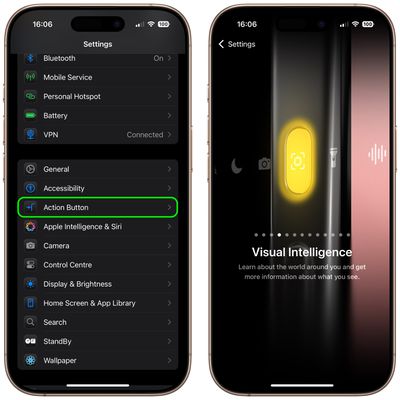
After your device is up-to-date, you can assign Visual Intelligence to the device's Action button in the following way.

  1. Open Settings on your iPhone 15 Pro.
  2. Tap Action Button.
  3. Swipe to Visual Intelligence.

settings

Pressing and holding the Action button will now activate Visual Intelligence. Note that you can also activate Visual Intelligence using the new button option in Control Center. Here's how.

  1. Swipe down from the top-right corner of your iPhone's display, then long press on the Control Center.
  2. Tap Add a Control at the bottom.
  3. Use the search bar at the top to search for Visual Intelligence, or swipe up to the "Apple Intelligence" section and choose the button.
  4. Tap the screen to exit the Control Center's edit mode.
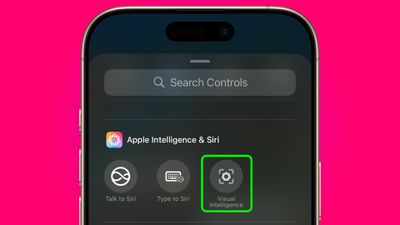
control center

Using Visual Intelligence

The Visual Intelligence interface features a view from the camera, a button to capture a photo, and dedicated "Ask" and "Search" buttons. Ask queries ChatGPT, and Search sends an image to Google Search.
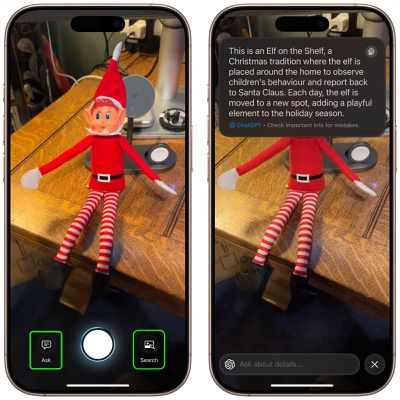
visual intelligence buttons
When using Visual Intelligence you can either snap a photo using the shutter button and then select an option, or you can select an option in live camera view. You cannot use photos that you took previously.

To learn about everything that you can do with Visual Intelligence, be sure to check out our dedicated guide.


Top Rated Comments

cicalinarrot Avatar
9 months ago
I'd title this "$1000 phones from a year ago still not outdated, bad luck for $900 phones buyers"
Score: 11 Votes (Like | Disagree)
bhirt37 Avatar
9 months ago
Visual intelligence, what a joke. Unless I am missing something, all this feature does is upload an image to either ChatGPT or Google image search, depending on the button. What amazing things you are doing apple. These billions invested in ai are paying off!!
Score: 9 Votes (Like | Disagree)
youteonduty Avatar
9 months ago
technically you can get all these features on all the phones running upto date ios but apple decided not too as idea is to sell new hardware
Score: 6 Votes (Like | Disagree)
almostinsane Avatar
9 months ago

You’re missing something. It’s in-device processing.
How is it on device if it sends the image to google and the query to Chatgpt?
Score: 5 Votes (Like | Disagree)
lelisa13p Avatar
9 months ago

The beta period for Apple I will be longer than expected
I'm patient. I can wait. These days the thrill of a Beta for me isn't what it once was.
Score: 5 Votes (Like | Disagree)
Ctrlos Avatar
9 months ago
Apple Intelligence gets some stick (largely for a set of useful or quaint OS features) but Visual Intelligence is brilliant.

Yes it relies on ChatGPT to do much of the heavy lifting but this doesn’t require an account and is no different to using Google as the search engine in Safari.

I’ve used it for all sorts of things from asking what an unknown food in the market might taste like to how to calculate Young’s Modulus of some tensile testing samples at work. On a recent trip to Spain I used it to visually translate nearly everything I came across.

Yes it’s Google Lens for the iPhone. But it’s only a purposeful button hold away at all times and the swishy gradient animations are look slick.
Score: 4 Votes (Like | Disagree)

Popular Stories

iOS 26

iOS 26.4 and iOS 27 Features Revealed in New Leak

Friday December 12, 2025 10:56 am PST by
Macworld's Filipe Espósito today revealed a handful of features that Apple is allegedly planning for iOS 26.4, iOS 27, and even iOS 28. The report said the features are referenced within the code for a leaked internal build of iOS 26 that is not meant to be seen by the public. However, it appears that Espósito and/or his sources managed to gain access to it, providing us with a sneak peek...
Apple Logo Top Half

Early iOS 26 Software Leak Uncovers Dozens of Upcoming Apple Features

Monday December 15, 2025 3:05 pm PST by
Software from an iPhone prototype running an early build of iOS 26 leaked last week, giving us a glimpse at future Apple devices and iOS features. We recapped device codenames in our prior article, and now we have a list of some of the most notable feature flags that were found in the software code. In some cases, it's obvious what the feature flags are referring to, while some are more...
apple beta 26 lineup

Apple Leak Confirms Work on Foldable iPhone, AirTag 2, and Dozens More Devices

Monday December 15, 2025 2:05 pm PST by
Last week, details about unreleased Apple devices and future iOS features were shared by Macworld. This week, we learned where the information came from, plus we have more findings from the leak. As it turns out, an Apple prototype device running an early build of iOS 26 was sold, and the person who bought it shared the software. The OS has a version number of 23A5234w, and the first...
Apple Foldable Thumb

Leak Reveals Foldable iPhone Details

Monday December 15, 2025 9:09 am PST by
The first foldable iPhone will feature a series of design and hardware firsts for Apple, according to details shared by the Weibo leaker known as Digital Chat Station. According to a new post, via machine translation, Apple is developing what the leaker describes as a "wide foldable" device, a term used to refer to a horizontally oriented, book-style foldable with a large internal display....
iOS 26

iOS 26.3 Beta 1 Features: What's New So Far

Monday December 15, 2025 4:23 pm PST by
Apple is testing iOS 26.3, the next version of iOS 26 that will launch around January. Since iOS 26.3's testing is happening over the holidays, it is a smaller update with fewer features than we've seen in prior betas. We've rounded up what's new so far, and we'll add to our list with subsequent betas if we come across any other features. Transfer to Android Apple is making it simpler...
iOS 26

Apple Releases iOS 26.2 With Alarms for Reminders, Lock Screen Changes, Enhanced Safety Alerts and More

Friday December 12, 2025 10:10 am PST by
Apple today released iOS 26.2, the second major update to the iOS 26 operating system that came out in September, iOS 26.2 comes a little over a month after iOS 26.1 launched. ‌iOS 26‌.2 is compatible with the ‌iPhone‌ 11 series and later, as well as the second-generation ‌iPhone‌ SE. The new software can be downloaded on eligible iPhones over-the-air by going to Settings >...
iOS 26

iOS 26.2 Coming Soon With These 8 New Features on Your iPhone

Thursday December 11, 2025 8:49 am PST by
Apple seeded the second iOS 26.2 Release Candidate to developers earlier this week, meaning the update will be released to the general public very soon. Apple confirmed iOS 26.2 would be released in December, but it did not provide a specific date. We expect the update to be released by early next week. iOS 26.2 includes a handful of new features and changes on the iPhone, such as a new...
airpods max 2024 colors

AirPods Max 2 Likely to Offer These 10 New Features

Monday December 15, 2025 7:41 am PST by
Apple released the AirPods Max on December 15, 2020, meaning the over-ear headphones launched five years ago today. While the AirPods Max were updated with a USB-C port and new color options last year, followed by support for lossless audio and ultra-low latency audio this year, the headphones lack some of the features that have been introduced for newer generations of the regular AirPods and the ...