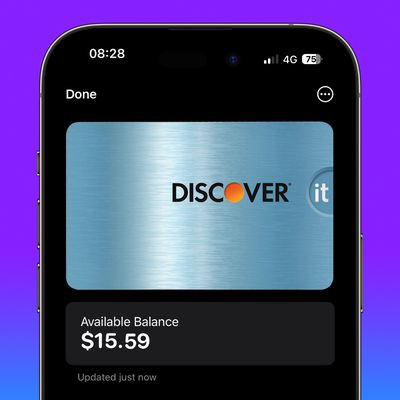
In iOS 17.1 and later, iPhone users in the UK can now view banking information like account balance when using Apple Pay and viewing bank cards and credit cards in the Wallet app. Keep reading to learn how it works.
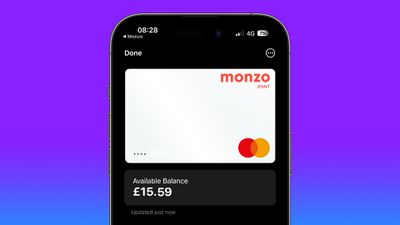
uk bank account apple wallet 2
Apple's Wallet app on ‌iPhone‌ has been able to display ‌Apple Pay‌ transactions made using your bank and credit cards for a while now, but if you are a Wallet app user in the United Kingdom, a new integration introduced in iOS 17.1 means you can view your current account balance from your bank, along with other information like spending history, payments, deposits, and withdrawals. If you have a credit card, you can also view your remaining credit.

The new feature is intended to help you make more informed purchases, increase your confidence when making a transaction, and allows you to simply view frequent information so that you have more control when it comes to your finances.

To get the additional account information, your bank needs to support the Open Banking API that Apple has implemented. Supporting banks currently include Barclays, Barclaycard, First Direct, Halifax, HSBC, Lloyds, M&S Bank, Monzo Bank, NatWest Bank, and Royal Bank of Scotland, with more banks likely to come on board now that the feature is live.

The following steps show you how integration is securely authorized through the Wallet app in iOS 17.1 and later. It's a simple enough process, and Apple will automatically redirect you to your bank app to authenticate the connection.

  1. Open the Wallet app on your ‌iPhone‌.
  2. Tap a card from a supporting bank.
  3. Tap Get Started under "See Balances and Full Transaction History for This Account." (If you don't see the option, your bank doesn't yet support the feature.)
  4. Tap Continue to connect your account to Wallet.
  5. Check the account details that you are about to give Wallet permission to access, then tap Continue.
  6. In your bank app, enter your ‌iPhone‌'s passcode or use Face ID to grant Wallet permission to access the specified account details.
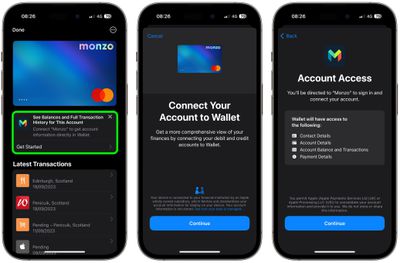
view uk bank account balance apple wallet

After following these steps, you'll be directed back to the Wallet app, where you will now see the available balance of your account underneath the bank card, along with your transaction history and other relevant information. If it's a credit card, you'll also see the remaining balance available, while a tap on the balance will also reveal your credit limit.

Apple Wallet also keeps annual transaction histories for linked accounts. You can access them for each account in Settings -> Wallet & Apple Pay: Tap the connected account under "Connections," tap the card under "Accounts," then tap Account Activity, where you can view transactions by year.


Top Rated Comments

toypadlock Avatar
31 months ago

E.g. last year I bought confectionery bar from a supermarket but had to return as I didn't like it. But the process was crazily complex - because I wasn't using the supermarket's own app.
you... returned a chocolate bar you didn't like?
Score: 22 Votes (Like | Disagree)
GigabitEthernet Avatar
31 months ago
Open Banking is one of the few genuinely good improvements to banking the UK Government/banking sector has made over recent years.

This is a good improvement.
Score: 19 Votes (Like | Disagree)
ProfessionalFan Avatar
31 months ago
The US needs this, such a good feature. I'd prefer one place to view everything. I believe there are third party apps that can do this like Mint (for most cards), but I want a built-in one if possible. I'd love the Wallet app to become my everything finance app.
Score: 11 Votes (Like | Disagree)
polyphenol Avatar
31 months ago
Amazed and pleased to see such a UK-only addition!

Not sure, right now, whether it will be any more use than my bank's own app. But might just be more convenient.

What I'd actually like is an open receipt mechanism. Shops often offer a paper receipt, a receipt on their app on your phone, or require an email address.

A mechanism whereby you can accept a detailed receipt from the shop's till, without installing a shop-specific app, maybe offer a hidden email for them to use if they need to contact you (e.g. a recall), and me to be able to use it as proof of purchase, is very much wanted.

E.g. last year I bought confectionery bar from a supermarket but had to return as I didn't like it. But the process was crazily complex - because I wasn't using the supermarket's own app.
Score: 10 Votes (Like | Disagree)
GigabitEthernet Avatar
31 months ago

The US needs this, such a good feature. I'd prefer one place to view everything. I believe there are third party apps that can do this like Mint (for most cards), but I want a built-in one if possible. I'd love the Wallet app to become my everything finance ap.
The US won't ever implement this as it would require the regulator to enforce it across the banking system which it is scared to do for fear of rocking the boat.

The UK banking sector is very different - consumer banking anyway - and so features like this are available relatively quickly. Apple Pay support is another one where it's now rare to find a bank that doesn't support it.
Score: 7 Votes (Like | Disagree)
Urban Splash Avatar
31 months ago
I want to turn off this feature when I buy Vision Pro
Score: 7 Votes (Like | Disagree)

Popular Stories

Aston Martin CarPlay Ultra Screen

Apple's CarPlay Ultra to Expand to These Vehicle Brands Later This Year

Sunday February 1, 2026 10:08 am PST by
Last year, Apple launched CarPlay Ultra, the long-awaited next-generation version of its CarPlay software system for vehicles. Nearly nine months later, CarPlay Ultra is still limited to Aston Martin's latest luxury vehicles, but that should change fairly soon. In May 2025, Apple said many other vehicle brands planned to offer CarPlay Ultra, including Hyundai, Kia, and Genesis. In his Powe...
Apple Logo Black

Apple's Next Launch is 'Imminent'

Sunday February 1, 2026 12:31 pm PST by
The calendar has turned to February, and a new report indicates that Apple's next product launch is "imminent," in the form of new MacBook Pro models. "All signs point to an imminent launch of next-generation MacBook Pros that retain the current form factor but deliver faster chips," Bloomberg's Mark Gurman said on Sunday. "I'm told the new models — code-named J714 and J716 — are slated...
Apple MacBook Pro M4 hero

New MacBook Pros Reportedly Launching Alongside macOS 26.3

Sunday February 1, 2026 5:42 am PST by
Apple is planning to launch new MacBook Pro models with M5 Pro and M5 Max chips alongside macOS 26.3, according to Bloomberg's Mark Gurman. "Apple's faster MacBook Pros are planned for the macOS 26.3 release cycle," wrote Gurman, in his Power On newsletter today. "I'm told the new models — code-named J714 and J716 — are slated for the macOS 26.3 software cycle, which runs from...
iOS 26

iOS 26.3 and iOS 26.4 Will Add These New Features to Your iPhone

Tuesday February 3, 2026 7:47 am PST by
We are still waiting for the iOS 26.3 Release Candidate to come out, so the first iOS 26.4 beta is likely still at least a week or two away. Following beta testing, iOS 26.4 will likely be released to the general public in March or April. Below, we have recapped known or rumored iOS 26.3 and iOS 26.4 features so far. iOS 26.3 iPhone to Android Transfer Tool iOS 26.3 makes it easier...
14 inch MacBook Pro Keyboard

Apple Changes How You Order a Mac

Saturday January 31, 2026 10:51 am PST by
Apple recently updated its online store with a new ordering process for Macs, including the MacBook Air, MacBook Pro, iMac, Mac mini, Mac Studio, and Mac Pro. There used to be a handful of standard configurations available for each Mac, but now you must configure a Mac entirely from scratch on a feature-by-feature basis. In other words, ordering a new Mac now works much like ordering an...