Safari in iOS 18 introduces a new feature called Highlights, which is designed to enhance your browsing experience by intelligently surfacing key information from webpages. The tool uses machine learning to identify and extract the most relevant details, and present them to you in an easily accessible format.

safari icon blue banner
Think of Highlights as a kind of smart assistant within Safari, saving you time and effort by eliminating the need to manually search through lengthy web content. Whether you're looking up a restaurant, researching a historical figure, or checking out a new movie, Highlights can often quickly provide the essential information you need.

The feature is particularly useful for various types of content:

  • For businesses and locations, it can display address details, operating hours, and quick access to directions.
  • When browsing pages about people, it might show brief biographical information.
  • For entertainment content, it can offer direct links to play songs or summarize reviews for movies and TV shows.

Highlights aims to streamline your browsing by providing these bite-sized pieces of information right when you need them.
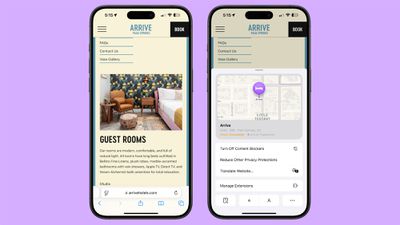
ios 18 safari highlights
Here's how to use the new feature in iOS 18:

  1. Open Safari and navigate to a supported webpage.
  2. Look for a purple sparkle over the tool icon in the browser bar. This indicates Highlights are available.
  3. Tap the sparkle to open the Highlights window.
  4. Review the summarized information presented in the Highlights window, and interact with the information you need, such as tapping on directions or playback links.

By keeping an eye out for the sparkle icon as you browse, you can take full advantage of this time-saving feature and quickly access the most pertinent information from websites. Note that Highlights is currently only available in the U.S. and only works for English websites.


Top Rated Comments

jz0309 Avatar
18 months ago
“Open Safari and navigate to a supported webpage”

How would one know that a webpage is supported???
Score: 12 Votes (Like | Disagree)
trip1ex Avatar
18 months ago
didn't work on this article
Score: 6 Votes (Like | Disagree)
NightFox Avatar
18 months ago
I always feel like these features are designed for the way people use the internet in adverts, and not how and why the internet gets used in real life. Maybe I'm just not using it right though.
Score: 3 Votes (Like | Disagree)
ifxf Avatar
18 months ago
I am not enabling this feature since I don’t want to share my browsing with Apple.
Score: 3 Votes (Like | Disagree)
318iphone Avatar
18 months ago
Some commenters seem to be confusing "summary" with highlight. This article is about highlights - from apple.com "Safari will automatically detect relevant information on a page and highlight it as you browse. Highlights display helpful information like directions and quick links to learn more about people, music, movies, and TV shows." The example given in the article does work. It "highlights" the location of the hotel. As you can see in the screen capture I just did on 15.1 beta4.

Attachment Image
Score: 2 Votes (Like | Disagree)
Aslak3 Avatar
18 months ago

Now let’s use AI to extract from AI written webpages. What could go wrong?:)
This is client side, but yep it’s a valid concern! Hopefully there will be standardised tags/markup to signify server side AI content is machine generated. Without that the web will turn into some kind of self referencing nonsense soup, not that it isn’t close to that already.
Score: 2 Votes (Like | Disagree)

Popular Stories

Aston Martin CarPlay Ultra Screen

Apple's CarPlay Ultra to Expand to These Vehicle Brands Later This Year

Sunday February 1, 2026 10:08 am PST by
Last year, Apple launched CarPlay Ultra, the long-awaited next-generation version of its CarPlay software system for vehicles. Nearly nine months later, CarPlay Ultra is still limited to Aston Martin's latest luxury vehicles, but that should change fairly soon. In May 2025, Apple said many other vehicle brands planned to offer CarPlay Ultra, including Hyundai, Kia, and Genesis. In his Powe...
Apple Logo Black

Apple's Next Launch is 'Imminent'

Sunday February 1, 2026 12:31 pm PST by
The calendar has turned to February, and a new report indicates that Apple's next product launch is "imminent," in the form of new MacBook Pro models. "All signs point to an imminent launch of next-generation MacBook Pros that retain the current form factor but deliver faster chips," Bloomberg's Mark Gurman said on Sunday. "I'm told the new models — code-named J714 and J716 — are slated...
iOS 26

iOS 26.3 and iOS 26.4 Will Add These New Features to Your iPhone

Tuesday February 3, 2026 7:47 am PST by
We are still waiting for the iOS 26.3 Release Candidate to come out, so the first iOS 26.4 beta is likely still at least a week or two away. Following beta testing, iOS 26.4 will likely be released to the general public in March or April. Below, we have recapped known or rumored iOS 26.3 and iOS 26.4 features so far. iOS 26.3 iPhone to Android Transfer Tool iOS 26.3 makes it easier...
Apple MacBook Pro M4 hero

New MacBook Pros Reportedly Launching Alongside macOS 26.3

Sunday February 1, 2026 5:42 am PST by
Apple is planning to launch new MacBook Pro models with M5 Pro and M5 Max chips alongside macOS 26.3, according to Bloomberg's Mark Gurman. "Apple's faster MacBook Pros are planned for the macOS 26.3 release cycle," wrote Gurman, in his Power On newsletter today. "I'm told the new models — code-named J714 and J716 — are slated for the macOS 26.3 software cycle, which runs from...
iOS 26 Home Feature

Apple Gives Final Warning to Home App Users

Tuesday February 3, 2026 8:55 am PST by
In 2022, Apple introduced a new Apple Home architecture that is "more reliable and efficient," and the deadline to upgrade and avoid issues is fast approaching. In an email this week, Apple gave customers a final reminder to upgrade their Home app by February 10, 2026. Apple says users who do not upgrade may experience issues with accessories and automations, or lose access to their smart...