

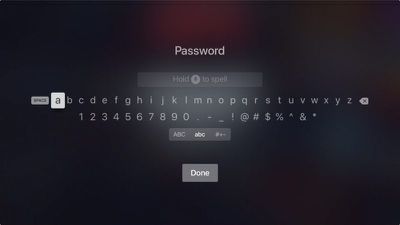
Signing into apps and services on Apple TV can be frustrating when you're shuttling between characters on the onscreen keyboard, or barking out letters and numbers at your Siri Remote. To make entering login credentials easier, Apple introduced continuity keyboard, an iOS feature that allows users to enter text on their Apple TV using their iPhone or iPad.
how to use autofill tvos 12 02
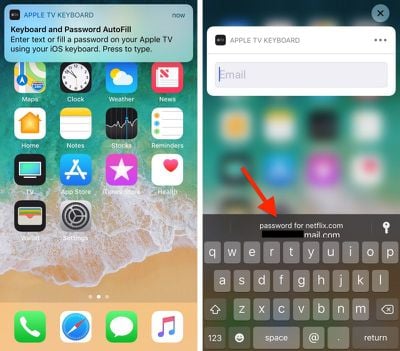
In tvOS 12, coming this fall, continuity keyboard has been further enhanced to support Password AutoFill. So whenever you encounter a login screen, you'll see the following notification on your iPhone or iPad.
how to use autofill tvos 12 01
Simply tap the alert at the top of the screen to bring up the keyboard, and you should be able to fill in your password credentials on Apple TV by tapping the AutoFill suggestion in the Quick Type bar. And if you're using the TV remote or Control Center interface with your Apple TV, the same simple login process applies.

The above assumes your Apple TV and iOS device are on the same iCloud account. But say you're a guest in someone's home, and you'd like to log in to your account on their Apple TV. What then?
how to use autofill tvos 12 03
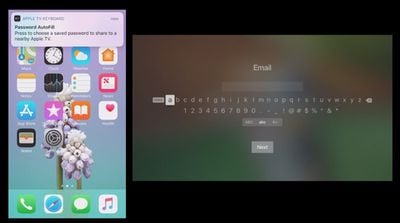
Happily, tvOS 12 also caters for this scenario. Apple TV can now ping the Siri Remote to look for a nearby iPhone. Once it's discovered your device, your iPhone will ask you to confirm that you want to use AutoFill. It will then prompt you to enter the authentication PIN displayed on the nearby Apple TV.
how to use autofill tvos o5
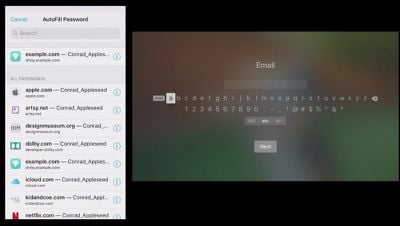
On authenticating your iPhone with Face ID, Touch ID, or a passcode, you'll be presented with your passwords list, and the password for the relevant app or service that you want to log in to will appear at the top, ready to send to your friend's Apple TV at a tap.

Password AutoFill on Apple TV requires the installation of tvOS 12 and iOS 12, both which are due to be released in the fall.


Related Roundup: Apple TV
Buyer's Guide: Apple TV (Don't Buy)

Top Rated Comments

Saipher Avatar
98 months ago
So why not just have the Apple TV auto fill passwords from iCloud? Why do I need a second device?
Maybe because then anyone with access to your tv would be able to access all your passwords without verification.
Score: 8 Votes (Like | Disagree)
dguisinger Avatar
98 months ago
One of the reasons I don't use my AppleTV as much anymore..... it constantly is asking me for my iCloud password, and I'm tired of being such a pain in the rear.... if all I want to do is watch a TV show when i pick up the remote, having to deal with password entry just pisses me off... I've got many of the same apps on my Xbox, I just switch inputs and watch it there.

*EDIT*
I will also add, the stupid touch remote is the worst remote ever. Its symetrical, so if I'm not looking, half the time i pick it up backwards causing it to do something I didn't want as your palm hits the touch surface, and its way too sensitive at times. While its nice that you don't need line of sight with a bluetooth remote, it easily activates between cushions or when you shift how you are seated if you bump it, causing it to exit what you are watching or get stuck on fast forward, etc.... Can we please get a designer at Apple who isn't obsessed with everything being so ****ing thin?
Score: 3 Votes (Like | Disagree)
Iconoclysm Avatar
98 months ago
Maybe because then anyone with access to your tv would be able to access all your passwords without verification.
Exactly. WTF are these people thinking?
[doublepost=1533134189][/doublepost]
So why not just have the Apple TV auto fill passwords from iCloud? Why do I need a second device?
Security, your Apple TV is open to anyone.

[doublepost=1533134329][/doublepost]
When the Apple TV 4K was first revealed they showed the feature of never having sign in. Repeatedly. Only once and Apple would remember your password.
That can't help you when you download new apps with new passwords or change your passwords.
Score: 2 Votes (Like | Disagree)
Mr. Donahue Avatar
98 months ago
When the Apple TV 4K was first revealed they showed the feature of never having sign in. Repeatedly. Only once and Apple would remember your password.
Score: 1 Votes (Like | Disagree)
thogin Avatar
98 months ago
Will this feature work with 3rd party password managers (1Password, LastPass, etc)? Or is it limited to iCloud Keychain?
Score: 1 Votes (Like | Disagree)
2010mini Avatar
98 months ago
So why not just have the Apple TV auto fill passwords from iCloud? Why do I need a second device?
Score: 1 Votes (Like | Disagree)

Popular Stories

Aston Martin CarPlay Ultra Screen

Apple's CarPlay Ultra to Expand to These Vehicle Brands Later This Year

Sunday February 1, 2026 10:08 am PST by
Last year, Apple launched CarPlay Ultra, the long-awaited next-generation version of its CarPlay software system for vehicles. Nearly nine months later, CarPlay Ultra is still limited to Aston Martin's latest luxury vehicles, but that should change fairly soon. In May 2025, Apple said many other vehicle brands planned to offer CarPlay Ultra, including Hyundai, Kia, and Genesis. In his Powe...
iOS 26

iOS 26.3 and iOS 26.4 Will Add These New Features to Your iPhone

Tuesday February 3, 2026 7:47 am PST by
We are still waiting for the iOS 26.3 Release Candidate to come out, so the first iOS 26.4 beta is likely still at least a week or two away. Following beta testing, iOS 26.4 will likely be released to the general public in March or April. Below, we have recapped known or rumored iOS 26.3 and iOS 26.4 features so far. iOS 26.3 iPhone to Android Transfer Tool iOS 26.3 makes it easier...
Apple Logo Black

Apple's Next Launch is 'Imminent'

Sunday February 1, 2026 12:31 pm PST by
The calendar has turned to February, and a new report indicates that Apple's next product launch is "imminent," in the form of new MacBook Pro models. "All signs point to an imminent launch of next-generation MacBook Pros that retain the current form factor but deliver faster chips," Bloomberg's Mark Gurman said on Sunday. "I'm told the new models — code-named J714 and J716 — are slated...
Apple MacBook Pro M4 hero

New MacBook Pros Reportedly Launching Alongside macOS 26.3

Sunday February 1, 2026 5:42 am PST by
Apple is planning to launch new MacBook Pro models with M5 Pro and M5 Max chips alongside macOS 26.3, according to Bloomberg's Mark Gurman. "Apple's faster MacBook Pros are planned for the macOS 26.3 release cycle," wrote Gurman, in his Power On newsletter today. "I'm told the new models — code-named J714 and J716 — are slated for the macOS 26.3 software cycle, which runs from...
iOS 26 Home Feature

Apple Gives Final Warning to Home App Users

Tuesday February 3, 2026 8:55 am PST by
In 2022, Apple introduced a new Apple Home architecture that is "more reliable and efficient," and the deadline to upgrade and avoid issues is fast approaching. In an email this week, Apple gave customers a final reminder to upgrade their Home app by February 10, 2026. Apple says users who do not upgrade may experience issues with accessories and automations, or lose access to their smart...















