iOS 15.4: How to Turn Off Notifications for Personal Automations in Shortcuts - MacRumorsOpen MenuShow RoundupsShow Forums menuVisit ForumsOpen Sidebar
Skip to Content

iOS 15.4: How to Turn Off Notifications for Personal Automations in Shortcuts

by

Apple's Shortcuts app is a great part of iOS because it includes tools that allow you to automate almost any action you can think of. But there is one aspect of it that has often annoyed users, and that's the lack of a setting that turns off notifications.
shortcuts automation
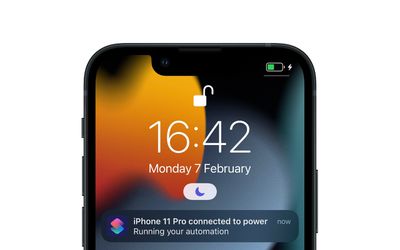
Whenever Shortcuts runs an automation (let's say, disable rotation lock when a particular app is opened) it does so in the background. Therefore it's likely that, from a security perspective, Apple initially felt it was good practice to send you a notification to indicate the action was being carried out. But if you regularly have familiar automations set up, the last thing you want your device to do is notify you every time it runs them.

In iOS 15.3, there was no easy way to disable these notifications. Fortunately, however, Apple has handily added a toggle in the latest iOS 15.4 update (currently in beta) that lets you turn notifications off for individual automations. The following steps show you how it's done.

  1. Open the Shortcuts app.
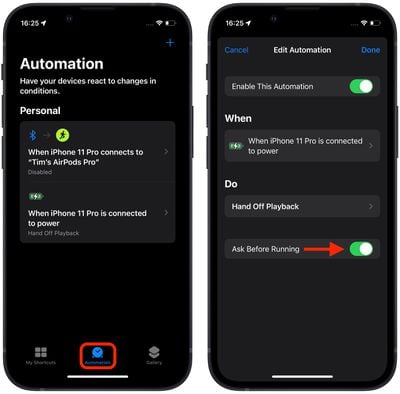
  2. Tap the Automation tab at the bottom of the screen.
  3. Select the automation for which you want to disable notifications.
  4. In the Edit Automation screen, toggle off the switch next to Ask Before Running.
    shortcuts

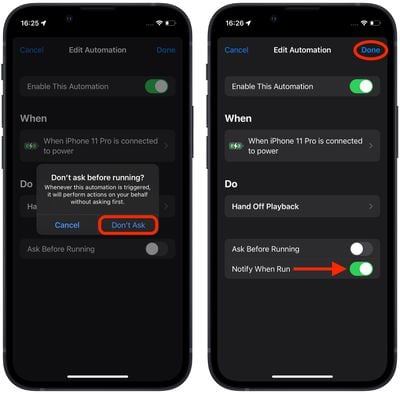
  5. In the prompt that appears, tap Don't Ask.
  6. Now that Ask Before Running is disabled, you should see a new Notify When Run switch below it. To turn off notifications for this automation, toggle off this Notify When Run toggle.
  7. Tap Done in the top-right corner of the screen to save your changes.
    shortcuts

You will no longer receive a notification for the selected automation when it runs. Note that you'll need to manually repeat the above steps for each automation that you don't want to receive notifications for – there is currently no global setting turn off all notifications in Shortcuts.


Popular Stories

imac video apple feature

Apple Released Yet Another New Product Today

Friday March 20, 2026 2:39 pm PDT by
Apple has unveiled a whopping nine new products so far this March, including an iPhone 17e, iPad Air models with the M4 chip, MacBook Air models with the M5 chip, MacBook Pro models with M5 Pro and M5 Max chips, the all-new MacBook Neo, an updated Studio Display, a higher-end Studio Display XDR, AirPods Max 2, and now the Nike Powerbeats Pro 2. iPhone 17e features the same overall design as...
iPhone 18 Pro Deep Red Feature

iPhone 18 Pro Launching Later This Year With These 12 New Features

Wednesday March 18, 2026 7:39 am PDT by
While the iPhone 18 Pro and iPhone 18 Pro Max are not expected to launch for another six months or so, there are already plenty of rumors about the devices. It was initially reported that the iPhone 18 Pro models would have fully under-screen Face ID, with only a front camera visible in the top-left corner of the screen. However, the latest rumors indicate that only one Face ID component...
ios 26 4 pastel

iOS 26.4: Top 10 New Features Coming to Your iPhone

Friday March 20, 2026 2:44 pm PDT by
iOS 26.4 isn't the major update with new Siri features that we hoped for, but there are some useful quality of life improvements, and a little bit of fun with an AI playlist generator and new emoji characters. Playlist Playground - Apple Music has a Playlist Playground option that lets you generate playlists from text-based descriptions. You can include moods, feelings, activities, or...
Related Apple News: Opinion | Ipad | Mac | Lifestyle | World News