While Apple's built-in Activity app tracks your daily steps, it doesn't offer a way to display this information as a step count directly on your Apple Watch face. Fortunately, there's a simple solution using third-party apps. Here's how to keep your daily step count just a glance away.
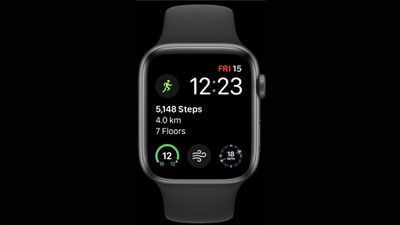
Apple's Activity app accurately tracks your steps and floors climbed, and you can check them any time by scrolling through the app and viewing your daily activity. You can even display the distance you've covered as a watch face Activity complication. However, there's one frustrating limitation: You can't display your actual steps count on the watch face using the complications provided by Apple. This is where third-party solutions come in handy.
What You'll Need:
- A third-party step counting app (like Pedometer++ or StepsApp)
- An Apple Watch running the latest watchOS
Adding a Step Counter to Your Apple Watch Face
Before following the steps below, install Your preferred step counter: Pedometer++ or StepsApp are decent options available on the App Store, since both apps offer reliable step counting with watch face complications without requiring a paid subscription.
- On your Apple Watch, press firmly on your current watch face, then tap Edit.
- Swipe left until you get to the "Complications" editing screen.
- Tap the complication that you want to use for your step counter, then tap the back button.

- Select your third-party step counter app from the list.
- Choose a complication to place on your watch face.
- Press the Digital Crown to save your changes.
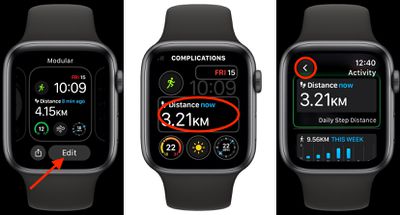
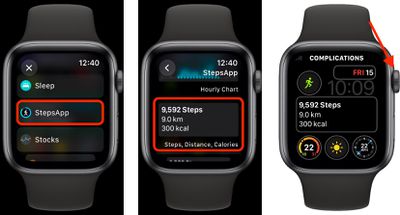
Tip: Choose a watch face like Modular or Infograph that offers larger complications for better readability. Some apps offer different complication styles, so it's worth experimenting to find what works best for you. The best thing about most third-party step counters is that they sync with Apple Health, so your data stays consistent.
Otherwise, that's all there is to it. Now you can track your daily steps without opening an app. The complication will update throughout the day, helping you stay on top of your movement goals.