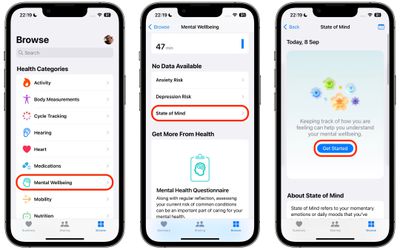
In iOS 17, Apple in the Health app has added the ability to track your emotions on a daily basis to give you an overall picture of mental wellbeing.
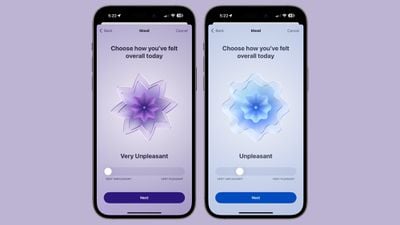
ios 17 beta 6 mood tracking
Through Health app notifications or the Apple Watch, you can log your mood at different times throughout the day and input an overall mood for the day.

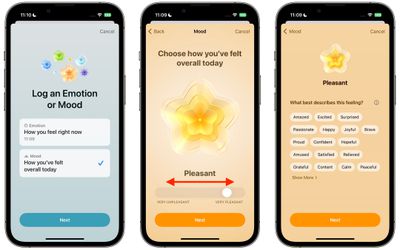
Logging a mood presents a slider bar with options ranging from Very Unpleasant to Neutral to Pleasant. The options are color coded (very unpleasant is purple, neutral is blue, and very pleasant is orange), and the idea is to drag the slider to the closest representation of your current mood.

From there, Apple asks you what best describes the feeling, and presents a list of adjectives related to the mood that you can select from. The "Very Pleasant" mood, for example, has options like Amazed, Peaceful, Joyful, and Calm. The "Very Unpleasant" mood includes Angry, Sad, Drained, and Stressed, while Neutral moods include Peaceful, Indifferent, and Content. You cannot input your own adjective, and must use one of the suggestions from Apple. There are a few dozen total options, so the idea is just to choose the closest match.
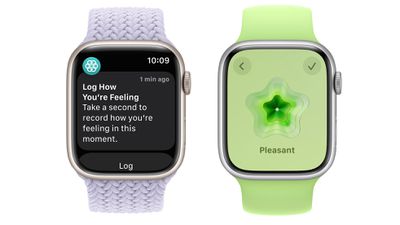
watchos 10 mood logging
After you've selected a mood and an accompanying adjective for it, Apple asks what's causing the mood. Options include health, fitness, family, friends, partner, dating, weather, money, and current events, but again, you have to choose from Apple's list. You can, however, add context in this section, so you can write down details on why you've chosen a specific category.

To create your first log of your emotional state or mood in iOS 17, follow the steps below.

  1. In the Health app, select the Browse tab, then under "Health Categories," tap Mental Wellbeing.
  2. Under "No Data Available," tap State of Mind.
  3. Tap Get Started.
    health

  4. Choose to log How you feel right now, or How you've felt overall today, then tap Next.
  5. Use the slider to log your emotion or mood on a spectrum from Very Unpleasant to Very Pleasant, then tap Next.
  6. Choose a word that best describes this feeling, then tap Next.
  7. Choose from the options what's having the biggest impact on you, then tap Done.health

That's all there it to it. All your logs can be viewed at any time using the State of Mind card in the Mental Wellbeing section of the Health app.

Get Reminders to Log Your State of Mind

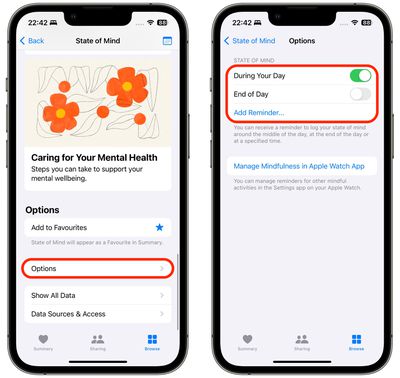
At the bottom of the State of Mind section is an Options menu that includes toggles that you can enable to get reminders to log your emotional state or mood during your day or at the end of the day.
health
For added customization, an Add Reminder... option also lets you add a specific time each day to get your reminder, which is useful if you know when certain triggers tend to occur during your day.


Tag: Health

Popular Stories

iOS 26

iOS 26.4 and iOS 27 Features Revealed in New Leak

Friday December 12, 2025 10:56 am PST by
Macworld's Filipe Espósito today revealed a handful of features that Apple is allegedly planning for iOS 26.4, iOS 27, and even iOS 28. The report said the features are referenced within the code for a leaked internal build of iOS 26 that is not meant to be seen by the public. However, it appears that Espósito and/or his sources managed to gain access to it, providing us with a sneak peek...
iOS 26

iOS 26.2 Coming Soon With These 8 New Features on Your iPhone

Thursday December 11, 2025 8:49 am PST by
Apple seeded the second iOS 26.2 Release Candidate to developers earlier this week, meaning the update will be released to the general public very soon. Apple confirmed iOS 26.2 would be released in December, but it did not provide a specific date. We expect the update to be released by early next week. iOS 26.2 includes a handful of new features and changes on the iPhone, such as a new...
iOS 26

Apple Releases iOS 26.2 With Alarms for Reminders, Lock Screen Changes, Enhanced Safety Alerts and More

Friday December 12, 2025 10:10 am PST by
Apple today released iOS 26.2, the second major update to the iOS 26 operating system that came out in September, iOS 26.2 comes a little over a month after iOS 26.1 launched. ‌iOS 26‌.2 is compatible with the ‌iPhone‌ 11 series and later, as well as the second-generation ‌iPhone‌ SE. The new software can be downloaded on eligible iPhones over-the-air by going to Settings >...
AirPods Pro Firmware Feature

Apple Releases New Firmware for AirPods Pro 2 and AirPods Pro 3

Thursday December 11, 2025 11:28 am PST by
Apple today released new firmware designed for the AirPods Pro 3 and the prior-generation AirPods Pro 2. The AirPods Pro 3 firmware is 8B30, up from 8B25, while the AirPods Pro 2 firmware is 8B28, up from 8B21. There's no word on what's include in the updated firmware, but the AirPods Pro 2 and AirPods Pro 3 are getting expanded support for Live Translation in the European Union in iOS...
macOS Tahoe 26 Thumb

Apple Releases macOS Tahoe 26.2 With Edge Light

Friday December 12, 2025 10:08 am PST by
Apple today released macOS Tahoe 26.2, the second major update to the macOS Tahoe operating system that came out in September. macOS Tahoe 26.2 comes five weeks after Apple released macOS Tahoe 26.1. Mac users can download the macOS Tahoe update by using the Software Update section of System Settings. macOS Tahoe 26.2 includes Edge Light, a feature that illuminates your face with soft...
AirTag 2 Mock Feature

Apple AirTag 2: Four New Features Found in iOS 26 Code

Thursday December 11, 2025 10:31 am PST by
The AirTag 2 will include a handful of new features that will improve tracking capabilities, according to a new report from Macworld. The site says that it was able to access an internal build of iOS 26, which includes references to multiple unreleased products. Here's what's supposedly coming: An improved pairing process, though no details were provided. AirTag pairing is already...
Apple Foldable Thumb

Leak Reveals Foldable iPhone Details

Monday December 15, 2025 9:09 am PST by
The first foldable iPhone will feature a series of design and hardware firsts for Apple, according to details shared by the Weibo leaker known as Digital Chat Station. According to a new post, via machine translation, Apple is developing what the leaker describes as a "wide foldable" device, a term used to refer to a horizontally oriented, book-style foldable with a large internal display....
ipados 26 1 slide over

Apple Releases iPadOS 26.2 With Multitasking Improvements

Friday December 12, 2025 10:09 am PST by
Apple today released iPadOS 26.2, the second major update to the iPadOS 26 operating system released in September. iPadOS 26.2 comes a month after iPadOS 26.1. The new software can be downloaded on eligible iPads over-the-air by going to Settings > General > Software Update. iPadOS 26.2 continues with the multitasking improvements that were added with iPadOS 26.1. You can now drag and...