

With iOS 17, Apple brought some headline features to iPhones, like StandBy Mode and NameDrop, but Apple also introduced some smaller quality-of-life improvements that are well worth familiarizing yourself with. Inline replies in the Messages app is one of them.

If you use WhatsApp, you're probably aware of the quick reply feature that the platform has had for several years. To reply to an individual message, you simply swipe to the right. It's a handy little trick that users often employ when involved in fast-moving conversations. It's also useful in busy group chats to make it clear which person in the group you're replying to.
Before iOS 17, replying to a specific chat bubble in the Messages app involved long pressing on it, then hitting reply. The experience wasn't as smooth as WhatsApp, but Apple's new swipe to reply feature fixes all that, and arguably improves upon it with some helpful visual cues. Here's how to use it on iPhones running iOS 17 and later.
- Open the Messages app on your iPhone and select an iMessage conversation.
- Find the specific message you want to reply to and swipe right on it.
- The selected message will be highlighted and a text box will appear, allowing you to type your reply. (You can also use the + button to access additional options like stickers, photos, and more.)
- Once you've composed your message, tap the Send button.
- To return to the main conversation, tap the blurred background.
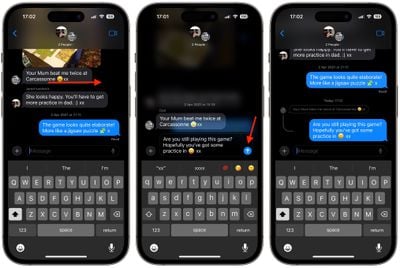
Notice the visual thread that indicates the nested connection between your reply and the original message, which is particularly helpful in group conversations to keep track of who is replying to whom.
Remember that everyone in a group conversation can read your inline replies. If you don't want this, start a new conversation with the person you want to reply to. It's also worth noting that swipe to reply only works on iMessages and not for regular SMS texts.




















