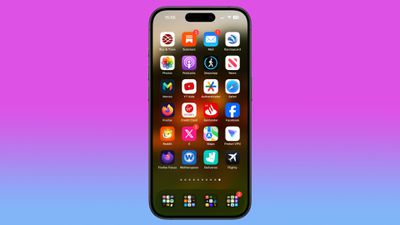
Do you find yourself frequently scrolling through multiple Home Screen pages on your iPhone to get to the apps you access most often? If so, chances are you've already filled up the first page with some of your favorite apps. But what if you could automatically make all of your most-used apps appear on page one? With the Siri Suggestions widget, you can.
siri suggested apps iphone home screen
The Siri Suggestions widget intelligently recommends apps based on your usage patterns. By populating your Home Screen with multiple instances of this widget, you can ensure that the apps you need most are always just a tap away. Read on to learn how it's done.

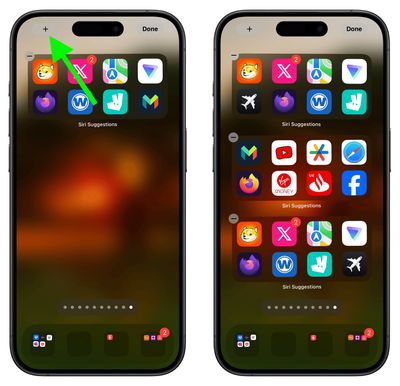
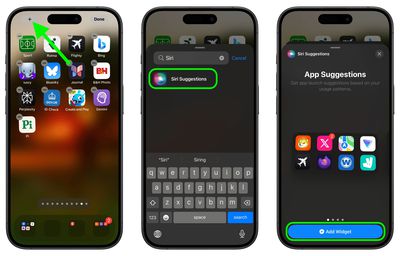
  1. With your iPhone unlocked, swipe to a Home Screen page with at least two free rows available.
  2. Press and hold the empty space on the Home Screen until the apps start to jiggle.
  3. Tap the "+" button in the top-left corner of the screen to access the widget gallery.
  4. Search for "Siri Suggestions" in the widget gallery or scroll through the list to find it.
  5. Tap the Siri Suggestions widget option, then choose the first option showing two rows of apps by tapping Add Widget.
    siri suggestions

  6. Drag the widget to a fresh new page containing no other apps.
  7. Add another instance of the Siri Suggestions widget by tapping the "+" button in the top-left corner of the screen again, then selecting it in the widget gallery, just like you did for the first one.
  8. Add a third Siri Suggestions widget in the same way.
    siri suggestions

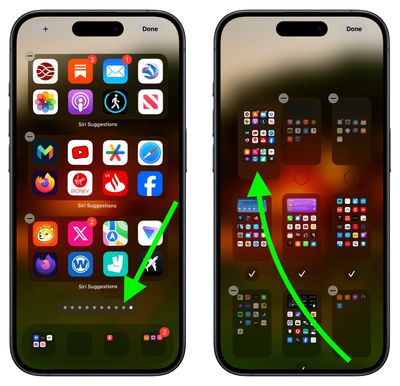
  9. Next, tap the row of dots representing your ‌Home Screen‌ pages.
  10. In the ‌Home Screen‌ grid that appears, touch and drag the page of widgets you just made and move it so that it's the first Home Screen page (the one you see when you unlock your iPhone). The others will move to make way in response to your drag action.
  11. Tap Done in the top-right corner of the screen when you're happy with the new arrangement, then tap Done again to exit jiggle mode.
    Home Screen pages

Don't worry if the widgets first show the same suggested apps as each other – this will correct itself when you swipe away from the page and return to it. That's all there is to it. By following the above steps, you will have quick access to your most-used apps, even if your habits change, ensuring your Home Screen is both dynamic and tailored to your needs.


Top Rated Comments

Apple Mac Daz Avatar
18 months ago
No thx I arrange my apps thats convenient for me, having it auto change would be confusing when you don’t know where your apps are
Score: 30 Votes (Like | Disagree)
FrenziedEngi Avatar
18 months ago
Destroy muscle memory with these 8 simple steps!

Static layout for most used apps seems best.

Swipe down and search for everything else. Every time I see someone hunting around for an app on their phone I tell them “swipe down…search”. It’s very quick and easy after you know about the action.
Score: 29 Votes (Like | Disagree)
vegetassj4 Avatar
18 months ago
I have mine set to make random suggestions. This way I am sure to use all of the useless apps I have downlaoded over the years. oooooh...Pocket Frogs....
Score: 9 Votes (Like | Disagree)
Radeon85 Avatar
18 months ago
Looks like an absolute mess to me, I have 325 apps all organised into 21 folders over 1.5 screens and it looks far cleaner than that.

If you want to quickly access your most used apps, then just pull the screen down to show the top 8 siri suggestions.
Score: 8 Votes (Like | Disagree)
Abazigal Avatar
18 months ago
I have been using this setup since widgets came to iOS with iOS 14? 1 stack of 3 medium widgets, plus two rows of Siri widgets. Hide everything else (meaning only 1 homescreen) and if I want to find some other app, either spotlight or App Library.

There does seem to be some intelligence here. For example, Siri will know when I am at a supermarket and surface the loyalty app I use to earn points and make payment. It’s not very consistent though.
Score: 6 Votes (Like | Disagree)
ChrisMac47 Avatar
18 months ago
What would Steve Jobs say? I'm sure it would not be printable. Life's too short to waste time doing all this.
Score: 6 Votes (Like | Disagree)

Popular Stories

iOS 26

iOS 26.4 and iOS 27 Features Revealed in New Leak

Friday December 12, 2025 10:56 am PST by
Macworld's Filipe Espósito today revealed a handful of features that Apple is allegedly planning for iOS 26.4, iOS 27, and even iOS 28. The report said the features are referenced within the code for a leaked internal build of iOS 26 that is not meant to be seen by the public. However, it appears that Espósito and/or his sources managed to gain access to it, providing us with a sneak peek...
Apple Logo Top Half

Early iOS 26 Software Leak Uncovers Dozens of Upcoming Apple Features

Monday December 15, 2025 3:05 pm PST by
Software from an iPhone prototype running an early build of iOS 26 leaked last week, giving us a glimpse at future Apple devices and iOS features. We recapped device codenames in our prior article, and now we have a list of some of the most notable feature flags that were found in the software code. In some cases, it's obvious what the feature flags are referring to, while some are more...
apple beta 26 lineup

Apple Leak Confirms Work on Foldable iPhone, AirTag 2, and Dozens More Devices

Monday December 15, 2025 2:05 pm PST by
Last week, details about unreleased Apple devices and future iOS features were shared by Macworld. This week, we learned where the information came from, plus we have more findings from the leak. As it turns out, an Apple prototype device running an early build of iOS 26 was sold, and the person who bought it shared the software. The OS has a version number of 23A5234w, and the first...
Apple Foldable Thumb

Leak Reveals Foldable iPhone Details

Monday December 15, 2025 9:09 am PST by
The first foldable iPhone will feature a series of design and hardware firsts for Apple, according to details shared by the Weibo leaker known as Digital Chat Station. According to a new post, via machine translation, Apple is developing what the leaker describes as a "wide foldable" device, a term used to refer to a horizontally oriented, book-style foldable with a large internal display....
iOS 26

iOS 26.3 Beta 1 Features: What's New So Far

Monday December 15, 2025 4:23 pm PST by
Apple is testing iOS 26.3, the next version of iOS 26 that will launch around January. Since iOS 26.3's testing is happening over the holidays, it is a smaller update with fewer features than we've seen in prior betas. We've rounded up what's new so far, and we'll add to our list with subsequent betas if we come across any other features. Transfer to Android Apple is making it simpler...
iOS 26

Apple Releases iOS 26.2 With Alarms for Reminders, Lock Screen Changes, Enhanced Safety Alerts and More

Friday December 12, 2025 10:10 am PST by
Apple today released iOS 26.2, the second major update to the iOS 26 operating system that came out in September, iOS 26.2 comes a little over a month after iOS 26.1 launched. ‌iOS 26‌.2 is compatible with the ‌iPhone‌ 11 series and later, as well as the second-generation ‌iPhone‌ SE. The new software can be downloaded on eligible iPhones over-the-air by going to Settings >...
iOS 26

iOS 26.2 Coming Soon With These 8 New Features on Your iPhone

Thursday December 11, 2025 8:49 am PST by
Apple seeded the second iOS 26.2 Release Candidate to developers earlier this week, meaning the update will be released to the general public very soon. Apple confirmed iOS 26.2 would be released in December, but it did not provide a specific date. We expect the update to be released by early next week. iOS 26.2 includes a handful of new features and changes on the iPhone, such as a new...
airpods max 2024 colors

AirPods Max 2 Likely to Offer These 10 New Features

Monday December 15, 2025 7:41 am PST by
Apple released the AirPods Max on December 15, 2020, meaning the over-ear headphones launched five years ago today. While the AirPods Max were updated with a USB-C port and new color options last year, followed by support for lossless audio and ultra-low latency audio this year, the headphones lack some of the features that have been introduced for newer generations of the regular AirPods and the ...