Apple today unveiled its rumored premium Apple News subscription service, ‌Apple News‌+. ‌Apple News‌+ provides access to more than 300 magazines and a handful of paywalled news articles from sites like The Wall Street Journal all for $9.99 per month.
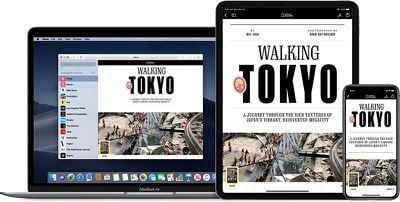
applenewsplus
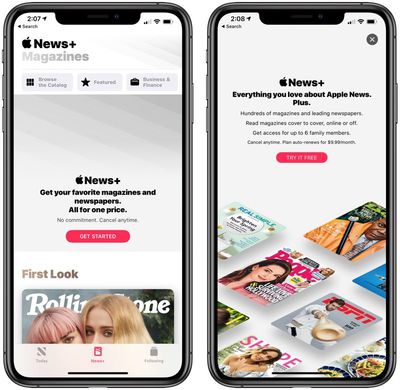
Signing up for an ‌Apple News‌ subscription can be done in the U.S. or Canada on an iPhone or iPad running iOS 12.2. Here's how:

  1. Open up the ‌Apple News‌ App.
  2. Tap on the "News+" tab at the bottom of the screen.
  3. Tap on "Get Started."
  4. Choose "Try It Free" to initiate a trial subscription. You'll be charged $9.99 per month when the 30-day trial period ends. applenewsplussubscribe
  5. Confirm your payment with Face ID or Touch ID.
From there, you'll have access to a new "My Magazines" section of the app where you can see featured magazines, browse the entire collection, or select from various categories like Cars, Entertainment, Food, Health, Hobbies, Lifestyle, Outdoors, and more.
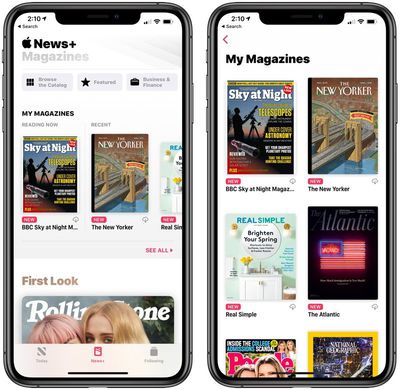
applenewsplusmymagazines
There are a selection of stories that are curated by Apple's editors and organized to highlight specific articles.
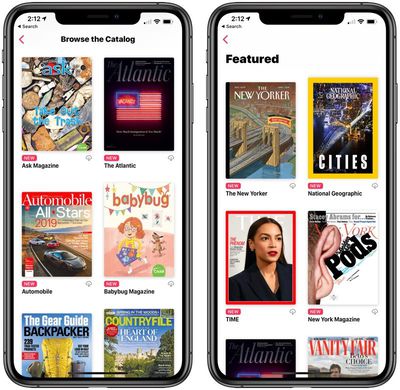
applenewsplusbrowsefeatured
‌Apple News‌+ magazines provide animated covers and a table of contents right up top so you can select the articles that are most interesting to you.

aplenewspluscover
The rest of the ‌Apple News‌ interface features rich, full-screen imagery and a digital-optimized reading experience for key stories.

nationalgeographicapplenewsplus

Cancelling your Apple News+ Subscription

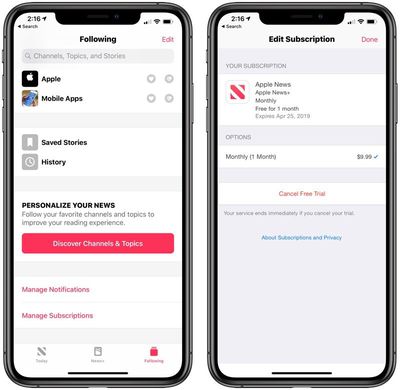
If you want to cancel your ‌Apple News‌+ subscription so you don't get charged $9.99 per month after your trial period ends, here's how:

  1. Tap on the "Following" tab in the ‌Apple News‌ app.
  2. Tap on "Manage Subscriptions."
  3. Tap on "Cancel Free Trial."applenewscancel

Make sure you don't cancel your ‌Apple News‌+ subscription until you've finished giving the service a try because Apple says that your service ends immediately if you hit the cancel button. We recommend setting a calendar reminder to cancel before 30 days is up if you want the full trial experience.

‌Apple News‌+ content can be read on ‌iPhone‌, ‌iPad‌, and Mac, with iOS 12.2 or macOS 10.14.4 required. You can also sign up for an ‌Apple News‌+ subscription using these same steps in the Apple New+ tab in the macOS Mojave app.

Top Rated Comments

MartyF81 Avatar
88 months ago
Came here because I am having a difficult time actually getting the trial to work. It keeps failing....

Of course another thread of people bashing the service? Get a grip folks, the world doesn't revolve around you. Will someone start a thread "Comment if you Hate News+" so you all can be in misery together and leave these other threads for their intended purpose.
Score: 8 Votes (Like | Disagree)
WordsmithMR Avatar
88 months ago
The people on here are so edgy and cool. They don't read magazines...
Guess what, that means the service isn't for you. Some people don't want movies enough to warrant Netflix. Other's don't need Spotify. Do we have to hear about it? Nope.
Score: 3 Votes (Like | Disagree)
Lerxt Avatar
88 months ago
Yeah. No. I’m not participating in subscriptions any longer.
Score: 3 Votes (Like | Disagree)
gwhizkids Avatar
88 months ago
Oh come off it. This has nothing to do with babysitting anybody, and a whole lot to do with keeping users who unwittingly forget to unsubscribe.

We're not all stupid enough to believe everything Apple does is "so amazing" and "for the people": they're a company wanting our cash. That's fine of course, it's just how they choose to go about doing business that shouldn't be so obviously against the typical sign-up process, as to be deliberately worse of an experience than before.
Sure it is about babysitting: if you don’t think you’re going to remember to cancel your subscription, despite the myriad ways provided via the phone itself to remind you, then don’t sign up in the first place. Don’t blame Apple for your own forgetfulness. They’re not your mommy.
Score: 1 Votes (Like | Disagree)
newyorksole Avatar
87 months ago
Oh come off it. This has nothing to do with babysitting anybody, and a whole lot to do with keeping users who unwittingly forget to unsubscribe.

We're not all stupid enough to believe everything Apple does is "so amazing" and "for the people": they're a company wanting our cash. That's fine of course, it's just how they choose to go about doing business that shouldn't be so obviously against the typical sign-up process, as to be deliberately worse of an experience than before.
Sure it is about babysitting: if you don’t think you’re going to remember to cancel your subscription, despite the myriad ways provided via the phone itself to remind you, then don’t sign up in the first place. Don’t blame Apple for your own forgetfulness. They’re not your mommy.
I’m going to have to agree with jimthing. How is it that with every other subscription you’re able to cancel it immediately and still have access until the billing period is over. That’s even the case with Apple Music.

But all of a sudden Apple wants you to set a reminder to cancel the subscription. They don’t even have a “turn off auto-renew” option.

This is all about them banking on people forgetting to cancel and still being charged and being like “eh why not”.
Score: 1 Votes (Like | Disagree)
rtdunham Avatar
88 months ago
Anyone figure out how to share with family members?
It looks to me like if you go to settings and choose family sharing, you're sharing with those family members EVERYTHING you subscribe to/buy: magazines, newspapers music, movies, etc. Am I wrong? Is there a way to selectively share ONLY news, for example? Or any other medium, on a selective basis?
Score: 1 Votes (Like | Disagree)

Popular Stories

iOS 26

iOS 26.4 and iOS 27 Features Revealed in New Leak

Friday December 12, 2025 10:56 am PST by
Macworld's Filipe Espósito today revealed a handful of features that Apple is allegedly planning for iOS 26.4, iOS 27, and even iOS 28. The report said the features are referenced within the code for a leaked internal build of iOS 26 that is not meant to be seen by the public. However, it appears that Espósito and/or his sources managed to gain access to it, providing us with a sneak peek...
apple beta 26 lineup

Apple Leak Confirms Work on Foldable iPhone, AirTag 2, and Dozens More Devices

Monday December 15, 2025 2:05 pm PST by
Last week, details about unreleased Apple devices and future iOS features were shared by Macworld. This week, we learned where the information came from, plus we have more findings from the leak. As it turns out, an Apple prototype device running an early build of iOS 26 was sold, and the person who bought it shared the software. The OS has a version number of 23A5234w, and the first...
Apple Foldable Thumb

Leak Reveals Foldable iPhone Details

Monday December 15, 2025 9:09 am PST by
The first foldable iPhone will feature a series of design and hardware firsts for Apple, according to details shared by the Weibo leaker known as Digital Chat Station. According to a new post, via machine translation, Apple is developing what the leaker describes as a "wide foldable" device, a term used to refer to a horizontally oriented, book-style foldable with a large internal display....
iOS 26

Apple Releases iOS 26.2 With Alarms for Reminders, Lock Screen Changes, Enhanced Safety Alerts and More

Friday December 12, 2025 10:10 am PST by
Apple today released iOS 26.2, the second major update to the iOS 26 operating system that came out in September, iOS 26.2 comes a little over a month after iOS 26.1 launched. ‌iOS 26‌.2 is compatible with the ‌iPhone‌ 11 series and later, as well as the second-generation ‌iPhone‌ SE. The new software can be downloaded on eligible iPhones over-the-air by going to Settings >...
Apple Logo Top Half

Early iOS 26 Software Leak Uncovers Dozens of Upcoming Apple Features

Monday December 15, 2025 3:05 pm PST by
Software from an iPhone prototype running an early build of iOS 26 leaked last week, giving us a glimpse at future Apple devices and iOS features. We recapped device codenames in our prior article, and now we have a list of some of the most notable feature flags that were found in the software code. In some cases, it's obvious what the feature flags are referring to, while some are more...
iOS 26

iOS 26.2 Coming Soon With These 8 New Features on Your iPhone

Thursday December 11, 2025 8:49 am PST by
Apple seeded the second iOS 26.2 Release Candidate to developers earlier this week, meaning the update will be released to the general public very soon. Apple confirmed iOS 26.2 would be released in December, but it did not provide a specific date. We expect the update to be released by early next week. iOS 26.2 includes a handful of new features and changes on the iPhone, such as a new...
macOS Tahoe 26 Thumb

Apple Releases macOS Tahoe 26.2 With Edge Light

Friday December 12, 2025 10:08 am PST by
Apple today released macOS Tahoe 26.2, the second major update to the macOS Tahoe operating system that came out in September. macOS Tahoe 26.2 comes five weeks after Apple released macOS Tahoe 26.1. Mac users can download the macOS Tahoe update by using the Software Update section of System Settings. macOS Tahoe 26.2 includes Edge Light, a feature that illuminates your face with soft...
AirPods Pro Firmware Feature

Apple Releases New Firmware for AirPods Pro 2 and AirPods Pro 3

Thursday December 11, 2025 11:28 am PST by
Apple today released new firmware designed for the AirPods Pro 3 and the prior-generation AirPods Pro 2. The AirPods Pro 3 firmware is 8B30, up from 8B25, while the AirPods Pro 2 firmware is 8B28, up from 8B21. There's no word on what's include in the updated firmware, but the AirPods Pro 2 and AirPods Pro 3 are getting expanded support for Live Translation in the European Union in iOS...