

Splitting a pair of first- or second-generation AirPods between two people is perfectly possible and a neat way of exploiting the wireless features of Apple's headphones to share your listening experience.

Listen to Music Together on One Pair of AirPods

There's nothing stopping you and a friend from each wearing an AirPod to enjoy music or watch a movie together on your iPhone or iPad. Thanks to Automatic Ear Detection, both AirPods sense when they're placed in an ear, regardless of whether they're attached to the same head.
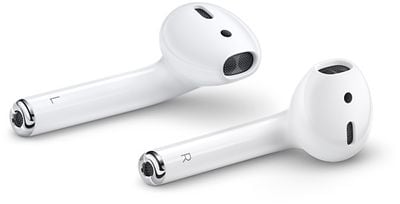
airpods
The only caveat to sharing AirPods between two people is that you're effectively splitting stereo channels, so you'll want to convert to mono audio. You can do that by following these steps:

  1. Open up the Settings app.
  2. Tap General and then tap Accessibility.
  3. Scroll down to where it says "Mono Audio" and toggle it on.

When you're done sharing your AirPods with a friend, make sure to turn the Mono Audio setting back off so you get regular stereo sound when you're using both of your AirPods.

Share a Call With a Friend With One Pair of AirPods

Splitting a pair of AirPods between two people to take a phone call is a different situation that has one important drawback.

Although both AirPods have built-in microphones, only one mic can be active at any one time, so if you're sharing a pair with a friend, both of you can listen in on the call but only one of you will be able to talk back to the caller.

If you want to get to decide who take part in the conversation during a shared call, you can select which AirPod has the active mic.
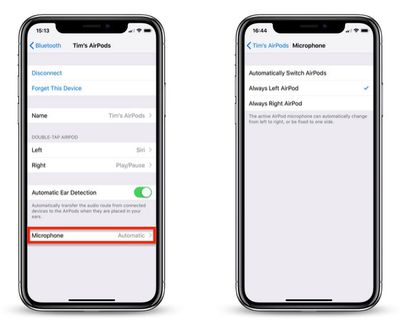
airpods set mic to one airpod
To do so, open the Settings app on your connected iOS device and tap Bluetooth, then tap the circled 'i' icon alongside your AirPods in the Devices List. Then tap Microphone and choose Always Left AirPod or Always Right AirPod.
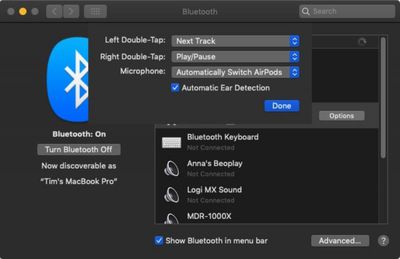
how to pair airpods with mac 4
If you're connected to a Mac, click the Bluetooth icon in the menu bar and select Open Bluetooth Preferences.... In the Bluetooth pane, click the Options button in the list next to your AirPods and click the Microphone dropdown to choose either Left AirPod or Right AirPod.

Related Roundup: AirPods 4
Buyer's Guide: AirPods (Neutral)
Related Forum: AirPods

Popular Stories

iOS 26

iOS 26.4 and iOS 27 Features Revealed in New Leak

Friday December 12, 2025 10:56 am PST by
Macworld's Filipe Espósito today revealed a handful of features that Apple is allegedly planning for iOS 26.4, iOS 27, and even iOS 28. The report said the features are referenced within the code for a leaked internal build of iOS 26 that is not meant to be seen by the public. However, it appears that Espósito and/or his sources managed to gain access to it, providing us with a sneak peek...
Apple Foldable Thumb

Leak Reveals Foldable iPhone Details

Monday December 15, 2025 9:09 am PST by
The first foldable iPhone will feature a series of design and hardware firsts for Apple, according to details shared by the Weibo leaker known as Digital Chat Station. According to a new post, via machine translation, Apple is developing what the leaker describes as a "wide foldable" device, a term used to refer to a horizontally oriented, book-style foldable with a large internal display....
apple beta 26 lineup

Apple Leak Confirms Work on Foldable iPhone, AirTag 2, and Dozens More Devices

Monday December 15, 2025 2:05 pm PST by
Last week, details about unreleased Apple devices and future iOS features were shared by Macworld. This week, we learned where the information came from, plus we have more findings from the leak. As it turns out, an Apple prototype device running an early build of iOS 26 was sold, and the person who bought it shared the software. The OS has a version number of 23A5234w, and the first...
iOS 26

Apple Releases iOS 26.2 With Alarms for Reminders, Lock Screen Changes, Enhanced Safety Alerts and More

Friday December 12, 2025 10:10 am PST by
Apple today released iOS 26.2, the second major update to the iOS 26 operating system that came out in September, iOS 26.2 comes a little over a month after iOS 26.1 launched. ‌iOS 26‌.2 is compatible with the ‌iPhone‌ 11 series and later, as well as the second-generation ‌iPhone‌ SE. The new software can be downloaded on eligible iPhones over-the-air by going to Settings >...
iOS 26

iOS 26.2 Coming Soon With These 8 New Features on Your iPhone

Thursday December 11, 2025 8:49 am PST by
Apple seeded the second iOS 26.2 Release Candidate to developers earlier this week, meaning the update will be released to the general public very soon. Apple confirmed iOS 26.2 would be released in December, but it did not provide a specific date. We expect the update to be released by early next week. iOS 26.2 includes a handful of new features and changes on the iPhone, such as a new...
Apple Logo Top Half

Early iOS 26 Software Leak Uncovers Dozens of Upcoming Apple Features

Monday December 15, 2025 3:05 pm PST by
Software from an iPhone prototype running an early build of iOS 26 leaked last week, giving us a glimpse at future Apple devices and iOS features. We recapped device codenames in our prior article, and now we have a list of some of the most notable feature flags that were found in the software code. In some cases, it's obvious what the feature flags are referring to, while some are more...
macOS Tahoe 26 Thumb

Apple Releases macOS Tahoe 26.2 With Edge Light

Friday December 12, 2025 10:08 am PST by
Apple today released macOS Tahoe 26.2, the second major update to the macOS Tahoe operating system that came out in September. macOS Tahoe 26.2 comes five weeks after Apple released macOS Tahoe 26.1. Mac users can download the macOS Tahoe update by using the Software Update section of System Settings. macOS Tahoe 26.2 includes Edge Light, a feature that illuminates your face with soft...
AirPods Pro Firmware Feature

Apple Releases New Firmware for AirPods Pro 2 and AirPods Pro 3

Thursday December 11, 2025 11:28 am PST by
Apple today released new firmware designed for the AirPods Pro 3 and the prior-generation AirPods Pro 2. The AirPods Pro 3 firmware is 8B30, up from 8B25, while the AirPods Pro 2 firmware is 8B28, up from 8B21. There's no word on what's include in the updated firmware, but the AirPods Pro 2 and AirPods Pro 3 are getting expanded support for Live Translation in the European Union in iOS...
















