

 Medical ID is a built-in feature of your iPhone's Health app that gives ambulance crews and other emergency first responders fast access to potentially life-saving information about any allergies or medical conditions you have, even if your iPhone is locked.
Even if you don't suffer from any health conditions, it's still worth enabling Medical ID, because it can also provide other vital information about you to emergency services, such as your blood type and who to contact in an emergency. This article shows you how to set up Medical ID in iOS 11.
How to Set Up Your Medical ID in iOS 11
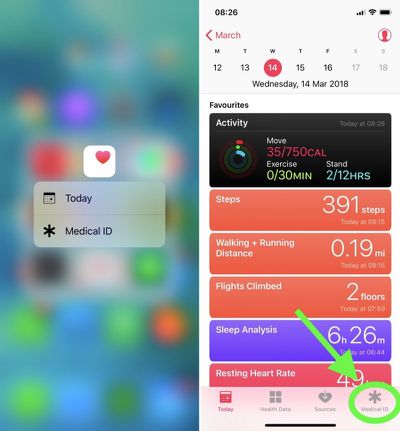
- Launch the Health app on your iPhone. (If you're using an iPhone 6s or later, firmly press the Health app icon to jump straight to the Medical ID via 3D Touch and skip the next step.)

- Tap Medical ID at the bottom of the screen.
- If you're in the U.S., you can opt to register as an organ donor with Donate Life America by tapping the option at the bottom of the Medical ID screen. If you don't want to register, or you're outside the U.S., simply skip this step.
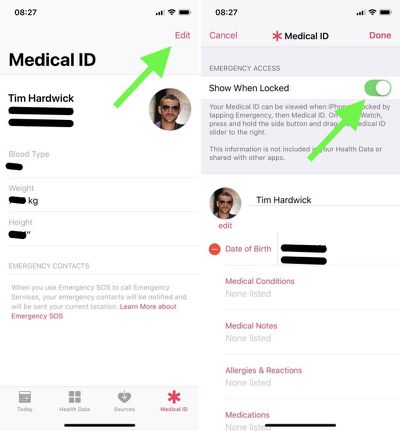
- Tap the Edit button at the top right of the screen.
- Under Emergency Access, toggle the Show When Locked switch to the On position. Make sure you perform this step, otherwise emergency services won't be able to access your Medical ID.
- Start adding information to your Medical ID card. Apart from your name and date of birth, the other types of information you can add in this section include medical conditions and medical notes, allergies and reactions, medications, blood type, organ donor status, weight, and height. (Note that information added to your Medical ID isn't included in your Health Data or shared with other apps.)
- Under Emergency Contacts, tap the green plus sign to add someone from your Contacts list. (You can add several people, but bear in mind that if you use the Emergency SOS feature on your iPhone's lock screen, all emergency contacts receive a message alerting them of the SOS and your location.)
- For each emergency contact you add, select an option from the list that best describes your relationship to that person, e.g. "father" or "doctor".
- Tap Done in the top right of the screen when you're finished.
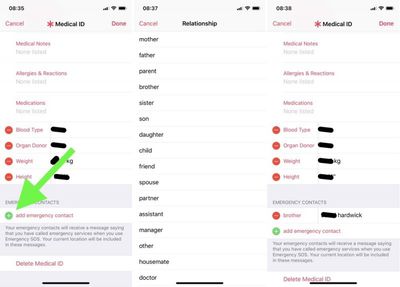
If you decide against keeping a Medical ID record, the Edit mode includes a Delete Medical ID option at the very bottom of the screen.
Accessing Medical ID on a Locked iPhone 8 or Earlier
- Press the Home button on the iPhone to activate the passcode screen.
- Tap Emergency in the bottom left corner of the passcode screen.
- Tap Medical ID in the bottom left corner of the Emergency keypad screen.
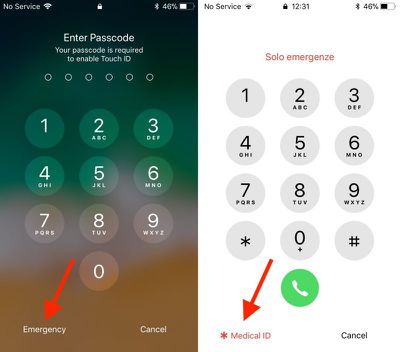
Note: If the Apple handset doesn't have a Home button, swipe up with your finger from the bottom of the screen to trigger the passcode screen, or use the alternative method for accessing Medical ID below.
Accessing Medical ID on a Locked iPhone X or Later
- Simultaneously press and hold the Side (power) button on the right and the Volume Up button on the left of the handset.
- Swipe rightwards across the Medical ID slider.
You can also access the Medical ID on Apple Watch: Press and hold the side button and drag the Medical ID slider to the right.






















Top Rated Comments
When I was working as an emergency nurse in a trauma center, we would use O Negative for emergencies with no time to crossmatch. By knowing the blood type in advance, we can possibly reduce the time to crossmatch, but we still crossmatch before administering blood. I haven't observed the process, but they essentially mix patient blood with donor blood in the lab and look for reactions before releasing the unit to be administered.
When I have donated blood, I let them know that my blood type is AB Negative. This is one of the rarest blood types (there are rarer types but most people don't know about them). When I was donating blood during the height of the battles in Afganistan and Iraq, the nurses in the mobile donation bus called for a courier to rush my blood and the blood of another AB Negative donor in the bus at the same time, saying it would be in a cargo plane and probably in the Middle East in about 24 hours (we're an hour away from Travis AFB). Despite the military using O Positive for unmatched, they still prefer to give crossmatched blood if available.
We used to write it on our kit in Afghanistan but were later told we would get the generic type (o-) until a test could be done as they wouldn’t trust it to be right.