iOS 15: How to Set Leaving and Arrival Times for Driving Directions in Apple Maps - MacRumorsOpen MenuShow RoundupsShow Forums menuVisit ForumsOpen Sidebar
Skip to Content

iOS 15: How to Set Leaving and Arrival Times for Driving Directions in Apple Maps

by

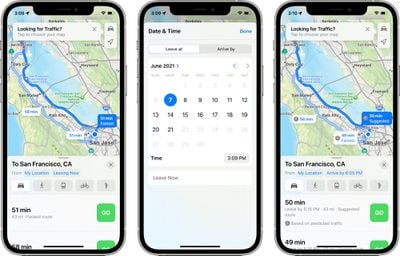
Apple Maps received several notable improvements in iOS 15, including new details in cities, an interactive globe, and enhanced driving directions. It also gained a feature that has long been available in rival map apps – the ability to set leaving and arrival times for driving directions.
arrive by maps
This is a feature that's long been available for Google Maps, and one that's really useful if you have a journey planned in the near future and you want to know how long it's going to take to get there or when you need to leave in order to arrive at a particular time.

Until now, there was no way to get estimated travel times in advance of a trip using the ‌‌Apple Maps‌‌ app. In previous versions of iOS, leaving and arrival time input was limited to directions for public transportation, but Apple has thankfully now expanded the option to driving, putting it on a more level playing field with Google Maps in the battle for users.

The following steps explain how to make use of the new leaving and arrival times on iPhones and iPads running iOS 15 and iPadOS 15 or later.

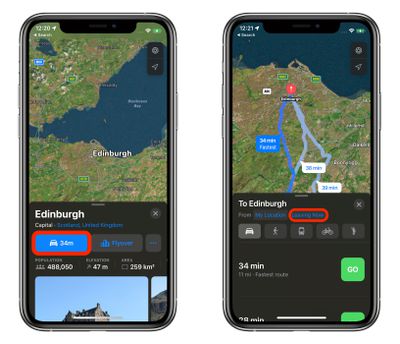
  1. In ‌Apple Maps‌' search field, enter your destination and tap Search.
  2. Tap the Driving directions button.
  3. Tap Leaving Now.
    maps

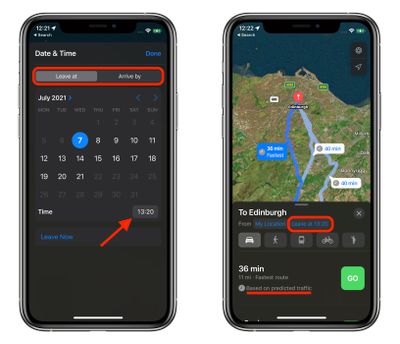
  4. Using the Leave at and Arrive by tabs, select a time and date.
  5. Tap Done.
    maps

‌Apple Maps‌ will show you several directions and how long it will take you to get to your destination based on predicted traffic for the time and date you selected.

Related Forum: iOS 15

Top Rated Comments

61 months ago
I'm still waiting for "ADD A STOP". It's so strange that you cannot do this in Apple Maps yet. Apple has really been catching up the past couple of years, but until that feature is added, I'll be sticking with Google.
Score: 10 Votes (Like | Disagree)
61 months ago
I agree that Google maps is far, far superior to Apple maps. I used to use Apple maps all the time, trying to improve its use. All too often app ends up embarrassingly wrong! Recent events made me switch to Google maps permanently, avoiding lots of roadworks.
Score: 8 Votes (Like | Disagree)
61 months ago
I only use Google Maps as pretty much a yellow pages these days. I find Apple Maps has come a long way in route guidance, especially with transit directions. Also, find Apple Maps much nicer to look at.
Score: 3 Votes (Like | Disagree)
61 months ago
Calendar on Mac has this feature. I get a notification when it’s time to leave. Very convenient.
Score: 2 Votes (Like | Disagree)
61 months ago

Huh?

I’m still waiting for Apple Maps to tell me the arrival time of my destination when I choose my preferred route in transit. It’ll only tell me the time the route will take but it does NOT include the walking time at all.
Maybe you are really fast walker? :D
Score: 2 Votes (Like | Disagree)
61 months ago
This is going to be very useful. I’m glad Apple is adding it.
Score: 2 Votes (Like | Disagree)

Popular Stories

imac video apple feature

Apple Released Yet Another New Product Today

Friday March 20, 2026 2:39 pm PDT by
Apple has unveiled a whopping nine new products so far this March, including an iPhone 17e, iPad Air models with the M4 chip, MacBook Air models with the M5 chip, MacBook Pro models with M5 Pro and M5 Max chips, the all-new MacBook Neo, an updated Studio Display, a higher-end Studio Display XDR, AirPods Max 2, and now the Nike Powerbeats Pro 2. iPhone 17e features the same overall design as...
iPhone 18 Pro Deep Red Feature

iPhone 18 Pro Launching Later This Year With These 12 New Features

Wednesday March 18, 2026 7:39 am PDT by
While the iPhone 18 Pro and iPhone 18 Pro Max are not expected to launch for another six months or so, there are already plenty of rumors about the devices. It was initially reported that the iPhone 18 Pro models would have fully under-screen Face ID, with only a front camera visible in the top-left corner of the screen. However, the latest rumors indicate that only one Face ID component...
ios 26 4 pastel

iOS 26.4: Top 10 New Features Coming to Your iPhone

Friday March 20, 2026 2:44 pm PDT by
iOS 26.4 isn't the major update with new Siri features that we hoped for, but there are some useful quality of life improvements, and a little bit of fun with an AI playlist generator and new emoji characters. Playlist Playground - Apple Music has a Playlist Playground option that lets you generate playlists from text-based descriptions. You can include moods, feelings, activities, or...
Related Apple News: Motoring | Politics | Technology | Local News | Education