

With iOS 16 and iPadOS 16, Apple has made several improvements to its stock Mail app to put it on a similar footing to rival third-party email apps. One of the new features is a scheduled send option. Keep reading to learn how it works.
iOS 16 Mail Guide Feature
Apple understands that there may be times when you want to compose an email hours, days, or even weeks in advance before it's actually sent, which is why it has introduced the ability to send an email later based on a custom schedule.

It's simple enough, includes preset options for convenience, and the only requirement is that your iPhone or iPad is on at the time you set for the email to be sent. Here's how you schedule an email for sending later in iOS 16 and iPadOS 16.

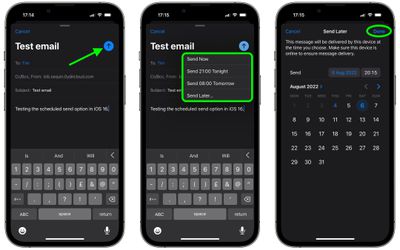
  1. In the Mail app, compose your email as usual, adding the recipient, sender, subject, and the message contents.
  2. Long press the Send icon (the blue arrow).
  3. Either select one of the preset options (Send Now, Send 9:00 PM Tonight, Send 8:00 AM Tomorrow) or tap Send Later... to enter a custom schedule.
  4. If you opted to Send Later..., use the calendar and time options to schedule when the email should be sent.
  5. Tap Done in the top-right corner of the screen.
mail

Before the email goes out, it will be listed in a "Send Later" mailbox that's listed under options like Flagged and Unread. Note that you can tap into this email inbox to see the messages you have scheduled and what time they're scheduled for.


Popular Stories

iOS 26

iOS 26.3 and iOS 26.4 Will Add These New Features to Your iPhone

Tuesday February 3, 2026 7:47 am PST by
We are still waiting for the iOS 26.3 Release Candidate to come out, so the first iOS 26.4 beta is likely still at least a week or two away. Following beta testing, iOS 26.4 will likely be released to the general public in March or April. Below, we have recapped known or rumored iOS 26.3 and iOS 26.4 features so far. iOS 26.3 iPhone to Android Transfer Tool iOS 26.3 makes it easier...
Apple Logo Black

Apple's Next Launch is 'Imminent'

Sunday February 1, 2026 12:31 pm PST by
The calendar has turned to February, and a new report indicates that Apple's next product launch is "imminent," in the form of new MacBook Pro models. "All signs point to an imminent launch of next-generation MacBook Pros that retain the current form factor but deliver faster chips," Bloomberg's Mark Gurman said on Sunday. "I'm told the new models — code-named J714 and J716 — are slated...
iOS 26 Home Feature

Apple Gives Final Warning to Home App Users

Tuesday February 3, 2026 8:55 am PST by
In 2022, Apple introduced a new Apple Home architecture that is "more reliable and efficient," and the deadline to upgrade and avoid issues is fast approaching. In an email this week, Apple gave customers a final reminder to upgrade their Home app by February 10, 2026. Apple says users who do not upgrade may experience issues with accessories and automations, or lose access to their smart...
Aston Martin CarPlay Ultra Screen

Apple's CarPlay Ultra to Expand to These Vehicle Brands Later This Year

Sunday February 1, 2026 10:08 am PST by
Last year, Apple launched CarPlay Ultra, the long-awaited next-generation version of its CarPlay software system for vehicles. Nearly nine months later, CarPlay Ultra is still limited to Aston Martin's latest luxury vehicles, but that should change fairly soon. In May 2025, Apple said many other vehicle brands planned to offer CarPlay Ultra, including Hyundai, Kia, and Genesis. In his Powe...
Apple Foldable Thumb

First Foldable iPhone Design Details Revealed

Monday February 2, 2026 7:19 am PST by
Apple's first foldable iPhone will feature relocated volume buttons, an all-black camera plateau, a smaller Dynamic Island, and more, according to design leaks from a known Weibo leaker. The user known as "Instant Digital" today claimed to share several key details about the design of the foldable iPhone: The volume buttons will be located on the top edge of the device, aligned to the...















