iOS 26 gives you two distinct ways to add websites to your iPhone's Home screen – as web apps or traditional bookmarks. They might look similar at first glance, but choosing the right option can dramatically improve how you access your favorite sites.
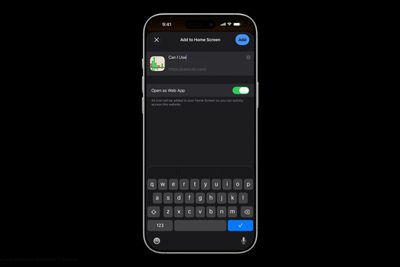
Add to Home Screen dark scaled

Understanding the Difference

When you add a website to your Home screen using the "Add to Home Screen" option, iOS 26 allows the website to be opened as a web app. The update introduces a new feature for adding any website to the Home Screen as a web app, even if it doesn't support progressive web app (PWA) functionality.

Web apps run almost like native apps, with features like offline access, push notifications, and a streamlined interface without Safari's address bar. In contrast, traditional bookmarks simply open the website in Safari when tapped. This choice matters more than you might think. Web apps can provide a faster, more app-like experience, whereas bookmarks work better for informational sites you visit only occasionally.

Add a Web App or Bookmark to Home Screen

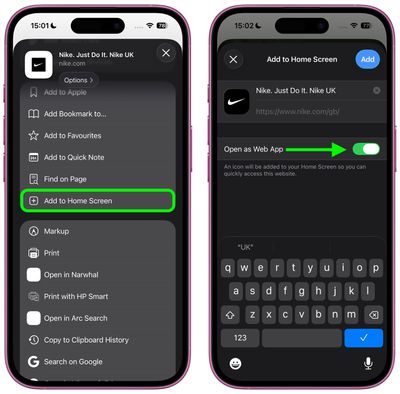
In iOS 26, Safari offers an Open as Web App toggle for all websites, even those that don't support have built-in web app support. If you want a bookmark, just switch the toggle off.

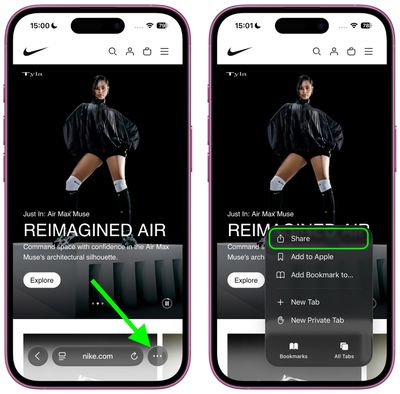
  1. Open Safari and navigate to the website you want to add.
  2. Tap the three dots to the right of Safari's address bar, then tap Share in the pop-up menu.
    safari

  3. Scroll down and tap Add to Home Screen.
  4. If the site supports web apps, you'll see the Open as Web App toggle in the dialog – switch it off if you want a bookmark instead.
  5. Customize the app name if desired, then tap Add.
    safari

Web apps appear on your Home screen with a dedicated icon, and tapping it will launch the site in its own window without Safari's browser interface. Bookmarks display with a generic website icon or the site's favicon, and tapping them opens the page in Safari.

Remove Bookmark or Web App From Home Screen

home screen
Both web apps and bookmarks can be deleted from the Home screen, much like any other app. To remove either kind, long-press the icon on your home screen, then tap Delete Bookmark (for some reason iOS doesn't differentiate the kind in this menu).

iOS 26 and iPadOS 26 are set for a general release in September 2025.

Top Rated Comments

iZac Avatar
13 weeks ago
I may be wrong, so please correct me if so - but I always believe the web version to be superior in one way; My assumption is that Safari allows less overt tracking and data collection of the user than an App Store counterpart.

My only evidence is that whenever I'm on the web version of a service, it keeps nagging me to download the App Store version for the 'best experience'
Score: 8 Votes (Like | Disagree)
flottenheimer Avatar
13 weeks ago
Locating this under 'Share' is an excellent example of how bad usability often is these days.
Score: 6 Votes (Like | Disagree)
Populus Avatar
13 weeks ago

I may be wrong, so please correct me if so - but I always believe the web version to be superior in one way; My assumption is that Safari allows less overt tracking and data collection of the user than an App Store counterpart.

My only evidence is that whenever I'm on the web version of a service, it keeps nagging me to download the App Store version for the 'best experience'
Exactly my thoughts. That’s why, for the past few years, more and more I opt for the web version of a service, especially if they offer a webapp.

If some day I install Discord, for instance, I will do so with the webapp instead of the App itself. I’m not sure how much data can the the App gather from my usage, but my guess is: more than just a sandboxed Safari tab.
Score: 4 Votes (Like | Disagree)
svish Avatar
13 weeks ago
Good to know about the change in iOS 26. Will be setting some pages as simple bookmarks.
Score: 3 Votes (Like | Disagree)
gdmedia Avatar
13 weeks ago
I wonder, if you choose the web option, will you be able to use Reader.

Right now, sometimes when you add a bookmark to your home screen, it will open as an app-like page, with no Safari address bar. This is something set up by the company that supplies the web page. Problem is, without the address bar, you cannot use Reader on that page. If you want to use Reader, you have to make a shortcut that opens that web page and put the shortcut on your home screen. When you open the page from your shortcut, it still includes the address bar and you can use reader.
Score: 2 Votes (Like | Disagree)
alayal Avatar
13 weeks ago
This is one of the best iOS 26 features, the only problems are that some web apps have horrible version of the icons and that safari on iOS don't support extensions for web apps.
Score: 2 Votes (Like | Disagree)

Popular Stories

iOS 26

6 New Things Your iPhone Can Do in iOS 26.1

Wednesday October 29, 2025 4:22 am PDT by
Apple is about to drop iOS 26.1, the first major point release since iOS 26 was rolled out in September, and there are at least six notable changes and improvements to look forward to. We've rounded them up below. Apple has already provided developers and public beta testers with the release candidate version of iOS 26.1, which means Apple will likely roll out the update to all compatible...
ios 26 1 slide to stop

iOS 26.1 Brings Back 2007 Feature in New Way

Friday October 31, 2025 1:40 pm PDT by
The upcoming iOS 26.1 update includes a small but helpful change for iPhones, and it could prevent you from running late to something important. Specifically, when an alarm goes off in the Clock app, there is a new "slide to stop" control on the screen for turning off the alarm. On previous iOS 26 versions, there is simply a large "stop" button, which could be accidentally tapped. The new ...
M5 MacBook Pro

Waiting for New Macs? Apple Just Shared Bad News

Friday October 31, 2025 7:32 am PDT by
Apple has just given a strong indication that it will not be releasing any additional new Macs for the remainder of the year. Apple's CFO Kevan Parekh dropped the hint during the company's earnings call on Thursday:On Mac, keep in mind, we expect to face a very difficult compare against the M4 MacBook Pro, Mac mini, and iMac launches in the year-ago quarter.Parekh essentially gave a heads up ...
iOS 26

iOS 26.1 Coming Soon: New Features for Your iPhone and Release Date

Monday October 27, 2025 7:55 am PDT by
The upcoming iOS 26.1 update includes a handful of new features and changes for iPhones, including a toggle for changing the appearance of the Liquid Glass design, "slide to stop" for alarms in the Clock app, and more. Below, we outline key details about iOS 26.1. Release Date Given that Apple has yet to seed an iOS 26.1 Release Candidate, which is typically the final beta version, the...
iPhone 17 Pro Cosmic Orange

8 Reasons to Wait for Next Year's iPhone 18 Pro

Thursday October 30, 2025 4:42 am PDT by
Apple's iPhone development roadmap runs several years into the future and the company is continually working with suppliers on several successive iPhone models at the same time, which is why we often get rumored features months ahead of launch. The iPhone 18 series is no different, and we already have a good idea of what to expect for the iPhone 18 Pro and iPhone 18 Pro Max. One thing worth...
maxresdefault

Apple TV 4K Could Still Launch Before 2025 Ends: All the Rumored Features

Monday October 27, 2025 4:51 pm PDT by
Apple is designing an updated version of the Apple TV 4K, and rumors suggest that it could come out sometime in the next couple of months. We're not expecting a major overhaul with design changes, but even a simple chip upgrade will bring major improvements to Apple's set-top box. Subscribe to the MacRumors YouTube channel for more videos. We've rounded up all the latest Apple TV rumors. ...
ipad mini 7 feature blue

OLED iPad Mini: Release Date, Pricing, and What to Expect

Wednesday October 29, 2025 7:13 am PDT by
Rumors are stoking excitement for the next-generation iPad mini that Apple is reportedly close to launching. So what should we expect from the successor to the iPad mini 7 that Apple released over a year ago? Read on to find out. Processor and Performance Apple is working on a next-generation version of the iPad mini (codename J510/J511) that features the A19 Pro chip, according to...
Coffee Burgundy and Purple iPhone 18 Pro Mock 1

Leaker Outlines Potential New Colors for iPhone 18 Pro

Friday October 31, 2025 8:28 am PDT by
Apple's iPhone 18 Pro models could be available in new rich and warm color option, according to a known leaker. The Weibo user known as "Instant Digital" today suggested that next-year's iPhone 18 Pro models will be available in at least one of the following color options: Coffee, purple, and burgundy. The iPhone XR, iPhone 11, iPhone 12, iPhone 14, and iPhone 14 Pro were all available in ...
apple tv hd

Apple Launched Its Big New Vision for TV 10 Years Ago Today

Thursday October 30, 2025 8:58 am PDT by
Apple launched the Apple TV HD, the Siri Remote, tvOS, and their accompanying App Store a decade ago today, marking a major overhaul of the device. The new vision for the Apple TV was unveiled on September 9, 2015 during Apple's "Hey Siri" event in San Francisco, where CEO Tim Cook introduced the device with the statement, "The future of TV is apps." The announcement represented a major...