In iOS 15 as well as Safari 15 for macOS Big Sur and macOS Catalina, Apple introduced some Safari interface design changes that haven't been universally welcomed. Fortunately, Apple has made some of these changes optional, such as the ability to disable tab bar coloring.

safari 15 tinting

Tab bar coloring on (left) versus coloring off (right) in dark mode

Tab bar coloring, or website tinting, happens when the color of Safari's interface changes around the tabs, bookmark, and navigation button areas to match the color of the website you're viewing.

The idea behind tinting is that it allows the browser interface to fade into the background and create a more immersive experience. However, the effect doesn't always look great, especially if you have several windows arranged on your desktop. Happily, Apple chose to include an option to turn it off.

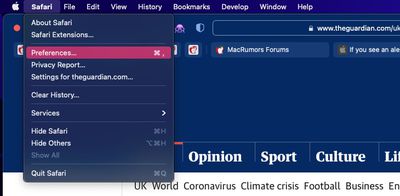
  1. Launch Safari, then select Safari -> Preferences... from the menu bar.
    safari preferences

  2. Select the Tabs panel.
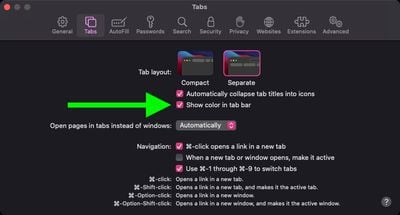
  3. Uncheck the box next to Show color in tab bar.
    safari

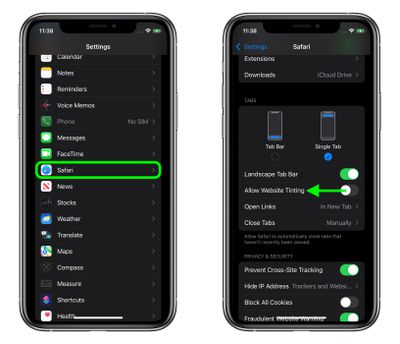
If you're using Safari in iOS 15, you can find the same option in Settings -> Safari. Under the "Tabs" section, turn off the switch next to Allow Website Tinting. On iPadOS 15, this option is called Show Color in Tab Bar, just like in Safari 15 for macOS.
settings
In previous versions of iOS, Apple included a "Show Color in Tab Bar" accessibility setting, which basically had the same effect as the new "Allow Website Tinting" toggle. The fact that Apple made the option more prominent suggests user aversion to tinting is more common than previously thought.


Tag: Safari

Top Rated Comments

007 Junior Avatar
55 months ago
I'm constantly confused whether a dark grey tab is active or not active. This is bad UI design.
Score: 37 Votes (Like | Disagree)
Woyzeck Avatar
55 months ago
Those were the times when widgets looked like widgets and not like artwork or content. Btw. for the newcomers: Apple was once great in user interface design.
Score: 16 Votes (Like | Disagree)
jb-net Avatar
55 months ago
Both look terrible. I can't decide turning it on or off.

Why did Apple ruin a once great user interface on Mac? I want the Safari 14 Taskbar und Tabbar back.
Score: 16 Votes (Like | Disagree)
Apple Knowledge Navigator Avatar
55 months ago
Disabling this was one of the first things that I did. Entirely form over function.
Score: 12 Votes (Like | Disagree)
project_2501 Avatar
55 months ago
The logic of colouring the current tab dark is so wrong!

Look at the following. Which tab is current?

Previously, and as per all good UI design, the lighter tab looks on top and current. Not the darker one.

Yet Apple made this idiotic change with apparently no consultation or input from design professionals. Bonkers.


By comparison look at Firefox. It is blooming clear which tab is the current one.


How does one revert / fix this Apple Safari behaviour?

Attachment Image

Attachment Image
Score: 11 Votes (Like | Disagree)
NewUsername Avatar
55 months ago
I think it looks good on iOS but awful on macOS.
Score: 10 Votes (Like | Disagree)

Popular Stories

iOS 26

iOS 26.4 and iOS 27 Features Revealed in New Leak

Friday December 12, 2025 10:56 am PST by
Macworld's Filipe Espósito today revealed a handful of features that Apple is allegedly planning for iOS 26.4, iOS 27, and even iOS 28. The report said the features are referenced within the code for a leaked internal build of iOS 26 that is not meant to be seen by the public. However, it appears that Espósito and/or his sources managed to gain access to it, providing us with a sneak peek...
iOS 26

iOS 26.2 Coming Soon With These 8 New Features on Your iPhone

Thursday December 11, 2025 8:49 am PST by
Apple seeded the second iOS 26.2 Release Candidate to developers earlier this week, meaning the update will be released to the general public very soon. Apple confirmed iOS 26.2 would be released in December, but it did not provide a specific date. We expect the update to be released by early next week. iOS 26.2 includes a handful of new features and changes on the iPhone, such as a new...
iOS 26

Apple Releases iOS 26.2 With Alarms for Reminders, Lock Screen Changes, Enhanced Safety Alerts and More

Friday December 12, 2025 10:10 am PST by
Apple today released iOS 26.2, the second major update to the iOS 26 operating system that came out in September, iOS 26.2 comes a little over a month after iOS 26.1 launched. ‌iOS 26‌.2 is compatible with the ‌iPhone‌ 11 series and later, as well as the second-generation ‌iPhone‌ SE. The new software can be downloaded on eligible iPhones over-the-air by going to Settings >...
AirPods Pro Firmware Feature

Apple Releases New Firmware for AirPods Pro 2 and AirPods Pro 3

Thursday December 11, 2025 11:28 am PST by
Apple today released new firmware designed for the AirPods Pro 3 and the prior-generation AirPods Pro 2. The AirPods Pro 3 firmware is 8B30, up from 8B25, while the AirPods Pro 2 firmware is 8B28, up from 8B21. There's no word on what's include in the updated firmware, but the AirPods Pro 2 and AirPods Pro 3 are getting expanded support for Live Translation in the European Union in iOS...
macOS Tahoe 26 Thumb

Apple Releases macOS Tahoe 26.2 With Edge Light

Friday December 12, 2025 10:08 am PST by
Apple today released macOS Tahoe 26.2, the second major update to the macOS Tahoe operating system that came out in September. macOS Tahoe 26.2 comes five weeks after Apple released macOS Tahoe 26.1. Mac users can download the macOS Tahoe update by using the Software Update section of System Settings. macOS Tahoe 26.2 includes Edge Light, a feature that illuminates your face with soft...
AirTag 2 Mock Feature

Apple AirTag 2: Four New Features Found in iOS 26 Code

Thursday December 11, 2025 10:31 am PST by
The AirTag 2 will include a handful of new features that will improve tracking capabilities, according to a new report from Macworld. The site says that it was able to access an internal build of iOS 26, which includes references to multiple unreleased products. Here's what's supposedly coming: An improved pairing process, though no details were provided. AirTag pairing is already...
ipados 26 1 slide over

Apple Releases iPadOS 26.2 With Multitasking Improvements

Friday December 12, 2025 10:09 am PST by
Apple today released iPadOS 26.2, the second major update to the iPadOS 26 operating system released in September. iPadOS 26.2 comes a month after iPadOS 26.1. The new software can be downloaded on eligible iPads over-the-air by going to Settings > General > Software Update. iPadOS 26.2 continues with the multitasking improvements that were added with iPadOS 26.1. You can now drag and...
bug security vulnerability issue fix larry

Update Now: iOS 26.2 Fixes 20+ Security Vulnerabilities

Friday December 12, 2025 11:11 am PST by
Apple today released iOS 26.2, iPadOS 26.2, and macOS 26.2, all of which introduce new features, bug fixes, and security improvements. Apple says that the updates address over 20 vulnerabilities, including two bugs that are known to have been actively exploited. There are a pair of WebKit vulnerabilities that could allow maliciously crafted web content to execute code or cause memory...