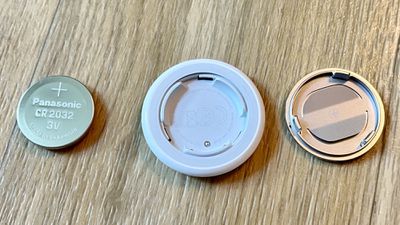
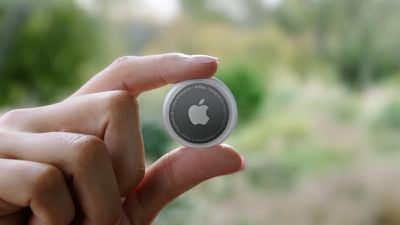
When you set up an AirTag, it's automatically associated with your Apple ID, which means it's linked to your ‌Apple ID‌ and can't be used by someone else unless you reset it.
f1618938547
Resetting can be as simple as removing an ‌AirTag‌ from your ‌Apple ID‌, by following these steps:

  1. Open the Find My app.
  2. Tap on the ‌AirTag‌ that you want to remove by choosing its name from the list.
  3. Swipe upwards to bring up the full ‌AirTag‌ settings.
  4. Tap on "Remove Item." remove airtag
  5. Tap on "Remove" and then tap again on the "Remove" popup.
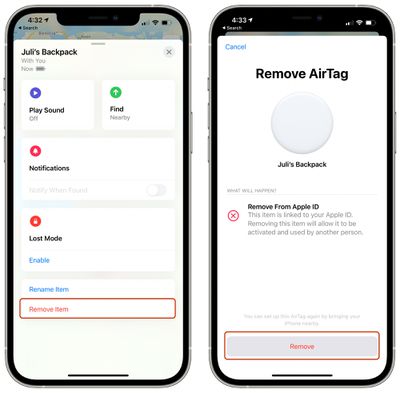
Once you've gone through this process, the ‌AirTag‌'s ownership is cleared and you can give it to someone else to set up and use with their own account.

Unfortunately, if you're not in Bluetooth range of your ‌AirTag‌ when you remove it from your account, it won't register and a manual reset will be required. If you wind up with an ‌AirTag‌ from someone else that says it's linked to their ID but they've already removed it from their account, follow these steps to physically reset the ‌AirTag‌:

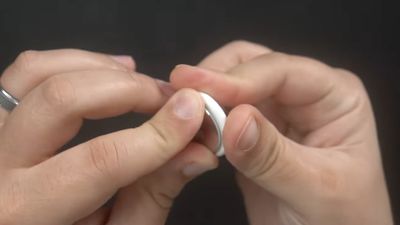
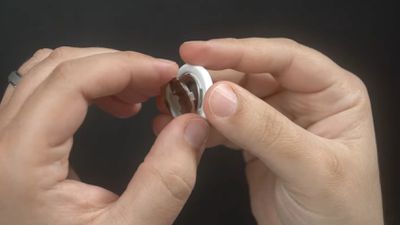
  1. Press down on the stainless steel backing of the ‌AirTag‌.
  2. As you press down, rotate counterclockwise until the cover stops rotating. airtag battery twist open
  3. Pull apart the two halves of the ‌AirTag‌. airtag battery pry apart
  4. Take out the battery.
  5. Put the battery back in.
  6. Press down on the battery until it makes a sound.
  7. Once the sound finishes, repeat this process four more times, removing and replacing the battery and then pressing on the battery until you hear a sound. airtag battery removed
  8. You need to hear a total of five sounds to ensure that the ‌AirTag‌ is reset.
  9. After you've finished this process, put the cover on the ‌AirTag‌ back on and then align the three tabs on the cover with the three slots on the ‌AirTag‌.
  10. Press down on the cover until there's a sound, and rotate the cover clockwise until it locks in place.
To avoid having to do this tedious physical resetting process, it's best to make sure that the person giving you an ‌AirTag‌ has removed it from their account in the proper way while it's in range of Bluetooth, because that's a far easier process for clearing ‌AirTag‌ ownership to pass it along to someone else.

Related Roundup: AirTag

Top Rated Comments

dojoman Avatar
62 months ago
Second step is required only if you removed the Airtag from your account and it's not in Bluetooth range. Thieves cannot use it if you didn't remove it from your account in the beginning.
Score: 23 Votes (Like | Disagree)
dwaltwhit Avatar
62 months ago
AirTags are made to track LOST items, not stolen ones. It is not an anti-theft device. It is not made so you can hunt down a thief and retrieve your items. It is not made to be thief-proof. I feel like people are making the AirTag into something it’s not.
Score: 22 Votes (Like | Disagree)
countryside Avatar
62 months ago
WARNING: Please do this away from children as they MAY swallow the battery... or the entire AirTag for that matter. Thanks, Officeworks ('https://forums.macrumors.com/threads/airtag-removable-battery-sparks-child-safety-concerns.2294746/') for alerting me to this incredible oversight.
Score: 17 Votes (Like | Disagree)
randomthoughts Avatar
62 months ago
So this is what happens, you can’t pair it to the other Apple ID, but the Find My app on the original Apple ID can’t update the location. If I bring it to a device with the original Apple ID, it wants to try to pair again.

So while someone won’t be able to disassociate the AirTag from your account for their own use, if you don’t have the item in your possession, someone could reset it and prevent you from tracking it.

That’s an issue.
Score: 12 Votes (Like | Disagree)
Icaras Avatar
62 months ago

So someone can find my AirTag and reset it to take ownership before I even realize it’s lost? I would think that these would have the same ownership lock that iPhones do… (forgive me but I forget what they call it… maybe Authentication Lock or something?)
No.

"If you wind up with an AirTag from someone else that says it's linked to their ID but they've already removed it from their account, follow these steps to physically reset the AirTag:"
Score: 10 Votes (Like | Disagree)
Ronal Avatar
62 months ago
Why do they even have the second option to remove from Apple ID? Makes this less and less secure, meaning people will still try to steal it and use it for themselves
Score: 9 Votes (Like | Disagree)

Popular Stories

Aston Martin CarPlay Ultra Screen

Apple's CarPlay Ultra to Expand to These Vehicle Brands Later This Year

Sunday February 1, 2026 10:08 am PST by
Last year, Apple launched CarPlay Ultra, the long-awaited next-generation version of its CarPlay software system for vehicles. Nearly nine months later, CarPlay Ultra is still limited to Aston Martin's latest luxury vehicles, but that should change fairly soon. In May 2025, Apple said many other vehicle brands planned to offer CarPlay Ultra, including Hyundai, Kia, and Genesis. In his Powe...
Apple Logo Black

Apple's Next Launch is 'Imminent'

Sunday February 1, 2026 12:31 pm PST by
The calendar has turned to February, and a new report indicates that Apple's next product launch is "imminent," in the form of new MacBook Pro models. "All signs point to an imminent launch of next-generation MacBook Pros that retain the current form factor but deliver faster chips," Bloomberg's Mark Gurman said on Sunday. "I'm told the new models — code-named J714 and J716 — are slated...
iOS 26

iOS 26.3 and iOS 26.4 Will Add These New Features to Your iPhone

Tuesday February 3, 2026 7:47 am PST by
We are still waiting for the iOS 26.3 Release Candidate to come out, so the first iOS 26.4 beta is likely still at least a week or two away. Following beta testing, iOS 26.4 will likely be released to the general public in March or April. Below, we have recapped known or rumored iOS 26.3 and iOS 26.4 features so far. iOS 26.3 iPhone to Android Transfer Tool iOS 26.3 makes it easier...
Apple MacBook Pro M4 hero

New MacBook Pros Reportedly Launching Alongside macOS 26.3

Sunday February 1, 2026 5:42 am PST by
Apple is planning to launch new MacBook Pro models with M5 Pro and M5 Max chips alongside macOS 26.3, according to Bloomberg's Mark Gurman. "Apple's faster MacBook Pros are planned for the macOS 26.3 release cycle," wrote Gurman, in his Power On newsletter today. "I'm told the new models — code-named J714 and J716 — are slated for the macOS 26.3 software cycle, which runs from...
iOS 26 Home Feature

Apple Gives Final Warning to Home App Users

Tuesday February 3, 2026 8:55 am PST by
In 2022, Apple introduced a new Apple Home architecture that is "more reliable and efficient," and the deadline to upgrade and avoid issues is fast approaching. In an email this week, Apple gave customers a final reminder to upgrade their Home app by February 10, 2026. Apple says users who do not upgrade may experience issues with accessories and automations, or lose access to their smart...