How to Remove Rapid Security Response Software Updates on iPhone and iPad - MacRumorsOpen MenuShow RoundupsShow Forums menuVisit ForumsOpen Sidebar
Skip to Content

How to Remove Rapid Security Response Software Updates on iPhone and iPad

by

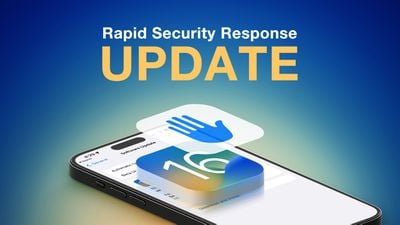
In iOS 16, Apple began deploying security updates to iPhones and iPads without having to update the entire operating system. If you're experiencing issues with your device after having installed a security update, keep reading to learn how to remove it.
Rapid Security Response Feature 1
In the past, some of Apple's most important point releases of its iOS mobile operating system have been linked to critical security updates that are designed to keep you and your private data safe and secure online.

When a user opts to install them, the entire operating system must be updated and restarted, which is why in iOS 16 Apple introduced Rapid Security Response updates. These smaller updates get important security improvements to your devices even faster, but Apple recognizes that there may be rare occasions when an unexpected issue is experienced after the update, which is why it also provides a way to remove them.

You can follow the steps below to remove a Rapid Security Response, after which you can reinstall the update at a later date, or wait for it to be installed permanently as part of a standard software update.

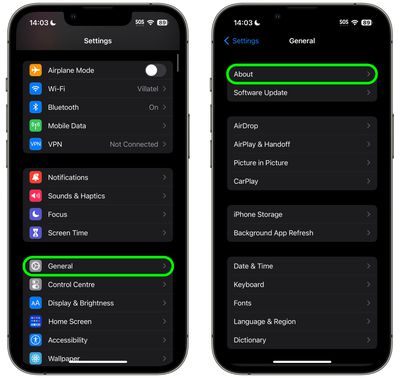
  1. Launch the Settings app on your iOS device.
  2. Tap General -> About.
    settings

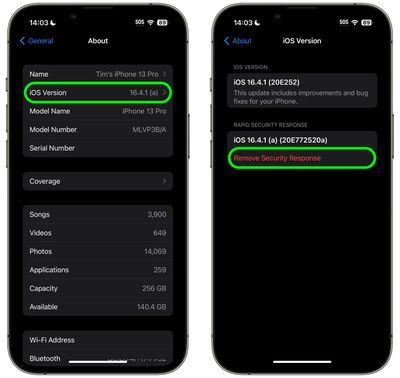
  3. Tap iOS Version or iPadOS version.
  4. Tap Remove Security Response.
    settings

  5. Tap Remove in the prompt to confirm.

The Rapid Security Response update will now be automatically removed from your device. Bear in mind that your iPhone or iPad will now be potentially vulnerable to whatever exploit or security issue the update was designed to fix, so it's best practice to use this as an opportunity to research and resolve the problem that began when you originally installed it. When you have done so, you'll be able to install the update again to ensure your device is protected.


Popular Stories

Apple Event Logo

Apple Just Released a New Accessory

Monday May 4, 2026 8:13 am PDT by
Apple today released a new Pride Edition Sport Loop for the Apple Watch. The band features a rainbow design with 11 colors of woven nylon yarns. The new Pride Edition Sport Loop is available to order now on Apple.com and in the Apple Store app in 40mm, 42mm, and 46mm sizes, and it will be available at Apple Store locations starting later this week. In the U.S., the band costs $49. There...
iOS 26

Apple Says iOS 26.5 Adds Three New Features to Your iPhone

Tuesday May 5, 2026 7:36 am PDT by
iOS 26.5 includes three new features for iPhones, according to Apple's release notes for the update, which is expected to be released next week. As discovered during beta testing, iOS 26.5 enables end-to-end encryption for RCS messaging between iOS and Android devices. Apple says this security upgrade is limited to supported carriers around the world and will continue to roll out....
Instagram Feature 2

PSA: Instagram Encrypted Messaging Ends on Friday, May 8

Tuesday May 5, 2026 8:24 am PDT by
Instagram will remove end-to-end encryption for direct messages between users from May 8, 2026. When the date comes around, Meta will potentially be able to see the contents of all messages between users on the social media platform. Encrypting messages has been an optional feature in Instagram since 2023, but in March of this year the social media platform quietly updated a help page to say ...
Related Apple News: Technology | Buyers Guide | Education | Politics | Business