

In iOS 16, Apple added a new Safety Check feature that's designed to make it easy for users to quickly reset all of the data and location access that they have granted to other people. Keep reading to learn how it works and how to use it.

Safety Check is a new option in iOS 16 that lets you stay aware of and reset all of the access to your data and location that you have granted to others. Apple says the idea behind it is to help people in domestic or intimate partner violence situations. Here's how to use the feature.
- Launch the Settings app on your iPhone.
- Scroll down and tap through to Privacy & Security.
- Scroll down and select Safety Check.
The Safety Check opening screen presents you with two options: Emergency Reset and Manage Sharing & Access. (Note the Quick Exit button that takes you right to the iPhone's Home Screen in case you're in danger of getting caught using it.)
Emergency Reset
Emergency Reset is a one-tap option that lets you protect your iOS device with just a couple of taps.
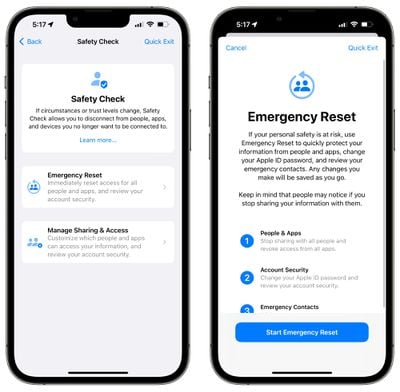
When you use Emergency Reset, it immediately stops sharing everything with all people and apps. This includes things like location information, activity, home data, photo albums, and more.
Emergency Reset also lets you remove all emergency contacts from your iPhone and reset your Apple ID and password so that no one can log into your account.
Manage Sharing
If your situation isn't an emergency, you can use the Manage Sharing & Access option. This includes a walkthrough that lets you see an overview of what you're sharing so you can't be secretly tracked or monitored using location sharing, shared albums, or other iPhone features.
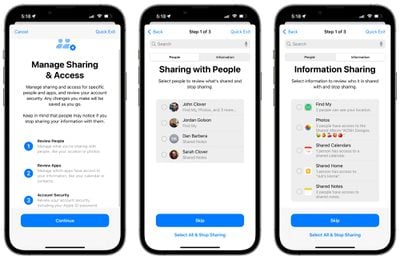
These screens include information on who you're sharing data with and what data those people have access to, along with which apps have access to your data. You can select people or apps and choose the "Stop Sharing" option to turn off sharing right away.
There's also a list of all the third-party apps that you have installed and what data they have access to, along with tools to disable that access. You can see which permissions an app has on an individual basis, or by data such as Bluetooth, Location, Contacts, and more.
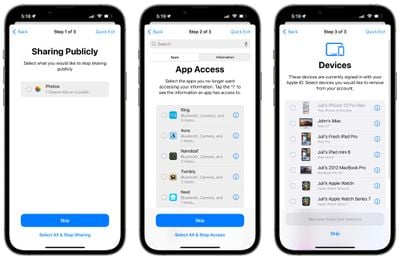
Lastly, Manage Sharing can tell you exactly which devices your iCloud account is logged into, giving you the option to log out, and you can use it to reset your Apple ID and password as well as deactivate Emergency contacts.




















