

How to Disable Night Mode on Your iPhone's Camera - MacRumorsOpen MenuShow RoundupsShow Forums menuVisit ForumsOpen Sidebar
Skip to Content

How to Disable Night Mode on Your iPhone's Camera

by

When using the Camera app on iPhones, the ‌Night Mode‌ feature comes on automatically when the camera sensor registers an indoor or outdoor scene that is dark enough to warrant brightening, resulting in natural colors and reduced noise. That's the idea, anyway. The reality is that ‌Night Mode‌ won't always capture the kind of nighttime image that you want.
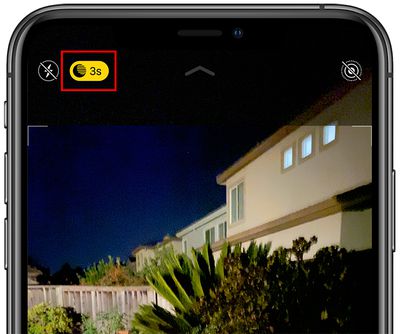
nightmodebutton
If you're aiming to shoot an authentic evening scene in which any sources of light remain subdued, for example, it's better to turn off ‌Night Mode‌ to prevent extreme light exposure and a blown out picture.

If you don't want ‌‌Night Mode‌‌ engaged when you're shooting in low light environments, you can turn it off by tapping the yellow ‌‌Night Mode‌‌ button when it appears at the top of the viewfinder. The problem is, when you open the Camera app again and the sensor detects low light, ‌Night Mode‌ will automatically enable itself again.

In iOS 14, there was no way to disable ‌Night Mode‌ for good – you had to manually switch ‌Night Mode‌ off every time you relaunch the Camera. But in iOS 15 and later, you can turn off ‌Night Mode‌ and ensure that it stays off whenever you subsequently open the Camera app. Here's how.

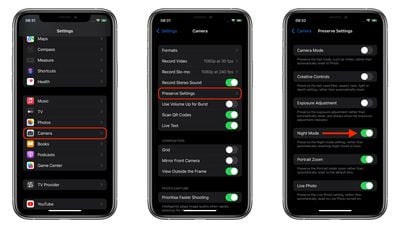
  1. Launch the Settings app on your iPhone.
  2. Tap Camera.
  3. Tap Preserve Settings.
  4. Toggle the Night Mode switch to the green ON position.
settings
Turning on this switch makes the Camera remember that you disabled ‌Night Mode‌ last time you were shooting. You can still manually enable ‌Night Mode‌ in the Camera app in the usual way, but now you're in control of when it's active.

Popular Stories

Apple Event Logo

Apple Just Released a New Accessory

Monday May 4, 2026 8:13 am PDT by
Apple today released a new Pride Edition Sport Loop for the Apple Watch. The band features a rainbow design with 11 colors of woven nylon yarns. The new Pride Edition Sport Loop is available to order now on Apple.com and in the Apple Store app in 40mm, 42mm, and 46mm sizes, and it will be available at Apple Store locations starting later this week. In the U.S., the band costs $49. There...
iOS 27 on iPhone 17 1

iOS 27 Will Add These New Features to Your iPhone

Saturday May 2, 2026 8:43 am PDT by
Apple is expected to unveil iOS 27 during its WWDC 2026 keynote on June 8, and there are already many rumored features and changes for iPhones. The first developer beta of iOS 27 will likely be available immediately following the keynote, and a public beta typically follows in July. Following beta testing, the software update should be released to all users with a compatible iPhone in...
Apple Announces 2026 Pride Band Watch Face and iPhone Wallpaper Article 2

iOS 26.5 Coming Soon With These New Features

Monday May 4, 2026 8:40 am PDT by
iOS 26.5 is expected to be released next week, following more than a month of beta testing. The update is relatively minor, but there are a couple of new features and changes across the operating system that we have recapped below. iOS 26.5 lays the groundwork for end-to-end encryption for RCS in the Messages app and ads in the Apple Maps app, and it will include a new Pride wallpaper and a...
Related Apple News: M4 Ipad Air | European Union | Ios 26 4 Features | Add A Volume Slider To Your Iphone Lock Screen | How To

















