Next time you're on a flight with someone and you both want to watch a video on your Mac without disturbing other passengers, try this convenient solution for sharing your Mac's audio among two pairs of headphones.

listen to mac two pairs of headphones
The method described below should work regardless of whether you're using one wired pair and one wireless pair of headphones, two pairs of Bluetooth headphones, or even several pairs.

How to Output Mac Audio to Two Audio Devices

  1. Make sure that the headphones you want to use together are paired with your Mac over Bluetooth and/or connected via the headphone jack.
  2. Launch the Audio MIDI Setup app, located in Applications/Utilities.
    how to share mac audio between two pairs bluetooth headphones01

  3. Click the plus (+) button at the lower left of the Audio Devices window and select Create Multi-Output Device.
    how to share mac audio between two pairs bluetooth headphones02

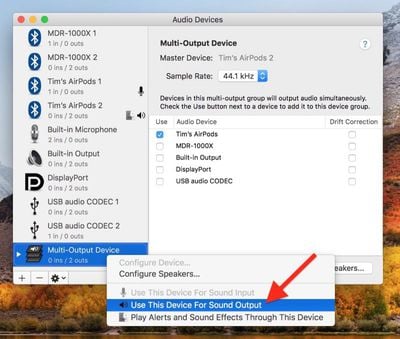
  4. Right-click (or Ctrl-click) the Multi-Output Device in the list that you just created, and select Use This Device For Sound Output. (You can also opt to Play Alerts and Sound Effects Through This Device from the same menu.)
    how to share mac audio between two pairs bluetooth headphones03

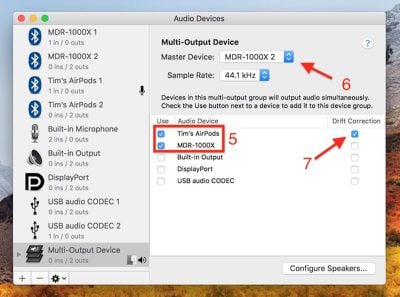
  5. Tick the sets of headphones that you want to use in the Audio Device list. (If one is a wired pair, tick Built-in Output.)
    how to share mac audio between two pairs bluetooth headphones04

  6. Select a Master Device in the drop-down menu.
  7. Tick Drift Correction for the secondary device in the Audio Device list.
  8. Launch System Settings (select  -> System Settings... from the menu bar) and select Sound in the side column.
    how to share mac audio between two pairs bluetooth headphones05

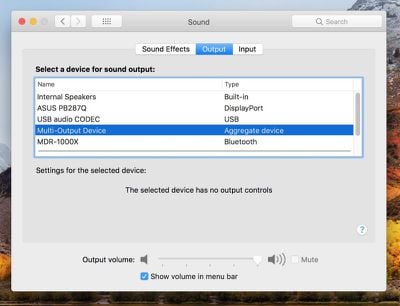
  9. Under "Output & Input," click the Output tab and choose the Multi-Output Device or "Aggregate device" in the list, and you should be good to go.


Top Rated Comments

KGB7 Avatar
96 months ago
In my day, we used a headphone jack splitter.
Score: 17 Votes (Like | Disagree)
vicviper789 Avatar
96 months ago
to me, this is one of the greatest strengths of macs in the audio sphere...I often create multi in/ multi out devices that span a few firewire/USB devices to address my signal routing needs. Ableton/Mainstage/Logic all play along just fine. Whatever foundation apple laid (years ago) to support this, is phenomenal.
Be quiet man, they might remove that feature if they find out people like and use it
Score: 11 Votes (Like | Disagree)
anandhts Avatar
96 months ago
would love to have the same feature in iOS devices..
Score: 8 Votes (Like | Disagree)
nathan_reilly Avatar
96 months ago
to me, this is one of the greatest strengths of macs in the audio sphere...I often create multi in/ multi out devices that span a few firewire/USB devices to address my signal routing needs. Ableton/Mainstage/Logic all play along just fine. Whatever foundation apple laid (years ago) to support this, is phenomenal.
Score: 4 Votes (Like | Disagree)
BMcCoy Avatar
96 months ago
No there are still some airlines that prohibited BT onboard. Such as Air Euroa.
I was replying to the post saying that Bluetooth is banned in Europe.
It's not.

It's not banned in Europe - the European Aviation Safety Agency (EASA) has ratified the regulations permitting Bluetooth as well as other aspects of personal electronic devices (PEDs), confirming the low risk of interference to the aircraft navigation and communications systems.

However, airlines remain free to apply more restrictive policies.
The vast majority of airlines that operate in Europe have adopted the EASA regulations in full.
Some have adopted modified rules, depending on the type model of aircraft. Some have adopted some restrictions relating to aircraft altitude.

So Bluetooth is not banned.
A few small airlines have some restrictions, but all the big names are fine.
Score: 4 Votes (Like | Disagree)
GGJstudios Avatar
96 months ago
This is great but more often I want the inverse: one pair of headphones (usually Bluetooth) streaming audio from several devices simultaneously. Eg. Listening to audio on my work computer, pick up my phone and listen to a short message, then quickly resume working—without going into menus on each device to switch.
I do this regularly with my Bose QC35 headphones. They connect to my iPhone and MBP simultaneously, so if a call comes in while I'm listening to something on the computer, I just pause what I'm listening to and take the call. No switching or selecting required. I wish my AirPods would do the same thing.
Score: 3 Votes (Like | Disagree)

Popular Stories

iOS 26

iOS 26.4 and iOS 27 Features Revealed in New Leak

Friday December 12, 2025 10:56 am PST by
Macworld's Filipe Espósito today revealed a handful of features that Apple is allegedly planning for iOS 26.4, iOS 27, and even iOS 28. The report said the features are referenced within the code for a leaked internal build of iOS 26 that is not meant to be seen by the public. However, it appears that Espósito and/or his sources managed to gain access to it, providing us with a sneak peek...
iOS 26

iOS 26.2 Coming Soon With These 8 New Features on Your iPhone

Thursday December 11, 2025 8:49 am PST by
Apple seeded the second iOS 26.2 Release Candidate to developers earlier this week, meaning the update will be released to the general public very soon. Apple confirmed iOS 26.2 would be released in December, but it did not provide a specific date. We expect the update to be released by early next week. iOS 26.2 includes a handful of new features and changes on the iPhone, such as a new...
iOS 26

Apple Releases iOS 26.2 With Alarms for Reminders, Lock Screen Changes, Enhanced Safety Alerts and More

Friday December 12, 2025 10:10 am PST by
Apple today released iOS 26.2, the second major update to the iOS 26 operating system that came out in September, iOS 26.2 comes a little over a month after iOS 26.1 launched. ‌iOS 26‌.2 is compatible with the ‌iPhone‌ 11 series and later, as well as the second-generation ‌iPhone‌ SE. The new software can be downloaded on eligible iPhones over-the-air by going to Settings >...
AirPods Pro Firmware Feature

Apple Releases New Firmware for AirPods Pro 2 and AirPods Pro 3

Thursday December 11, 2025 11:28 am PST by
Apple today released new firmware designed for the AirPods Pro 3 and the prior-generation AirPods Pro 2. The AirPods Pro 3 firmware is 8B30, up from 8B25, while the AirPods Pro 2 firmware is 8B28, up from 8B21. There's no word on what's include in the updated firmware, but the AirPods Pro 2 and AirPods Pro 3 are getting expanded support for Live Translation in the European Union in iOS...
macOS Tahoe 26 Thumb

Apple Releases macOS Tahoe 26.2 With Edge Light

Friday December 12, 2025 10:08 am PST by
Apple today released macOS Tahoe 26.2, the second major update to the macOS Tahoe operating system that came out in September. macOS Tahoe 26.2 comes five weeks after Apple released macOS Tahoe 26.1. Mac users can download the macOS Tahoe update by using the Software Update section of System Settings. macOS Tahoe 26.2 includes Edge Light, a feature that illuminates your face with soft...
AirTag 2 Mock Feature

Apple AirTag 2: Four New Features Found in iOS 26 Code

Thursday December 11, 2025 10:31 am PST by
The AirTag 2 will include a handful of new features that will improve tracking capabilities, according to a new report from Macworld. The site says that it was able to access an internal build of iOS 26, which includes references to multiple unreleased products. Here's what's supposedly coming: An improved pairing process, though no details were provided. AirTag pairing is already...
ipados 26 1 slide over

Apple Releases iPadOS 26.2 With Multitasking Improvements

Friday December 12, 2025 10:09 am PST by
Apple today released iPadOS 26.2, the second major update to the iPadOS 26 operating system released in September. iPadOS 26.2 comes a month after iPadOS 26.1. The new software can be downloaded on eligible iPads over-the-air by going to Settings > General > Software Update. iPadOS 26.2 continues with the multitasking improvements that were added with iPadOS 26.1. You can now drag and...
bug security vulnerability issue fix larry

Update Now: iOS 26.2 Fixes 20+ Security Vulnerabilities

Friday December 12, 2025 11:11 am PST by
Apple today released iOS 26.2, iPadOS 26.2, and macOS 26.2, all of which introduce new features, bug fixes, and security improvements. Apple says that the updates address over 20 vulnerabilities, including two bugs that are known to have been actively exploited. There are a pair of WebKit vulnerabilities that could allow maliciously crafted web content to execute code or cause memory...