

As an Apple Music subscriber, you're able to download songs, playlists, and albums from the Apple Music catalog to your iPhone or iPad for offline listening, but this can gradually eat up your device's storage space over time.

Fortunately the Music app includes a handy feature that can spring into action whenever your device's storage space runs low, and automatically offload songs you haven't played for a while in order to make space for newer ones.
It's called Optimized Storage, and here's how you can enable it.
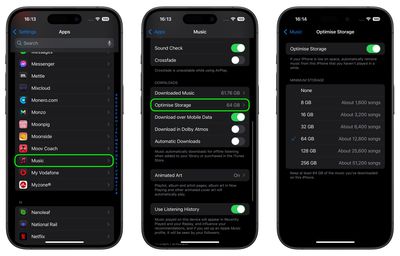
- Launch the Settings app on your iPhone or iPad.
- Scroll down to the apps list and select Music.
- Under Downloads, tap Optimized Storage.

- Toggle the Optimized Storage switch to the "on" position so that it shows green.
- Choose a minimum storage amount that you want to keep for music before downloaded songs start being removed from your device.
You can also monitor storage space by turning off automatic downloads and making sure to download new songs manually when needed. There's also an option to remove downloaded songs one by one from the Apple Music app if you prefer not to have songs offloaded by Apple automatically.






















Top Rated Comments
We repurposed a retired 512gb iPhone 13 as a storage device connected to our "sound system" (really 2 bookshelf speakers-we are decidedly low tech on that front) and pushed most of our music (29k+ songs) onto it.
Knappeduivel: I feel the same way about the Apple ecosystem. And thanks for introducing me to Swinsian. I'll have to check that out.
(I’m sure many people have experienced the same issue for years.)