iOS 17: How to Name Your Pets in Photos With Pet Recognition - MacRumorsOpen MenuShow RoundupsShow Forums menuVisit ForumsOpen Sidebar
Skip to Content

iOS 17: How to Name Your Pets in Photos With Pet Recognition

by

With iOS 17 and iPadOS 17, Apple has added pet recognition to its stock Photos app for iPhone and iPad. Keep reading to learn how to set it up.

photos
Regular users of Apple's Photos app will be undoubtedly familiar with the People album, which tries to identify faces in your pictures so that you can label people with their proper names and use that label as an organizing element in your library or as a discoverable tag.

In addition to people, the ‌Photos‌ app in iOS 17 can recognize specific animals so you can have your pets automatically sorted into albums. Accordingly, the People album has been renamed the "People & Pets" album.

The pet recognition feature works on cats and dogs. If you have pictures of such animals in your photo library, here's how to name them for easier discovery and organization.

  1. Open the Photos app on your device.
  2. Tap the Search tab, input "pets" into the search field at the top of the screen, then tap Search.
  3. Under "Pets" (located below the selection of photos identified as featuring pets) tap any Unnamed Pet.
  4. Tap Add Name at the top of the screen.
  5. Enter the pet's name, then tap Next.
  6. Tap Done to finish.

photos

That's all there is to it. Once your pet is named and recognized in photos, you can use the typical photo management options to organize and manage your tags.
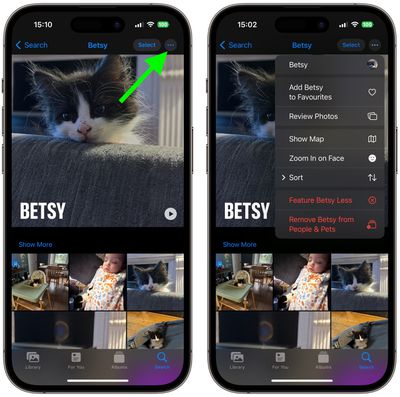
photos
Simply select the pet in question, then tap the three encircled dots in the top-right corner of the screen, and you'll be able to favorite the pet, sort and review the pet's photos, and more.


Popular Stories

imac video apple feature

Apple Released Yet Another New Product Today

Friday March 20, 2026 2:39 pm PDT by
Apple has unveiled a whopping nine new products so far this March, including an iPhone 17e, iPad Air models with the M4 chip, MacBook Air models with the M5 chip, MacBook Pro models with M5 Pro and M5 Max chips, the all-new MacBook Neo, an updated Studio Display, a higher-end Studio Display XDR, AirPods Max 2, and now the Nike Powerbeats Pro 2. iPhone 17e features the same overall design as...
iPhone 18 Pro Deep Red Feature

iPhone 18 Pro Launching Later This Year With These 12 New Features

Wednesday March 18, 2026 7:39 am PDT by
While the iPhone 18 Pro and iPhone 18 Pro Max are not expected to launch for another six months or so, there are already plenty of rumors about the devices. It was initially reported that the iPhone 18 Pro models would have fully under-screen Face ID, with only a front camera visible in the top-left corner of the screen. However, the latest rumors indicate that only one Face ID component...
ios 26 4 pastel

iOS 26.4: Top 10 New Features Coming to Your iPhone

Friday March 20, 2026 2:44 pm PDT by
iOS 26.4 isn't the major update with new Siri features that we hoped for, but there are some useful quality of life improvements, and a little bit of fun with an AI playlist generator and new emoji characters. Playlist Playground - Apple Music has a Playlist Playground option that lets you generate playlists from text-based descriptions. You can include moods, feelings, activities, or...
Related Apple News: Culture | Entertainment | Iphone | Education | Technology