


macos finder iconStationery Pad is a handy way to nix a step in your workflow if you regularly use document templates on your Mac. The long-standing Finder feature essentially tells a file's parent application to open a copy of it by default, ensuring that the original file remains unedited.

Stationery Pad doesn't get much attention these days, but it's a neat alternative to repeatedly editing templates and using the "Save As..." command, which can lead to overwriting the original file if you're not too careful.

Almost any file type can be defined as a template with Stationery Pad – it could be used to streamline common Photoshop jobs, create skeleton HTML/CSS files, or help with Word document invoicing. To make use of Stationery Pad, create the file you want to use as a template, then follow the steps below.

How to Define a File as a Template Using Stationery Pad

  1. Find the file in Finder that you want to use as a template.

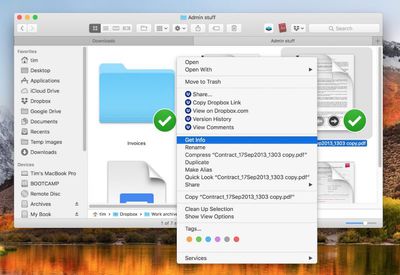
  2. Right-click (or Ctrl-click) the file and select Get Info in the contextual dropdown menu. Alternatively, click the file to select it and use the Command+I keyboard shortcut to launch Get Info.
    How to Use Stationery Pad

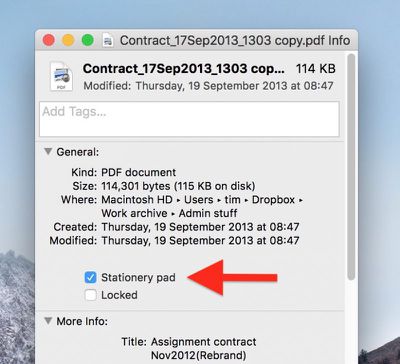
  3. Tick the Stationery Pad checkbox under the General section.
    How to Use Stationery Pad 1

  4. Click the red traffic light button to close the Get Info window.
Next time you double-click the template file, Finder will create and open a copy of it, leaving the original untouched. To reverse the behavior, simply untick the Stationery Pad checkbox in the template file's Get Info window.

Top Rated Comments

Starfia Avatar
99 months ago
Whoa!!

I've been a programming-enthusiast Mac user since well before the dawn of OS X and I never truly noticed that check box. That was one truly rare high-value meeting of article and reader.
Score: 10 Votes (Like | Disagree)
CreatorCode Avatar
99 months ago
Definitely before OS X.

Possibly before System 7, but definitely added in some 7.x version. One of the interesting long-standing Mac features.
The original concept is actually a relic of the Lisa. The original idea behind the Lisa was that users would create files by tearing off the appropriate type of Stationery (Word processing, spreadsheet, drawing) and then start editing it. None of this "launching apps" business like today.

The ability to designate any file as a Stationery Pad, though, was a System 7 feature, I'm pretty sure.
Score: 6 Votes (Like | Disagree)
Pupi Avatar
99 months ago
Cool tip, thanks. Mac is such a beast. I can’t even imagine how it would be by now if they kept developing the power-user side of it, instead of making it more and more like an iPad.
Score: 5 Votes (Like | Disagree)
chucker23n1 Avatar
99 months ago
It's a something that's been there for ages (even before OS X if I remember correctly) but I guess it's a feature most aren't aware of – I don't ever use it myself, even tough it might be a good idea sometimes. :)
Definitely before OS X.

Possibly before System 7, but definitely added in some 7.x version. One of the interesting long-standing Mac features.
Score: 3 Votes (Like | Disagree)
ignatius345 Avatar
99 months ago

4. Click the red traffic light button to close the Get Info window.
Is "red traffic light button" really what we're calling the close window button now?
Score: 3 Votes (Like | Disagree)
lec0rsaire Avatar
99 months ago
I can honestly say I would’ve never known about this. I spent nearly my entire life with Windows and it’s fun to discover little things this OS can do.
Score: 2 Votes (Like | Disagree)

Popular Stories

iOS 26

iOS 26.4 and iOS 27 Features Revealed in New Leak

Friday December 12, 2025 10:56 am PST by
Macworld's Filipe Espósito today revealed a handful of features that Apple is allegedly planning for iOS 26.4, iOS 27, and even iOS 28. The report said the features are referenced within the code for a leaked internal build of iOS 26 that is not meant to be seen by the public. However, it appears that Espósito and/or his sources managed to gain access to it, providing us with a sneak peek...
iOS 26

iOS 26.2 Coming Soon With These 8 New Features on Your iPhone

Thursday December 11, 2025 8:49 am PST by
Apple seeded the second iOS 26.2 Release Candidate to developers earlier this week, meaning the update will be released to the general public very soon. Apple confirmed iOS 26.2 would be released in December, but it did not provide a specific date. We expect the update to be released by early next week. iOS 26.2 includes a handful of new features and changes on the iPhone, such as a new...
iOS 26

Apple Releases iOS 26.2 With Alarms for Reminders, Lock Screen Changes, Enhanced Safety Alerts and More

Friday December 12, 2025 10:10 am PST by
Apple today released iOS 26.2, the second major update to the iOS 26 operating system that came out in September, iOS 26.2 comes a little over a month after iOS 26.1 launched. ‌iOS 26‌.2 is compatible with the ‌iPhone‌ 11 series and later, as well as the second-generation ‌iPhone‌ SE. The new software can be downloaded on eligible iPhones over-the-air by going to Settings >...
AirPods Pro Firmware Feature

Apple Releases New Firmware for AirPods Pro 2 and AirPods Pro 3

Thursday December 11, 2025 11:28 am PST by
Apple today released new firmware designed for the AirPods Pro 3 and the prior-generation AirPods Pro 2. The AirPods Pro 3 firmware is 8B30, up from 8B25, while the AirPods Pro 2 firmware is 8B28, up from 8B21. There's no word on what's include in the updated firmware, but the AirPods Pro 2 and AirPods Pro 3 are getting expanded support for Live Translation in the European Union in iOS...
macOS Tahoe 26 Thumb

Apple Releases macOS Tahoe 26.2 With Edge Light

Friday December 12, 2025 10:08 am PST by
Apple today released macOS Tahoe 26.2, the second major update to the macOS Tahoe operating system that came out in September. macOS Tahoe 26.2 comes five weeks after Apple released macOS Tahoe 26.1. Mac users can download the macOS Tahoe update by using the Software Update section of System Settings. macOS Tahoe 26.2 includes Edge Light, a feature that illuminates your face with soft...
AirTag 2 Mock Feature

Apple AirTag 2: Four New Features Found in iOS 26 Code

Thursday December 11, 2025 10:31 am PST by
The AirTag 2 will include a handful of new features that will improve tracking capabilities, according to a new report from Macworld. The site says that it was able to access an internal build of iOS 26, which includes references to multiple unreleased products. Here's what's supposedly coming: An improved pairing process, though no details were provided. AirTag pairing is already...
ipados 26 1 slide over

Apple Releases iPadOS 26.2 With Multitasking Improvements

Friday December 12, 2025 10:09 am PST by
Apple today released iPadOS 26.2, the second major update to the iPadOS 26 operating system released in September. iPadOS 26.2 comes a month after iPadOS 26.1. The new software can be downloaded on eligible iPads over-the-air by going to Settings > General > Software Update. iPadOS 26.2 continues with the multitasking improvements that were added with iPadOS 26.1. You can now drag and...
bug security vulnerability issue fix larry

Update Now: iOS 26.2 Fixes 20+ Security Vulnerabilities

Friday December 12, 2025 11:11 am PST by
Apple today released iOS 26.2, iPadOS 26.2, and macOS 26.2, all of which introduce new features, bug fixes, and security improvements. Apple says that the updates address over 20 vulnerabilities, including two bugs that are known to have been actively exploited. There are a pair of WebKit vulnerabilities that could allow maliciously crafted web content to execute code or cause memory...
















