Apple's latest iPhone 16 models include a new Camera Control button (located on the lower right-hand side when holding the phone in portrait mode). The new button aims to make it easier to adjust photography settings when shooting with the iPhone in both portrait and landscape orientation.
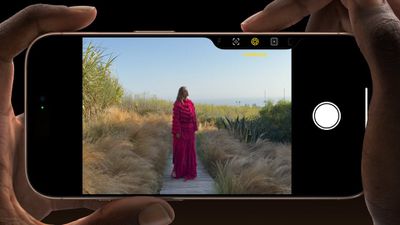
When you press down on the Camera Control button it brings up the Camera app, which is where its additional functionality lays hidden, but it can be easily invoked with light press gestures.
A light press on the Camera Control button engages a haptic click to bring up settings like zoom and exposure, which you can adjust with a swipe, while a double light press lets you switch between all these settings, selecting individual options with a further light press.
If you find yourself accidentally engaging the Camera Control adjustments when taking a picture in high-motion environments (like inadvertently zooming in or changing exposure settings), you can remove light press functionality from the Camera Control button entirely. Here's how it's done:
- Open Settings on your iPhone.
- Tap Accessibility.
- Under "Physical & Motor," tap Camera Control.
- Toggle off the switch next to Show Adjustments.
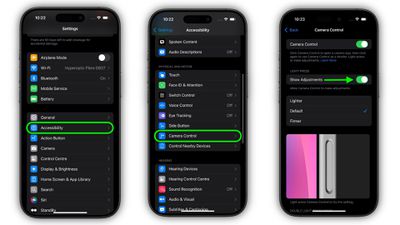
This option removes the Camera Control interface and its corresponding light-press adjustments, so now you don't need to worry about accidentally engaging them while shooting. This essentially makes the Camera Control button a simple shutter button after you have opened the Camera app with the first press.
To reinstate Camera Control adjustments that are activated by a light press, simply toggle back on the Show Adjustments option in Settings -> Accessibility -> Camera Control.
In a software update coming later this year, Camera Control will introduce a two-stage shutter that lets you automatically lock focus and exposure with a light press — so you can re-frame your shot without losing focus on your subject.