iPhone 14 Pro: How to Take 48-Megapixel ProRaw Photos - MacRumorsOpen MenuShow RoundupsShow Forums menuVisit ForumsOpen Sidebar
Skip to Content

iPhone 14 Pro: How to Take 48-Megapixel ProRaw Photos

by

iPhone 14 Pro models feature an upgraded rear camera system that can shoot 48-megapixel photos, but only in ProRAW mode. This article explains what ProRAW is and how to enable it.
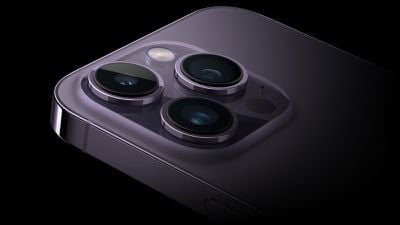
iPhone 14 Pro Rear Camera
Apple's biggest camera upgrade for the iPhone 14 Pro and iPhone 14 Pro Max models is to the Main lens, which has been increased to 48 megapixels.

Apple says the new sensor also comes with a "new machine learning model [that] delivers sharper images and less noise for unprecedented detail." However, this only applies when taking ProRAW shots at 48 megapixels. Otherwise, the camera defaults to shooting in 12-megapixel resolution, similar to iPhone 13 models.

There's a good reason for this. ProRAW is a 10-bit file that uses the Linear DNG format to retain more information and dynamic range, providing additional flexibility when editing exposure and white balance.

With a ProRAW image containing 8,064 x 6,048 pixels, these files consume a significant amount of storage and can be approximately 75MB in size, or three times the size of an average 12-megapixel image.
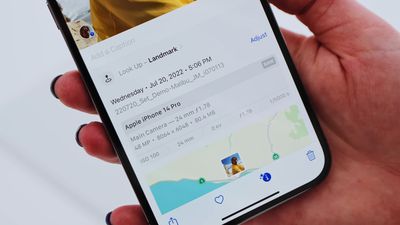
iphone 14 pro 48mp photo size
Unless you have the largest capacity 1TB iPhone 14 Pro model, you're unlikely to want to shoot at this resolution all the time. But on those occasions that you do want to take advantage of ProRAW levels of detail, here's how to turn on the feature.

  1. Launch the Settings app on your iPhone 14 Pro
  2. Scroll down and tap through to Camera.
  3. Tap Formats.
  4. Under "Photo Capture," switch on the toggle next to Apple ProRAW.
  5. Make sure the ProRAW Resolution setting that appears is set to 48MP.
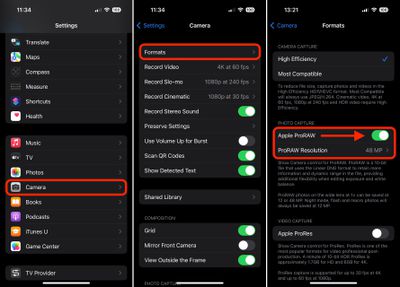
settings

Now when you go into the Camera app, tap the ProRAW icon in the top-right of the interface so that it is no longer crossed out, then you're ready to point and shoot. Note that Night mode, flash and macros are always saved at 12 megapixels.


Related Forum: iPhone

Popular Stories

Apple Event Logo

Apple Just Released a New Accessory

Monday May 4, 2026 8:13 am PDT by
Apple today released a new Pride Edition Sport Loop for the Apple Watch. The band features a rainbow design with 11 colors of woven nylon yarns. The new Pride Edition Sport Loop is available to order now on Apple.com and in the Apple Store app in 40mm, 42mm, and 46mm sizes, and it will be available at Apple Store locations starting later this week. In the U.S., the band costs $49. There...
iOS 27 on iPhone 17 1

iOS 27 Will Add These New Features to Your iPhone

Saturday May 2, 2026 8:43 am PDT by
Apple is expected to unveil iOS 27 during its WWDC 2026 keynote on June 8, and there are already many rumored features and changes for iPhones. The first developer beta of iOS 27 will likely be available immediately following the keynote, and a public beta typically follows in July. Following beta testing, the software update should be released to all users with a compatible iPhone in...
Apple Announces 2026 Pride Band Watch Face and iPhone Wallpaper Article 2

iOS 26.5 Coming Soon With These New Features

Monday May 4, 2026 8:40 am PDT by
iOS 26.5 is expected to be released next week, following more than a month of beta testing. The update is relatively minor, but there are a couple of new features and changes across the operating system that we have recapped below. iOS 26.5 lays the groundwork for end-to-end encryption for RCS in the Messages app and ads in the Apple Maps app, and it will include a new Pride wallpaper and a...
Related Apple News: South Africa | Reviews | Buyers Guide | Politics | Business