iOS 17: How to Protect Your Eyes With the Screen Distance Measuring Tool - MacRumorsOpen MenuShow RoundupsShow Forums menuVisit ForumsOpen Sidebar
Skip to Content

iOS 17: How to Protect Your Eyes With the Screen Distance Measuring Tool

by

In iOS 17 and iPadOS 17, Apple has introduced new tools for improving eye health when viewing screens. Called Screen Distance, the tools are aimed at children, but can be used by anyone looking to reduce eye strain. Keep reading to learn how it works.
iOS 17 Health Feature
While it's not possible for children to stop using screens altogether in this day and age, Apple has added some new tools that parents can use to help protect their child's eye health when they use an iPhone or iPad.

Of course, no-one is too old keep their own eyes in good condition, which is why grown-ups can use the new Screen Distance tools, too. To reduce eye strain and the risk of myopia in children, Screen Distance helps you keep the iPhone at a recommended distance.

Apple recommends a viewing distance of 12 inches for the eyes, and will offer a position guide to help you know where to hold the device for optimal viewing without eye strain. Here’s how to enable the new feature.

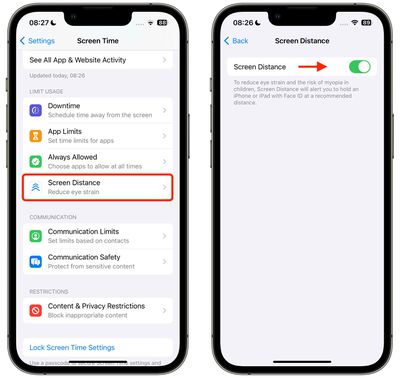
  1. Open the Settings app on your iPhone or ‌iPad‌.
  2. Tap Screen Time.
  3. Under "Limit Usage," tap Screen Distance.
  4. Read the info screen, then Continue.
  5. Toggle the Screen Distance switch so that it's in the green ON position.
    settings

If the ‌iPhone‌ or ‌‌iPad‌‌ is too close, Apple's "Shield" will now let you (or your child) know that the display needs to be further away. Once the device is moved to the suggested distance, the shield will display a Continue button for you to resume what you were doing.


Tag: Health

Popular Stories

Apple Event Logo

Apple Just Released a New Accessory

Monday May 4, 2026 8:13 am PDT by
Apple today released a new Pride Edition Sport Loop for the Apple Watch. The band features a rainbow design with 11 colors of woven nylon yarns. The new Pride Edition Sport Loop is available to order now on Apple.com and in the Apple Store app in 40mm, 42mm, and 46mm sizes, and it will be available at Apple Store locations starting later this week. In the U.S., the band costs $49. There...
iOS 27 on iPhone 17 1

iOS 27 Will Add These New Features to Your iPhone

Saturday May 2, 2026 8:43 am PDT by
Apple is expected to unveil iOS 27 during its WWDC 2026 keynote on June 8, and there are already many rumored features and changes for iPhones. The first developer beta of iOS 27 will likely be available immediately following the keynote, and a public beta typically follows in July. Following beta testing, the software update should be released to all users with a compatible iPhone in...
Apple Announces 2026 Pride Band Watch Face and iPhone Wallpaper Article 2

iOS 26.5 Coming Soon With These New Features

Monday May 4, 2026 8:40 am PDT by
iOS 26.5 is expected to be released next week, following more than a month of beta testing. The update is relatively minor, but there are a couple of new features and changes across the operating system that we have recapped below. iOS 26.5 lays the groundwork for end-to-end encryption for RCS in the Messages app and ads in the Apple Maps app, and it will include a new Pride wallpaper and a...
Related Apple News: Education | South Africa | Buyers Guide | Iphone | Politics