

iOS 16: How to Undo and Redo Individual Edits to Photos - MacRumorsOpen MenuShow RoundupsShow Forums menuVisit ForumsOpen Sidebar
Skip to Content

iOS 16: How to Undo and Redo Individual Edits to Photos

by

In iOS 16, Apple has brought some notable improvements to the Photos app, one of which is the ability to undo and redo individual adjustments that you make to your pictures. Keep reading to learn how it's done.
iOS 16 Photos and Camera Guide Feature
In previous versions of iOS, whenever you made edits to a picture in Apple's stock ‌Photos‌ app, if you weren't happy with the results then you had to manually change the edited parameters or else revert all of the changes in one go and reinstate the look of the original. What you didn't have the ability to do though was undo or redo individual adjustments during the editing process.

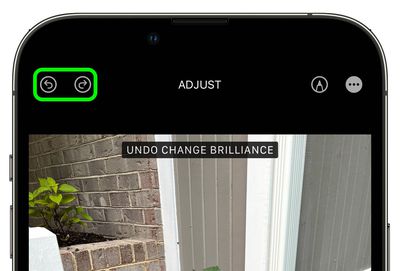
That's all changed in iOS 16, because Apple has added handy Undo and Redo buttons to the Photo app's editing interface. Now when you select an image in your Photo Library and tap Edit to make changes, if at any point in the process you're not happy with the results, you can tap the Undo icon in the upper left corner of the screen to revert each effect one by one, right back to the original image.
photos
What's more, if you find you preferred a specific adjustment after you've undone it, you can simply tap the Redo icon to re-apply the effect. That's all there is to it.

Popular Stories

iphone 17 pro orange

Apple Highlights Photos Shot on iPhone During NASA's Mission to Moon

Saturday April 11, 2026 8:17 am PDT by
As we previously reported, astronauts aboard NASA's Orion spacecraft used the iPhone 17 Pro Max to take selfies of themselves with the Earth in the background during the Artemis II mission around the far side of the Moon last week. Now that the crew members have safely returned to Earth, Apple's CEO Tim Cook and marketing chief Greg Joswiak have both turned to social media to congratulate...
google photos wardrobe

Google Photos to Get AI 'Wardrobe' Feature

Wednesday April 29, 2026 3:50 pm PDT by
Google Photos is getting a new wardrobe planning feature that will help you decide what to wear. AI will pull in images of clothing from the Google Photos library, organizing clothing items into a digital closet. You will be able to put items together to create outfits, and even virtually try them with a digital avatar on to see how they'll look. The Google Photos app will show all items of...
Apple Event Logo

Apple Just Released a New Accessory

Monday May 4, 2026 8:13 am PDT by
Apple today released a new Pride Edition Sport Loop for the Apple Watch. The band features a rainbow design with 11 colors of woven nylon yarns. The new Pride Edition Sport Loop is available to order now on Apple.com and in the Apple Store app in 40mm, 42mm, and 46mm sizes, and it will be available at Apple Store locations starting later this week. In the U.S., the band costs $49. There...
Related Apple News: Airtag | Ios Resize Iphone Lock Screen Clock | Mac Pro | Bird Buddy | South Africa
















