iOS 18: Recording Audio With Transcripts in Notes - MacRumorsOpen MenuShow RoundupsShow Forums menuVisit ForumsOpen Sidebar
Skip to Content

iOS 18: Recording Audio With Transcripts in Notes

by

In iOS 18, Apple has made a significant enhancement to the Notes app, introducing a built-in audio recording feature that streamlines the process of capturing and transcribing voice notes. The new functionality is available on iPhone 12 and later models, and allows you to record audio directly within a note, eliminating the need to use separate apps or share files.
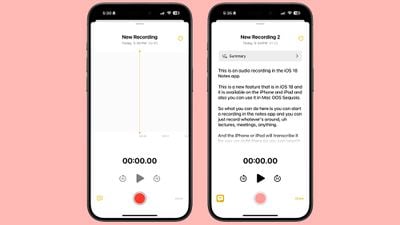
ios 18 notes app voice recording
The new audio recording tool in Notes offers more than just simple voice capture. As users record, the app automatically generates a real-time transcript, making it easier to review and search through recorded content. This feature is particularly useful for students attending lectures, professionals in meetings, or anyone who needs to quickly capture and reference spoken information.

Record a Voice Note and Get a Transcript

To use the new audio recording feature in iOS 18's Notes app, simply follow these steps:

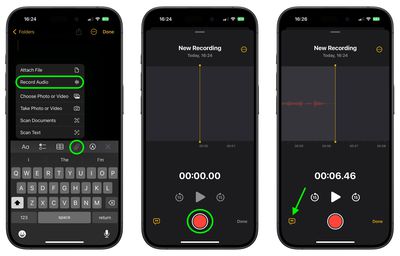
  1. Open the Notes app and create a new note or open an existing one.
  2. Tap inside the note, then select the paperclip icon from the menu above the keyboard.
  3. Choose Record Audio from the pop-up menu.
  4. Press the red record button to start recording, and tap it again to stop. To view the transcript, tap the quote bubble icon in the bottom-left corner.
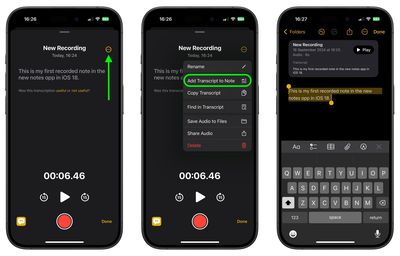
    notes

  5. To add the full transcript to the note, tap the three-dot menu in the upper right corner.
  6. Select Add Transcript to Note from the dropdown menu.
    notes

That's all there is to it. While the audio recording feature offers new note-taking abilities, it's worth noting that it currently only supports English, but Apple will likely bring support for additional languages in a future update.

In an iOS 18 update coming later this year, Apple Intelligence will also be able to generate transcription summaries, offering a distilled, more easily digestible version of your voice recordings.


Top Rated Comments

Jxdawg Avatar
20 months ago
If only this was available when I was a student…

Also, proud of Apple for not slapping the AI label on it like so many other companies have been.
Score: 7 Votes (Like | Disagree)
20 months ago
An outstanding feature...one I'll be using a lot!
Score: 5 Votes (Like | Disagree)
20 months ago

If only this was available when I was a student…

Also, proud of Apple for not slapping the AI label on it like so many other companies have been.
I hear you...now everything from a data dashboard to a bayesian filter has now been rebranded as AI. Pretty soon my next cheeseburger will be AI-enhanced.

On another note, unless you are at least five years into retirement, we are all still students. The world is accelerating way, way too fast to not be studying (or practicing) something at all times. So I welcome any technology that helps us learn...including, almost ironically given my earlier statement...AI.
Score: 5 Votes (Like | Disagree)
kiranmk2 Avatar
20 months ago
Seems a bit complicated - too much clicking on strange icons or the three dots to find "hidden" options. I would have thought a better approach was to make this part of the Voice Recordings app and give a (clear) option to transcribe the recording and add this to the Notes app.
Score: 4 Votes (Like | Disagree)
20 months ago
I kind of wish the transcription text was actually transcribed onto the note itself (or at least be an option to do so) instead of being contained in the little voice module inside the note. A small annoyance but it would make navigating those much easier for me personally. For example, being able to use “Find in Note” directly from the note itself and not having to first click into the recording. Also, even if you don’t give the recording a title it doesn’t carry over to being the title of the actual note. Quite an annoying to have to title things twice.
Score: 3 Votes (Like | Disagree)
20 months ago
Isn't communicating without keeping a copy of the conversation the main idea of making a phone call?
Score: 3 Votes (Like | Disagree)

Popular Stories

imac video apple feature

Apple Released Yet Another New Product Today

Friday March 20, 2026 2:39 pm PDT by
Apple has unveiled a whopping nine new products so far this March, including an iPhone 17e, iPad Air models with the M4 chip, MacBook Air models with the M5 chip, MacBook Pro models with M5 Pro and M5 Max chips, the all-new MacBook Neo, an updated Studio Display, a higher-end Studio Display XDR, AirPods Max 2, and now the Nike Powerbeats Pro 2. iPhone 17e features the same overall design as...
iPhone 18 Pro Deep Red Feature

iPhone 18 Pro Launching Later This Year With These 12 New Features

Wednesday March 18, 2026 7:39 am PDT by
While the iPhone 18 Pro and iPhone 18 Pro Max are not expected to launch for another six months or so, there are already plenty of rumors about the devices. It was initially reported that the iPhone 18 Pro models would have fully under-screen Face ID, with only a front camera visible in the top-left corner of the screen. However, the latest rumors indicate that only one Face ID component...
ios 26 4 pastel

iOS 26.4: Top 10 New Features Coming to Your iPhone

Friday March 20, 2026 2:44 pm PDT by
iOS 26.4 isn't the major update with new Siri features that we hoped for, but there are some useful quality of life improvements, and a little bit of fun with an AI playlist generator and new emoji characters. Playlist Playground - Apple Music has a Playlist Playground option that lets you generate playlists from text-based descriptions. You can include moods, feelings, activities, or...
Related Apple News: Local News | Health | Business | Iphone | Reviews