

With iOS 18, Apple introduced several handy improvements to the Notes app, making it easier to organize information and add visual flair to your notes. Read on to learn how these new features can improve your note-taking experience.

The following four new Notes features are worth getting acquainted with in iOS 18.
- Collapsible sections allow for better organization of lengthy notes around titles and headers, making it easier to navigate complex documents.
- New text highlighting options provide a way to emphasize important information visually, aiding in study and review.
- Simplified file attachments streamline the process of creating comprehensive notes that incorporate various types of content.
- Built-in audio recording feature that streamlines the process of capturing and transcribing voice notes.
Together, these updates make Notes a more powerful tool for capturing and organizing your ideas. Here's how to take advantage of the new collapsible sections, text highlighting, file attachment, and audio transcription options in iOS 18:
Collapsing Sections for Better Organization
To streamline longer notes, add collapsible sections in the following way:
- Create a title, heading or subheading in your note.
- Tap the heading to select it.
- Tap the chevron that appears next to the heading to collapse the section and hide the associated text.
- Tap the arrow again to expand the section and reveal the associated text.
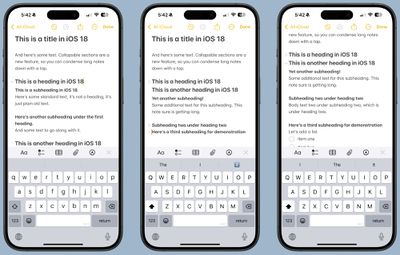
This feature works with any level of heading, allowing you to create a compact outline of your note's contents.
Adding Color With Text Highlighting
For the first time, Notes supports colored text highlighting. Here's how to highlight a portion of text:
- Select the word or phrase you want to highlight.
- Tap the "Aa" button in the formatting menu.
- Choose from five new highlight colors: Pink, purple, orange, mint, and blue.
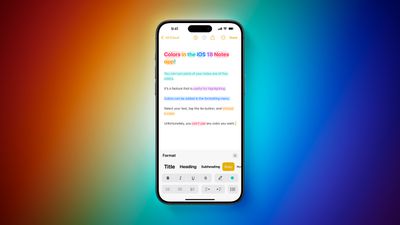
This simple addition allows you to emphasize important information or categorize different parts of your notes visually.
Attaching Files More Easily
In iOS 18, Apple has streamlined the process of adding files to your notes. Previously, you had to copy and paste a file into notes to add it, a process that required several steps. Now you can select the option from the toolbar icon:
- Tap the new paperclip icon in the note toolbar.
- Select "Add File" from the menu.
- Choose a file from the Files app to attach it directly to your note.
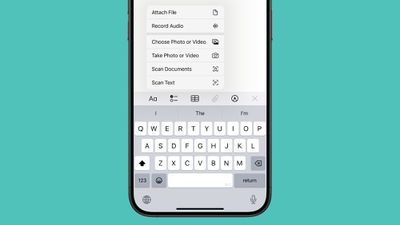
As an alternative, you can now long-press on a note in the list view and select "Add Attachment" to quickly add files without opening the note.
Recording Audio Within a Note
The new audio recording tool in Notes offers more than just simple voice capture. As you record, the app automatically generates a real-time transcript, making it easier to review and search through recorded content. It's particularly useful if attending lectures, meetings, or whenever you need to quickly capture and reference spoken information. The new audio recording and transcription functionality in Notes is available on iPhone 12 and later models.
- Open the Notes app and create a new note or open an existing one.
- Tap inside the note, then select the paperclip icon from the menu above the keyboard.
- Choose Record Audio from the pop-up menu.
- Press the red record button to start recording, and tap it again to stop. To view the transcript, tap the quote bubble icon in the bottom-left corner.

- To add the full transcript to the note, tap the three-dot menu in the upper right corner.
- Select Add Transcript to Note from the dropdown menu.
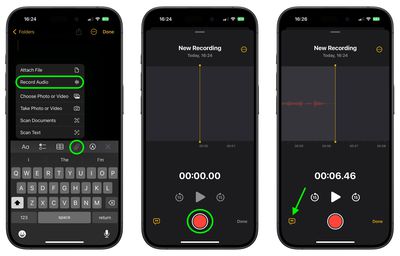
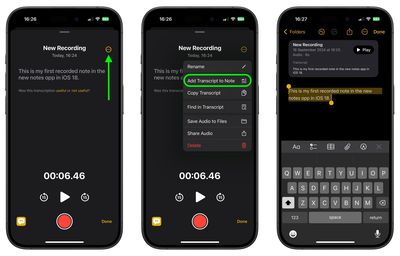
That's all there is to it. While the audio recording feature offers new note-taking abilities, it's worth noting that it currently only supports English, but Apple will likely bring support for additional languages in a future update.
Summing Up
These new features in iOS 18's Notes app offer more flexibility in organizing information, emphasizing key points, and incorporating various types of content into your notes. Familiarize yourself with these tools and you'll be able to create more dynamic and useful notes for work, study, or personal use.
On October 28, 2024, Apple released iOS 18.1, which introduces new Writing Tools to Notes and other Apple apps, thanks to Apple Intelligence. With Writing Tools, AI features can proofread, summarize, and even rewrite your text. See our dedicated Writing Tools roundup for all the details.





















