Apple's iOS 18 update brings powerful new search functions to the Photos app, allowing you to find specific images with unprecedented precision. Here's how to make the most of its new capabilities.
iOS 18 Photos Feature Chromatic
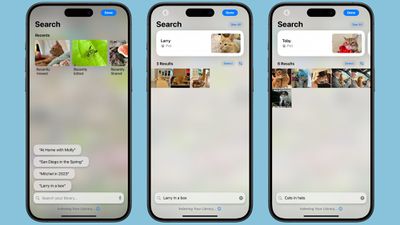
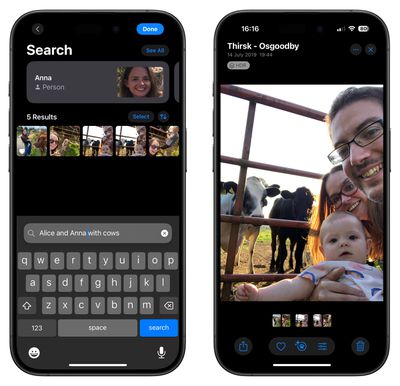
In iOS 18, the key to effective searching in Photos is using natural language. Instead of simple keywords, try describing the photo you're looking for in detail. The app can now understand complex queries and find images based on specific elements within them.

For example, if you've previously identified friends and family using the People and Pets features, you can search for "Dad smiling" or "Snowy sleeping." The more specific you are, the better your results will be. You can even search for actions or emotions, like "kids laughing at swings" or "couple dancing at wedding."
ios 18 photos search
The new search function is also pretty handy at finding objects and scenes. Try queries like "car next to lake" or "sunset over city skyline." You can combine multiple elements in your search, such as "yellow flowers in vase by window."

For food lovers, searches like "pizza with mushrooms" or "steak and chips on table" can help you find culinary inspirations from your photo library. When searching for people, you can now include details about their appearance or actions. "Mum in green hat with wine glass" or "Emma in wedding dress" are examples of how specific you can get.
photos
The Photos app can even search within videos. If you remember a specific moment in a video but can't recall which one, try describing the scene. For instance, "baby crawling" or "fireworks over lake" can take you directly to that moment.

Note that for these advanced search features to work, the Photos app needs time to index your library. This process happens on your device to protect your privacy, so be patient if searches aren't immediately accurate after updating to iOS 18.

With practice, you'll find that the new search function in Photos can help you rediscover forgotten memories and locate specific images with ease. Don't be afraid to get creative with your searches – you might be surprised at what the app can find.


Top Rated Comments

Haventseenitall Avatar
18 months ago
I keep looking for my camera roll and album. Hate the new Photo's app. It's so bad. Let me have control.
Score: 14 Votes (Like | Disagree)
mac_head Avatar
18 months ago
You know that design and user interfaces are bad when you have to "master" them...
Score: 13 Votes (Like | Disagree)
dakicka Avatar
18 months ago
They made Photos much worse. First, there should be a simple search to find Albums by name from within Albums.

Second, the idiots that re designed photos made evening convoluted and more difficult to get to things. The whole swiping up and down of the fixed Recent Days, etc is annoying.

Third, trying the watch VIDEOS and play them back frame by frame is an incessant task. I literally might switch to an android for the sole reason I cannot watch videos in full screen not scrub frame by frame with a timeline anymore. The powers that be that approved this massive downgrade ought to be fired immediately.
Score: 10 Votes (Like | Disagree)
kirky29 Avatar
18 months ago
I find the search button a little too small, and doesn't always respond first time, and 4/10 times it either freezes mid typing or just crashes for me. (Reported many times to Apple)
Score: 9 Votes (Like | Disagree)
mrfunnypenguin Avatar
18 months ago
Currently not liking this redesign. It's like whoever designed it never actually tried using it. Hopefully Apple will improve it in future releases!
Score: 8 Votes (Like | Disagree)
jz0309 Avatar
18 months ago
While I have the photos app on my phone and about 10k photos in it, I manage my photos on my Mac in LRC…

but will say this: if you need a guide on how to use search - something is wrong
Score: 8 Votes (Like | Disagree)

Popular Stories

iOS 26

iOS 26.3 and iOS 26.4 Will Add These New Features to Your iPhone

Tuesday February 3, 2026 7:47 am PST by
We are still waiting for the iOS 26.3 Release Candidate to come out, so the first iOS 26.4 beta is likely still at least a week or two away. Following beta testing, iOS 26.4 will likely be released to the general public in March or April. Below, we have recapped known or rumored iOS 26.3 and iOS 26.4 features so far. iOS 26.3 iPhone to Android Transfer Tool iOS 26.3 makes it easier...
Apple Logo Black

Apple's Next Launch is 'Imminent'

Sunday February 1, 2026 12:31 pm PST by
The calendar has turned to February, and a new report indicates that Apple's next product launch is "imminent," in the form of new MacBook Pro models. "All signs point to an imminent launch of next-generation MacBook Pros that retain the current form factor but deliver faster chips," Bloomberg's Mark Gurman said on Sunday. "I'm told the new models — code-named J714 and J716 — are slated...
iOS 26 Home Feature

Apple Gives Final Warning to Home App Users

Tuesday February 3, 2026 8:55 am PST by
In 2022, Apple introduced a new Apple Home architecture that is "more reliable and efficient," and the deadline to upgrade and avoid issues is fast approaching. In an email this week, Apple gave customers a final reminder to upgrade their Home app by February 10, 2026. Apple says users who do not upgrade may experience issues with accessories and automations, or lose access to their smart...
Aston Martin CarPlay Ultra Screen

Apple's CarPlay Ultra to Expand to These Vehicle Brands Later This Year

Sunday February 1, 2026 10:08 am PST by
Last year, Apple launched CarPlay Ultra, the long-awaited next-generation version of its CarPlay software system for vehicles. Nearly nine months later, CarPlay Ultra is still limited to Aston Martin's latest luxury vehicles, but that should change fairly soon. In May 2025, Apple said many other vehicle brands planned to offer CarPlay Ultra, including Hyundai, Kia, and Genesis. In his Powe...
Apple Foldable Thumb

First Foldable iPhone Design Details Revealed

Monday February 2, 2026 7:19 am PST by
Apple's first foldable iPhone will feature relocated volume buttons, an all-black camera plateau, a smaller Dynamic Island, and more, according to design leaks from a known Weibo leaker. The user known as "Instant Digital" today claimed to share several key details about the design of the foldable iPhone: The volume buttons will be located on the top edge of the device, aligned to the...