One of the newest features in iOS 10's redesigned Apple Music app is the ability to view lyrics for your favorite songs. While the ability to quickly access song lyrics to learn the lines is helpful, the new feature may get lost in the midst of Apple Music's new look. We've put together a how-to guide to show you how to view lyrics for your songs.

First, you'll need to start playing a song. Once a song is playing, click on the song's banner, just above the Apple Music menu bar at the bottom, to open the song's individual card. From here, there are two methods to view lyrics.

Method One:
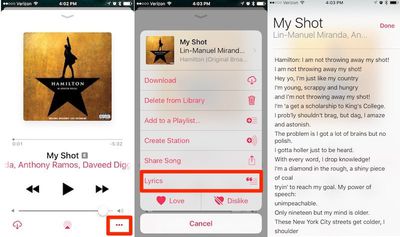
applemusiclyrics1

  1. Tap the "three dots" button in the bottom right corner. This brings up a menu overlay displaying options for the song, like adding it to a playlist or creating a station.
  2. Tap the "Lyrics" button below the "Share Song" option. Songs with available lyrics will have this option displayed, while songs without lyrics available will not.
  3. The lyrics will pop up in a separate translucent window that slides over the song window.

Method Two:
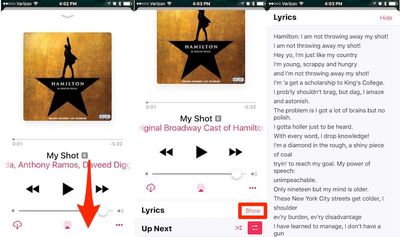
applemusiclyrics2

  1. Scroll down while in the song card.
  2. The lyrics toggle will be displayed directly beneath the song, right above the "Up Next" feature.
  3. Tap on "Show" to reveal the lyrics to your song.

Currently, lyrics are not available on all songs and albums, but Apple has been rapidly expanding the number of tracks with lyrics support throughout the beta testing period and coverage has become fairly broad in time for the public release.


Related Forum: iOS 10

Top Rated Comments

MacFather Avatar
123 months ago
Deleted.
Score: 9 Votes (Like | Disagree)
NSNotFound Avatar
123 months ago
This is literally the worst version of the Music app ever made by Apple. Bad usability and completely incoherent design choice.
Score: 8 Votes (Like | Disagree)
macfacts Avatar
123 months ago
Maybe Apple should improve the user interface for their music and messaging apps so tutorials aren't needed.
Score: 4 Votes (Like | Disagree)
Tapdawg Avatar
123 months ago
I've spent years putting lyrics manually onto each of my songs I have purchased. This update has removed the ability for me to see my lyrics. Why would Apple remove a feature like this?

Cash Grab for Apple Music?
Score: 4 Votes (Like | Disagree)
thisisnotmyname Avatar
123 months ago
To those asking about songs purchased vs Apple Music, lyrics are intellectual property that can be licensed separately from the song itself thus having a license to the song does not necessarily entitle you to see the lyrics too. Apple licensed the lyrics specifically in conjunction with Apple Music thus the access for subscribers. It's not an Apple conspiracy to force anyone onto AM, you can thank the music industry eeking out a few more dollars on format change grounds.
Score: 3 Votes (Like | Disagree)
kwikdeth Avatar
123 months ago
Not to defend the UI/UX of the Music app in general I agree that it gets confusing. But I am curious what the better solution for this specific feature is? This is a non-critical feature and it's only hidden behind 1-2 taps. What's the issue? Where would you put this feature?

It's easy to quickly judge these things, but as a software developer who often helps with UI/UX design, I am failing see a better place for this.
In iOS 6 all you had to do was tap the artwork in the main player window. Simple, easy, direct.
Score: 3 Votes (Like | Disagree)

Popular Stories

iOS 26

iOS 26.3 and iOS 26.4 Will Add These New Features to Your iPhone

Tuesday February 3, 2026 7:47 am PST by
We are still waiting for the iOS 26.3 Release Candidate to come out, so the first iOS 26.4 beta is likely still at least a week or two away. Following beta testing, iOS 26.4 will likely be released to the general public in March or April. Below, we have recapped known or rumored iOS 26.3 and iOS 26.4 features so far. iOS 26.3 iPhone to Android Transfer Tool iOS 26.3 makes it easier...
Apple Logo Black

Apple's Next Launch is 'Imminent'

Sunday February 1, 2026 12:31 pm PST by
The calendar has turned to February, and a new report indicates that Apple's next product launch is "imminent," in the form of new MacBook Pro models. "All signs point to an imminent launch of next-generation MacBook Pros that retain the current form factor but deliver faster chips," Bloomberg's Mark Gurman said on Sunday. "I'm told the new models — code-named J714 and J716 — are slated...
iOS 26 Home Feature

Apple Gives Final Warning to Home App Users

Tuesday February 3, 2026 8:55 am PST by
In 2022, Apple introduced a new Apple Home architecture that is "more reliable and efficient," and the deadline to upgrade and avoid issues is fast approaching. In an email this week, Apple gave customers a final reminder to upgrade their Home app by February 10, 2026. Apple says users who do not upgrade may experience issues with accessories and automations, or lose access to their smart...
Aston Martin CarPlay Ultra Screen

Apple's CarPlay Ultra to Expand to These Vehicle Brands Later This Year

Sunday February 1, 2026 10:08 am PST by
Last year, Apple launched CarPlay Ultra, the long-awaited next-generation version of its CarPlay software system for vehicles. Nearly nine months later, CarPlay Ultra is still limited to Aston Martin's latest luxury vehicles, but that should change fairly soon. In May 2025, Apple said many other vehicle brands planned to offer CarPlay Ultra, including Hyundai, Kia, and Genesis. In his Powe...
Apple Foldable Thumb

First Foldable iPhone Design Details Revealed

Monday February 2, 2026 7:19 am PST by
Apple's first foldable iPhone will feature relocated volume buttons, an all-black camera plateau, a smaller Dynamic Island, and more, according to design leaks from a known Weibo leaker. The user known as "Instant Digital" today claimed to share several key details about the design of the foldable iPhone: The volume buttons will be located on the top edge of the device, aligned to the...