

How to Identify Plants and Flowers Using Your iPhone Camera - MacRumorsOpen MenuShow RoundupsShow Forums menuVisit ForumsOpen Sidebar
Skip to Content

How to Identify Plants and Flowers Using Your iPhone Camera

by

If you are looking for an easy way to identify the species of plants and flowers that doesn't involve reaching for a taxonomy book, then try your iPhone. You don't even need to purchase an app, because in iOS 15 and later, Apple's software includes a feature called Visual Lookup that will do just what you need.
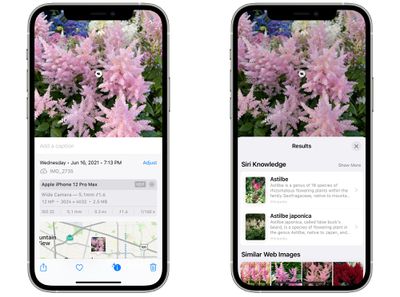
photos visual lookup
Since iOS 15, Apple has made advances in its on-device machine learning and integrated them into its stock Photos app to make your iPhone more intelligent at recognizing the contents of pictures you take.

This means the ‌Photos‌ app can identify various objects, landmarks, animals, books, plants, works of art, and more in your image library, and then offer information about them that it draws from the web.

The following steps show you how to use Visual Lookup to get taxonomic information on plants and flowers whenever you come across one that you don't recognize.

  1. Open the Photos app on your iPhone and select a picture with a clearly defined subject, such as a flower or animal.
  2. Check the info ("i") icon at the bottom of the screen. If it has a little star over it, tap it – this indicates there's a Visual Lookup you can examine.
  3. Tap the little icon in the center of the photo to bring up the Lookup search results.
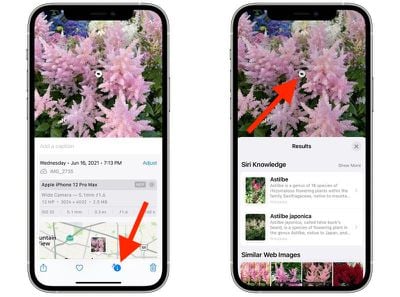
photos
Visual Lookup search results consist of Siri Knowledge, similar images found on the web, and other online sources of information. Note that Visual Lookup has limited availability depending on your region.


Popular Stories

iphone 17 pro orange

Apple Highlights Photos Shot on iPhone During NASA's Mission to Moon

Saturday April 11, 2026 8:17 am PDT by
As we previously reported, astronauts aboard NASA's Orion spacecraft used the iPhone 17 Pro Max to take selfies of themselves with the Earth in the background during the Artemis II mission around the far side of the Moon last week. Now that the crew members have safely returned to Earth, Apple's CEO Tim Cook and marketing chief Greg Joswiak have both turned to social media to congratulate...
google photos wardrobe

Google Photos to Get AI 'Wardrobe' Feature

Wednesday April 29, 2026 3:50 pm PDT by
Google Photos is getting a new wardrobe planning feature that will help you decide what to wear. AI will pull in images of clothing from the Google Photos library, organizing clothing items into a digital closet. You will be able to put items together to create outfits, and even virtually try them with a digital avatar on to see how they'll look. The Google Photos app will show all items of...
Apple Event Logo

Apple Just Released a New Accessory

Monday May 4, 2026 8:13 am PDT by
Apple today released a new Pride Edition Sport Loop for the Apple Watch. The band features a rainbow design with 11 colors of woven nylon yarns. The new Pride Edition Sport Loop is available to order now on Apple.com and in the Apple Store app in 40mm, 42mm, and 46mm sizes, and it will be available at Apple Store locations starting later this week. In the U.S., the band costs $49. There...
Related Apple News: Mac Studio 2026 Rumors | Siri | Ipados | Ipad | Ipad
















