Creating a photo slideshow on your iPhone is a fantastic way to showcase your memories in a dynamic and visually engaging way. Whether it's reliving a recent holiday, celebrating a family event, or sharing your artistic endeavors, a slideshow can bring your stories to life.
icloud photos
Available through the Photos app, the slideshow feature allows you to easily curate your images and present them in a polished, professional manner without needing any additional software.

Using the slideshow function also enhances your ability to share and enjoy memories, by offering a seamless way to compile and view your photos. It enables you to create a cinematic experience right on your ‌iPhone‌, complete with transitions and music. It's perfect for gatherings, where you can AirPlay a slideshow on a larger screen. Or you can use it for personal reflection and enjoy your favorite moments in a refreshing format.

Let's walk through the easy steps to create your own photo slideshow on ‌iPhone‌.

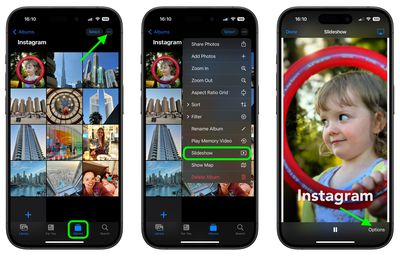
  1. Open the ‌Photos‌ app.
  2. Go to the Albums view and tap the desired album that you want to turn into a slideshow. Alternatively, in the Library view, choose Select and tap the pictures that you want to include in your slideshow.
  3. Tap the More icon (three dots) and select Slideshow from the dropdown menu.
    slideshow

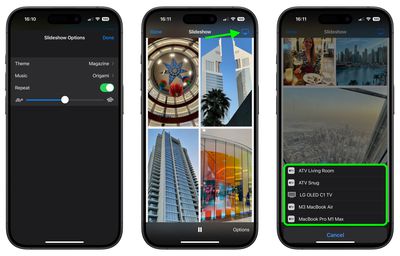
  4. As the slideshow plays, tap the screen and choose Options to adjust the speed, theme and music. (If you don't want to be limited to the default music options, you can choose a song from your Music library.)
  5. To stream your slideshow to a nearby Apple device or smart TV, tap the AirPlay icon in the top-right corner, then select the preferred device.
  6. To end the slideshow, tap the screen and select Done.
    slideshow

That's all there is to it. If you're looking for a more dynamic presentation of your photos that you can preserve for repeat vewing, consider creating a Memory Video (More ➝ Play Memory Video). In addition to music options, Memory Videos include filters (or "Looks"), title options, and the ability to save your memory.
Popular Stories

Aston Martin CarPlay Ultra Screen

Apple's CarPlay Ultra to Expand to These Vehicle Brands Later This Year

Sunday February 1, 2026 10:08 am PST by
Last year, Apple launched CarPlay Ultra, the long-awaited next-generation version of its CarPlay software system for vehicles. Nearly nine months later, CarPlay Ultra is still limited to Aston Martin's latest luxury vehicles, but that should change fairly soon. In May 2025, Apple said many other vehicle brands planned to offer CarPlay Ultra, including Hyundai, Kia, and Genesis. In his Powe...
Apple Logo Black

Apple's Next Launch is 'Imminent'

Sunday February 1, 2026 12:31 pm PST by
The calendar has turned to February, and a new report indicates that Apple's next product launch is "imminent," in the form of new MacBook Pro models. "All signs point to an imminent launch of next-generation MacBook Pros that retain the current form factor but deliver faster chips," Bloomberg's Mark Gurman said on Sunday. "I'm told the new models — code-named J714 and J716 — are slated...
Apple MacBook Pro M4 hero

New MacBook Pros Reportedly Launching Alongside macOS 26.3

Sunday February 1, 2026 5:42 am PST by
Apple is planning to launch new MacBook Pro models with M5 Pro and M5 Max chips alongside macOS 26.3, according to Bloomberg's Mark Gurman. "Apple's faster MacBook Pros are planned for the macOS 26.3 release cycle," wrote Gurman, in his Power On newsletter today. "I'm told the new models — code-named J714 and J716 — are slated for the macOS 26.3 software cycle, which runs from...
iOS 26

iOS 26.3 and iOS 26.4 Will Add These New Features to Your iPhone

Tuesday February 3, 2026 7:47 am PST by
We are still waiting for the iOS 26.3 Release Candidate to come out, so the first iOS 26.4 beta is likely still at least a week or two away. Following beta testing, iOS 26.4 will likely be released to the general public in March or April. Below, we have recapped known or rumored iOS 26.3 and iOS 26.4 features so far. iOS 26.3 iPhone to Android Transfer Tool iOS 26.3 makes it easier...
14 inch MacBook Pro Keyboard

Apple Changes How You Order a Mac

Saturday January 31, 2026 10:51 am PST by
Apple recently updated its online store with a new ordering process for Macs, including the MacBook Air, MacBook Pro, iMac, Mac mini, Mac Studio, and Mac Pro. There used to be a handful of standard configurations available for each Mac, but now you must configure a Mac entirely from scratch on a feature-by-feature basis. In other words, ordering a new Mac now works much like ordering an...