How to Hide Your Instagram Online Status - MacRumorsOpen MenuShow RoundupsShow Forums menuVisit ForumsOpen Sidebar
Skip to Content

How to Hide Your Instagram Online Status

by

Most social media networks and chat platforms these days include a feature that shows when a user was last online or last active on the service, which can be either helpful or a hindrance, depending on your personal or business situation.

Instagram Feature 2
WhatsApp includes an optional "Last Seen" status for the person you're chatting with in a conversation thread, while Instagram tells you how long it was since a user was active when you're viewing messages from them in your Direct inbox. Instagram also shows a green dot next to their profile picture and name if the person is currently interacting with the app.

Sometimes though, for whatever reason, you might not want someone – or indeed anyone – to know when you were last active on social media. Fortunately, WhatsApp and Instagram both allow you to hide your activity status in the app. Here our focus is on how to hide your Instagram status, but you can find how to do the same thing in WhatsApp in our dedicated how-to article.

Hiding Your Instagram Online Status

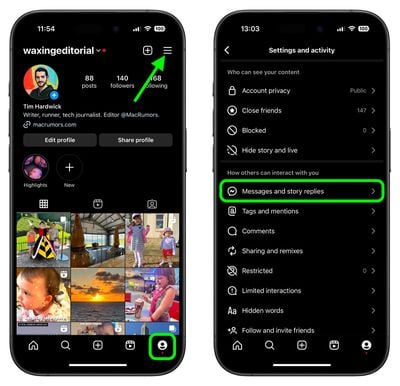
  1. Open the Instagram app and tap the Profile icon in the bottom-right corner.
  2. Tap the More (three lines) icon in the top-right corner.
  3. Under "How others can interact with you," tap Messages and story replies.
    instagram

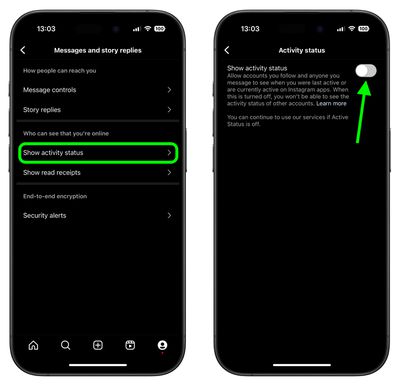
  4. Tap Show activity status.
  5. Tap the switch next to Show activity status to toggle it on or off.
    instagram

Did you know you can also hide Like and View counts on Instagram posts, too? Check out our dedicated tutorial to learn how.


Popular Stories

Instagram Feature 2

Instagram Now Lets You Edit Comments for Up to 15 Minutes

Thursday April 9, 2026 1:31 pm PDT by
Instagram today implemented a small but useful change, allowing Instagram users to edit their comments for up to 15 minutes after writing the initial comment. The Meta-owned social media site has long supported editing an Instagram post, but comments have never been able to be updated to correct typos. Editing a comment can be done by tapping on the new "Edit" option that is displayed after...
Instagram Feature 2

PSA: Instagram Encrypted Messaging Ends on Friday, May 8

Tuesday May 5, 2026 8:24 am PDT by
Instagram will remove end-to-end encryption for direct messages between users from May 8, 2026. When the date comes around, Meta will potentially be able to see the contents of all messages between users on the social media platform. Encrypting messages has been an optional feature in Instagram since 2023, but in March of this year the social media platform quietly updated a help page to say ...
Apple Event Logo

Apple Just Released a New Accessory

Monday May 4, 2026 8:13 am PDT by
Apple today released a new Pride Edition Sport Loop for the Apple Watch. The band features a rainbow design with 11 colors of woven nylon yarns. The new Pride Edition Sport Loop is available to order now on Apple.com and in the Apple Store app in 40mm, 42mm, and 46mm sizes, and it will be available at Apple Store locations starting later this week. In the U.S., the band costs $49. There...
Related Apple News: Entertainment | Culture | Buyers Guide | Ipad | Mac