How to Hide Your WhatsApp 'Last Seen' Status From Specific Contacts - MacRumorsOpen MenuShow RoundupsShow Forums menuVisit ForumsOpen Sidebar
Skip to Content

How to Hide Your WhatsApp 'Last Seen' Status From Specific Contacts

by

In a new privacy-centric update released in August 2022, WhatsApp has added the ability for users to adjust the visibility of their "Last Seen" status on a contact-by-contact basis. Keep reading to learn how it's done.

Whatsapp Feature
As regular WhatsApp users will know, the "Last Seen" status of a contact you're in conversation with sits atop the conversation thread, informing you when that contact last opened and was active on the app.

Previously, WhatsApp let you disable your Last Seen status so that other contacts couldn't see when you were last online, but the setting's options were limited to "Everyone," "My Contacts," and "Nobody," and there was no way to make exceptions for individual contacts.

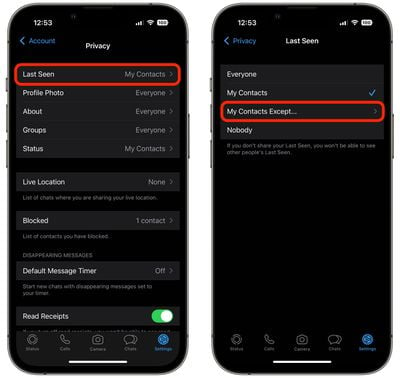
The good news however is that WhatsApp is switching things up by adding the option "My Contacts Except..." which lets you select specific contacts so that they don't see when the last time was that you were active on the messaging network.

Here's how to make the change to your privacy settings in the WhatsApp app for mobile.

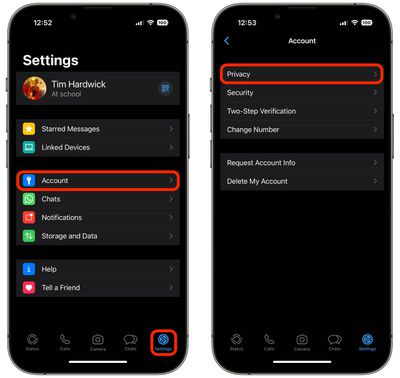
  1. In WhatsApp, tap the Settings tab (the cog icon) at the bottom of the screen.
  2. Tap Account -> Privacy.
    whatsapp

  3. Tap Last Seen.
  4. Select My Contacts Except....
  5. Choose the people from your contacts list that you want to hide your Last Seen status from.
  6. When you've finished selecting contacts, tap Done in the top-right corner of the screen.
    whatsapp

If you don't see the new option in the Last Seen menu, make sure you've updated WhatsApp to the latest version, then try again.

Popular Stories

Whatsapp Feature

WhatsApp Plus Lands on iPhone With Custom Themes, Icons, and More

Monday May 11, 2026 2:41 am PDT by
WhatsApp has started rolling out its paid WhatsApp Plus subscription to iOS, following beta testing of the new personalization-focused tier amongst a small group of users, reports WABetaInfo. The plan is light on practical features, and is aimed more at heavier users who want to customize various aspects of the WhatsApp experience. It gives you access to premium sticker packs with fullscreen ...
meta ai incognito chat

Meta AI App Gets 'Incognito Chat' as OpenAI Faces Lawsuits Over Stored Chat Logs

Wednesday May 13, 2026 1:23 pm PDT by
The Meta AI app and Meta AI on WhatsApp have a new "incognito chat" option, which Meta CEO Mark Zuckerberg said is a "completely private way to interact with AI." Zuckerberg also said that Meta AI's incognito mode is the first major AI product where there is no log of conversations stored on servers. Zuckerberg likened the feature to end-to-end encryption, and said no one will be able to...
whatsapp wabetainfo share sheet%402x

WhatsApp Begins Rolling Out Redesigned Media Share Sheet on iOS

Tuesday May 19, 2026 7:46 am PDT by
WhatsApp is rolling out a new media attachment sheet on iOS, providing iPhone users with a faster way to share their most recent files without losing sight of the chat. Usually in WhatsApp, sharing media within a chat requires you to tap a plus button to reveal the app's custom share sheet, and then tap into photos to see your full library, which takes over most of the screen. As spotted...
Related Apple News: Lifestyle | Reviews | Culture | Sport | Iphone