

How to Hide External Drives on Your Mac's Desktop - MacRumorsOpen MenuShow RoundupsShow Forums menuVisit ForumsOpen Sidebar
Skip to Content

How to Hide External Drives on Your Mac's Desktop

by

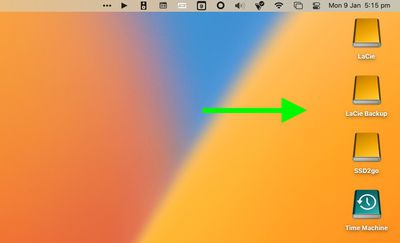
Whenever you have external drives connected or volumes mounted on your Mac, by default macOS displays them as icons on your desktop. If you'd rather not see these drives on the desktop, there's a setting you can change in macOS that will hide them.
macOS
With the setting enabled, the drives will not appear on your desktop, providing you with a more minimalist visual experience, and you'll still be able to access the drive contents via Finder. The following steps show you how it's done.

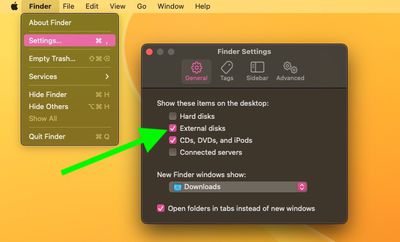
  1. Click the Finder icon in the Dock to make sure it's active, then click the Finder menu bar and select Settings... (or Preferences... in older versions of macOS) from the dropdown menu.
  2. Click the General tab if it's not already selected.
  3. Uncheck the box next to External disks. (You can also uncheck the box next to CDs, DVDs, and iPods if you don't want them to appear on the desktop when connected.)
  4. Close Finder Settings by clicking the red traffic light.
finder

The change should take effect immediately – any external drives connected to your Mac will no longer show up on the desktop. To access any connected drives or media, open a Finder window and you will be able to select them in the sidebar.

On a separate note, there's a simple Terminal command that turns the Dock into more of a straightforward app switcher by making it display only apps that are currently running on your Mac. If you like having a minimalist desktop, why not try it out.


Popular Stories

imac video apple feature

Apple Released Yet Another New Product Today

Friday March 20, 2026 2:39 pm PDT by
Apple has unveiled a whopping nine new products so far this March, including an iPhone 17e, iPad Air models with the M4 chip, MacBook Air models with the M5 chip, MacBook Pro models with M5 Pro and M5 Max chips, the all-new MacBook Neo, an updated Studio Display, a higher-end Studio Display XDR, AirPods Max 2, and now the Nike Powerbeats Pro 2. iPhone 17e features the same overall design as...
HomePod mini and Apple TV Sage

New Apple TV and HomePod Mini Remain 'Ready' to Launch

Sunday March 22, 2026 6:33 am PDT by
Apple has unveiled nine new products this month, but the wait continues for the next-generation Apple TV 4K and HomePod mini models. In his Power On newsletter today, Bloomberg's Mark Gurman said new versions of the Apple TV and HomePod mini have been "ready" since last year, but he reiterated that Apple has held off on releasing them until the more personalized version of Siri and other...
ios 26 4 pastel

iOS 26.4: Top 10 New Features Coming to Your iPhone

Friday March 20, 2026 2:44 pm PDT by
iOS 26.4 isn't the major update with new Siri features that we hoped for, but there are some useful quality of life improvements, and a little bit of fun with an AI playlist generator and new emoji characters. Playlist Playground - Apple Music has a Playlist Playground option that lets you generate playlists from text-based descriptions. You can include moods, feelings, activities, or...
Related Apple News: Local News | Mac | Buyers Guide | World News | Travel














