How to Hide Dynamic Island and Red Indicator in iPhone Screen Recordings - MacRumorsOpen MenuShow RoundupsShow Forums menuVisit ForumsOpen Sidebar
Skip to Content

How to Hide Dynamic Island and Red Indicator in iPhone Screen Recordings

by

This article explains how to stop the Dynamic Island and red recording indicator from appearing in video captured on iPhone 14 Pro models using the screen recording feature. Keep reading to learn how it's done.

dynamic island
On iPhone, Apple's screen recording feature records a video of what you're doing on your screen, which is great if you want to capture gameplay, walk someone through a tutorial in an app, demonstrate a bug, or anything else.

On older iPhones with a notch at the top of the display, the notch isn't visible in screen recordings, which is as it should be. But on newer iPhones with a ‌Dynamic Island‌ cutout, such as the iPhone 14 Pro and iPhone 14 Pro Max, the ‌Dynamic Island‌ animates to show the red recording indicator, which causes the cutout to be visible in the captured video.

This can be distracting, especially if you want the viewer's attention to be focused on the main content of your screen recording. Fortunately, there is a way to remove ‌Dynamic Island‌ activity from screen recordings, and it's really rather simple. The following steps show you how.

  1. Bring up the Control Center by swiping down diagonally from the top-right corner of the screen.
  2. Tap the Screen Recording button in Control Center (if it isn't there, you can add the function via Settings -> Control Center).
  3. Before the three-second countdown ends, swipe horizontally across the ‌Dynamic Island‌ from either edge of the cutout towards the center.
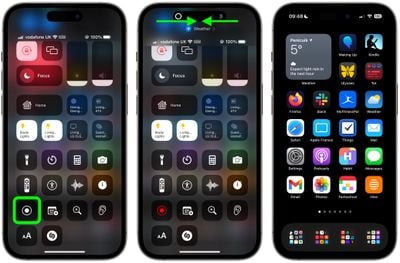
screen recording

Performing the action described in the last step will make the countdown timer disappear and prevent the ‌Dynamic Island‌ and the red screen recording indicator from appearing in your captured screen recording. When you want to stop the recording, simply tap the ‌Dynamic Island‌ to reveal the Stop button.

Popular Stories

imac video apple feature

Apple Released Yet Another New Product Today

Friday March 20, 2026 2:39 pm PDT by
Apple has unveiled a whopping nine new products so far this March, including an iPhone 17e, iPad Air models with the M4 chip, MacBook Air models with the M5 chip, MacBook Pro models with M5 Pro and M5 Max chips, the all-new MacBook Neo, an updated Studio Display, a higher-end Studio Display XDR, AirPods Max 2, and now the Nike Powerbeats Pro 2. iPhone 17e features the same overall design as...
ios 26 4 pastel

iOS 26.4: Top 10 New Features Coming to Your iPhone

Friday March 20, 2026 2:44 pm PDT by
iOS 26.4 isn't the major update with new Siri features that we hoped for, but there are some useful quality of life improvements, and a little bit of fun with an AI playlist generator and new emoji characters. Playlist Playground - Apple Music has a Playlist Playground option that lets you generate playlists from text-based descriptions. You can include moods, feelings, activities, or...
HomePod mini and Apple TV Sage

New Apple TV and HomePod Mini Remain 'Ready' to Launch

Sunday March 22, 2026 6:33 am PDT by
Apple has unveiled nine new products this month, but the wait continues for the next-generation Apple TV 4K and HomePod mini models. In his Power On newsletter today, Bloomberg's Mark Gurman said new versions of the Apple TV and HomePod mini have been "ready" since last year, but he reiterated that Apple has held off on releasing them until the more personalized version of Siri and other...
Related Apple News: App Store | Apple Command Center | Macbook Air M3 Buyers Guide | Technology | Mac Studio Update Rumors