How to Group Mac App Icons More Prominently in Your Dock - MacRumorsOpen MenuShow RoundupsShow Forums menuVisit ForumsOpen Sidebar
Skip to Content

How to Group Mac App Icons More Prominently in Your Dock

by

In macOS, the Dock provides convenient one-click access to your most frequently used Mac applications. The simplest way to organize docked apps is to click and drag them into your preferred place, but here we're going to show you a lesser-known trick for arranging docked items more clearly.

using spaces to arrange dock apps
To relate certain types of apps and add an extra visual clue to their location in the Dock, try inserting some spaces. Using this method, you could separate out other apps from, say, conversion tools that you frequently drag and drop files onto. Keep reading to learn how it's done.

How to Insert Spaces into the macOS Dock

  1. Launch the Terminal app found in Applications/Utilities. (To quickly open the Utilities folder in Finder, select Go -> Utilities from the menu bar, or use the key shortcut Shift-Command-U.)

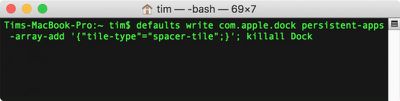
  2. At the Terminal prompt, type the following command and press Enter: defaults write com.apple.dock persistent-apps -array-add '{"tile-type"="spacer-tile";}'; killall Dock
    macos terminal dock spaces

  3. Your Dock will reboot with a single space added to it. Click and drag the space to your desired location, just like a regular app icon.
    Screen Shot

  4. Repeat the Terminal command above to insert additional spaces and arrange them in your Dock to suit.

macos dock spacers
To remove a space from your Dock simply right-click (or Ctrl-click) it and select Remove from Dock. Alternatively, click and drag the space out of the Dock then let go of the mouse button to delete it.


Top Rated Comments

105 months ago
To insert a small spacer, you specify "tile-type"="small-spacer-tile" (found on Ask Different ('https://apple.stackexchange.com/a/273540/654')).

An example with both widths:


To add them to the documents side instead of the apps side, use the key persistent-others instead of persistent-apps (found on Lifewire ('https://www.lifewire.com/add-custom-and-standard-doc-spacers-to-mac-2260861')).

Attachment Image
Score: 25 Votes (Like | Disagree)
keysofanxiety Avatar
105 months ago
Great tip, didn’t know this. Big fan of these articles too. Thanks!
Score: 8 Votes (Like | Disagree)
opeter Avatar
105 months ago
My problem with these separators is, that they take to much space (like a whole width of an icon).
Score: 6 Votes (Like | Disagree)
trollied Avatar
105 months ago
Dynamic spacer:

defaults write com.apple.dock persistent-apps -array-add '{"tile-type"="flex-spacer-tile";}'
Score: 5 Votes (Like | Disagree)
RightMACatU Avatar
105 months ago
Too bad I can't do this with my office cube neighbor :D
Score: 4 Votes (Like | Disagree)
105 months ago
I like this. Is there a way to group the icons together in a Stack, like the folders can do?
It's not as fancy, but I put aliases to grouped applications in a folder, then put those folders in the dock.
Score: 3 Votes (Like | Disagree)

Popular Stories

imac video apple feature

Apple Released Yet Another New Product Today

Friday March 20, 2026 2:39 pm PDT by
Apple has unveiled a whopping nine new products so far this March, including an iPhone 17e, iPad Air models with the M4 chip, MacBook Air models with the M5 chip, MacBook Pro models with M5 Pro and M5 Max chips, the all-new MacBook Neo, an updated Studio Display, a higher-end Studio Display XDR, AirPods Max 2, and now the Nike Powerbeats Pro 2. iPhone 17e features the same overall design as...
ios 26 4 pastel

iOS 26.4: Top 10 New Features Coming to Your iPhone

Friday March 20, 2026 2:44 pm PDT by
iOS 26.4 isn't the major update with new Siri features that we hoped for, but there are some useful quality of life improvements, and a little bit of fun with an AI playlist generator and new emoji characters. Playlist Playground - Apple Music has a Playlist Playground option that lets you generate playlists from text-based descriptions. You can include moods, feelings, activities, or...
iPhone 18 Pro Deep Red Feature

iPhone 18 Pro Launching Later This Year With These 12 New Features

Wednesday March 18, 2026 7:39 am PDT by
While the iPhone 18 Pro and iPhone 18 Pro Max are not expected to launch for another six months or so, there are already plenty of rumors about the devices. It was initially reported that the iPhone 18 Pro models would have fully under-screen Face ID, with only a front camera visible in the top-left corner of the screen. However, the latest rumors indicate that only one Face ID component...
Related Apple News: Iphone | Ios 27 | M4 Ipad Air Vs M5 Ipad Pro | Lawsuit | Turn Off User Profiles Screen Apple Tv