iOS 14: How to Set Google Chrome as the Default Browser on iPhone and iPad - MacRumorsOpen MenuShow RoundupsShow Forums menuVisit ForumsOpen Sidebar
Skip to Content

iOS 14: How to Set Google Chrome as the Default Browser on iPhone and iPad

by

Apple made a change in iOS 14 and iPadOS 14 that enables third-party browsers and email clients to be used as default apps, meaning users who don't get on with Safari or Apple's native Mail app can choose an alternative and it will be opened automatically whenever the system requires it.
ios14 and default chrome feature
The latest version of Google Chrome now supports this ability, so anyone on iOS 14 can set Google's app as their default browser and it will be used to automatically open web page links that are tapped in other apps.

Note that these steps will only work if you have iOS 14 or iPadOS 14 installed.

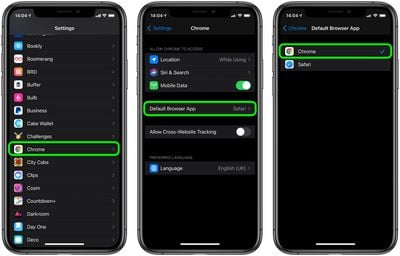
  1. Download the latest version of Google Chrome from the App Store [Direct Link] or update the app if you already have it.
  2. Launch the Settings app.
  3. Scroll down and select Chrome.
  4. Tap Default Browser App.
  5. Tap Chrome.

settings

After you've completed these steps, any app that tries to open a web page will launch Chrome instead of Safari. To change this behavior, simply repeat the steps and select Safari in the Default Browser Apps screen.

As of writing, no other third-party web browser provides an option to set it as the default browser for the iOS, but give it some time and the option will surely arrive for Firefox, Opera, and others.

Apple is expected to release iOS 14 and iPadOS 14 for all users later this month, and we could even see them announced next week at Apple's "Time Flies" event on Tuesday, September 15, where it is expected to announce the Apple Watch Series 6 and new iPads.


Tag: Chrome
Related Forum: iOS 14

Top Rated Comments

TheYayAreaLiving 🎗️ Avatar
74 months ago
I don’t trust Google.
Only trust in Apple.


Attachment Image
Score: 27 Votes (Like | Disagree)
74 months ago
Why would I change to chrome?
Score: 18 Votes (Like | Disagree)
katbel Avatar
74 months ago
Don’t trust Google, if I did I would have bought a cheaper phone with android
Score: 11 Votes (Like | Disagree)
grantew1 Avatar
74 months ago

Great, so now you can switch from a giant business-gobbling company's browser to a data-hoarding monster's browser. This is progress.
If you dont like the options, you should make a browser....
Score: 10 Votes (Like | Disagree)
74 months ago

I don’t trust Google.
Only trust in Apple.


Agree...However, since Google owns YouTube, assume you don't use YouTube?
Score: 10 Votes (Like | Disagree)
fredrik9 Avatar
74 months ago
It was finally time to give us this option. Won't switch from Safari though as it's still an amazing browser.
Score: 10 Votes (Like | Disagree)

Popular Stories

Apple Event Logo

Apple Just Released a New Accessory

Monday May 4, 2026 8:13 am PDT by
Apple today released a new Pride Edition Sport Loop for the Apple Watch. The band features a rainbow design with 11 colors of woven nylon yarns. The new Pride Edition Sport Loop is available to order now on Apple.com and in the Apple Store app in 40mm, 42mm, and 46mm sizes, and it will be available at Apple Store locations starting later this week. In the U.S., the band costs $49. There...
iOS 27 on iPhone 17 1

iOS 27 Will Add These New Features to Your iPhone

Saturday May 2, 2026 8:43 am PDT by
Apple is expected to unveil iOS 27 during its WWDC 2026 keynote on June 8, and there are already many rumored features and changes for iPhones. The first developer beta of iOS 27 will likely be available immediately following the keynote, and a public beta typically follows in July. Following beta testing, the software update should be released to all users with a compatible iPhone in...
Apple Announces 2026 Pride Band Watch Face and iPhone Wallpaper Article 2

iOS 26.5 Coming Soon With These New Features

Monday May 4, 2026 8:40 am PDT by
iOS 26.5 is expected to be released next week, following more than a month of beta testing. The update is relatively minor, but there are a couple of new features and changes across the operating system that we have recapped below. iOS 26.5 lays the groundwork for end-to-end encryption for RCS in the Messages app and ads in the Apple Maps app, and it will include a new Pride wallpaper and a...
Related Apple News: Sport | Entertainment | Buyers Guide | Mac | Opinion