On iPhone and iPad, Apple's screen recording feature records a video of what you're doing on your screen, which is great if you want to capture gameplay, walk someone through a tutorial in an app, demonstrate a bug, or anything else. You can also include a voiceover in screen recordings. Keep reading to learn how.
iPhone Home Screen Gradient
If you're making a screen recording to demonstrate something in iOS, chances are it would benefit from some voiceover commentary. Fortunately, Apple enables you to do this by activating your device's microphone for the duration of the recording.

To record your voice along with screen activity, simply follow these steps.

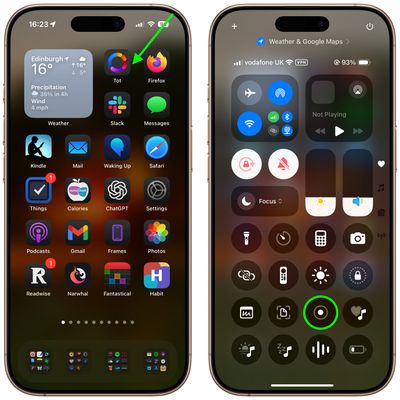
  1. Invoke the Control Center by swiping down diagonally from the top-right corner of the screen.
  2. Long press the Screen Recording button in Control Center (if it isn't there, you can add the function via Settings -> Control Center).
    home screen

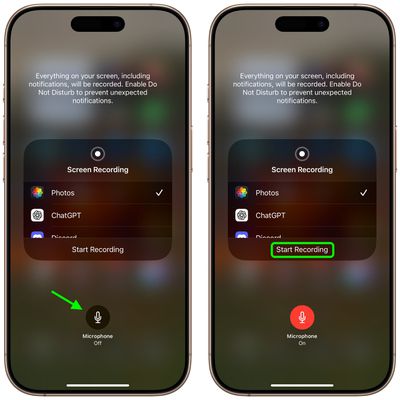
  3. Tap the Microphone button so that it turns red and reads "Microphone On."
  4. Select an app from the list that you want to save the recording to.
  5. When you're ready, tap Start Recording.
    control center

You can end the recording by tapping the Stop button in the top-left corner of the screen (if your iPhone has a Dynamic Island, tap it to reveal the Stop button), and the recording will be automatically saved to the app that you checked in the app list.


Top Rated Comments

mrgraff Avatar
9 months ago

I think it is just showing how to invoke Control Center. The app it is pointing to is irrelevant.
Correct. But it also took me a second to realize that the step had nothing to do with Tot. Also, I've never had to swipe diagonally to invoke Command Center; straight down has always worked. A stubby shorter arrow that stops just below the battery indicator might've been better.
Score: 4 Votes (Like | Disagree)
Starfia Avatar
9 months ago
That is a great tip about a very hidden feature!

And, wow – this is the first time I've ever heard of the gesture to invoke Control Center interpreted as a diagonal swipe from the upper-right corner as opposed to a vertical swipe down from the upper-right status cluster. I wonder what the code is actually detecting.
Score: 4 Votes (Like | Disagree)
UpsetTheAppleCart Avatar
9 months ago
Does anyone know how to reduce the file size of a screen recording on iPhone/iPad? I don’t always need a recording to be super clear, so a slight reduction in quality to keep the file small would be nice.
Score: 3 Votes (Like | Disagree)
e-coli Avatar
9 months ago
Love this type of content
Score: 3 Votes (Like | Disagree)
MasterControlProgram Avatar
9 months ago

Correct. But it also took me a second to realize that the step had nothing to do with Tot. Also, I've never had to swipe diagonally to invoke Command Center; straight down has always worked. A stubby shorter arrow that stops just below the battery indicator might've been better.
Agreed, doing it diagonally is probably not the best instruction. Doing it that way on my iPad brings in the app I last used with slide over. It has to be a straight down swipe on there or it doesn’t work.
Score: 3 Votes (Like | Disagree)
UpsetTheAppleCart Avatar
9 months ago

I have a “Reduce Video Size” shortcut that I don’t know where it came from on the share sheet. If you don’t have it already, try to search online, it uses an iOS built in “Encode Media” function, just like there’s one on macOS.
Oh! I never thought of using a shortcut. Thanks for the info! I found one that works great for me. Here’s the link for anyone who may be interested: https://www.icloud.com/shortcuts/cf7efcf1b47148278044bc240b7d8c99
Score: 2 Votes (Like | Disagree)

Popular Stories

Aston Martin CarPlay Ultra Screen

Apple's CarPlay Ultra to Expand to These Vehicle Brands Later This Year

Sunday February 1, 2026 10:08 am PST by
Last year, Apple launched CarPlay Ultra, the long-awaited next-generation version of its CarPlay software system for vehicles. Nearly nine months later, CarPlay Ultra is still limited to Aston Martin's latest luxury vehicles, but that should change fairly soon. In May 2025, Apple said many other vehicle brands planned to offer CarPlay Ultra, including Hyundai, Kia, and Genesis. In his Powe...
Apple Logo Black

Apple's Next Launch is 'Imminent'

Sunday February 1, 2026 12:31 pm PST by
The calendar has turned to February, and a new report indicates that Apple's next product launch is "imminent," in the form of new MacBook Pro models. "All signs point to an imminent launch of next-generation MacBook Pros that retain the current form factor but deliver faster chips," Bloomberg's Mark Gurman said on Sunday. "I'm told the new models — code-named J714 and J716 — are slated...
iOS 26

iOS 26.3 and iOS 26.4 Will Add These New Features to Your iPhone

Tuesday February 3, 2026 7:47 am PST by
We are still waiting for the iOS 26.3 Release Candidate to come out, so the first iOS 26.4 beta is likely still at least a week or two away. Following beta testing, iOS 26.4 will likely be released to the general public in March or April. Below, we have recapped known or rumored iOS 26.3 and iOS 26.4 features so far. iOS 26.3 iPhone to Android Transfer Tool iOS 26.3 makes it easier...
Apple MacBook Pro M4 hero

New MacBook Pros Reportedly Launching Alongside macOS 26.3

Sunday February 1, 2026 5:42 am PST by
Apple is planning to launch new MacBook Pro models with M5 Pro and M5 Max chips alongside macOS 26.3, according to Bloomberg's Mark Gurman. "Apple's faster MacBook Pros are planned for the macOS 26.3 release cycle," wrote Gurman, in his Power On newsletter today. "I'm told the new models — code-named J714 and J716 — are slated for the macOS 26.3 software cycle, which runs from...
iOS 26 Home Feature

Apple Gives Final Warning to Home App Users

Tuesday February 3, 2026 8:55 am PST by
In 2022, Apple introduced a new Apple Home architecture that is "more reliable and efficient," and the deadline to upgrade and avoid issues is fast approaching. In an email this week, Apple gave customers a final reminder to upgrade their Home app by February 10, 2026. Apple says users who do not upgrade may experience issues with accessories and automations, or lose access to their smart...