

Apple Watch Ultra models recently gained new low-power settings that can extend battery life up to 60 hours on a single charge, or what Apple calls "multi-day adventure battery life." This article explains how it works and how to set it up.
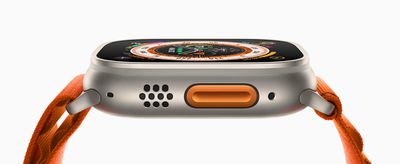
Apple Watch Ultra Orange Alpine Loop Action button 220907 big
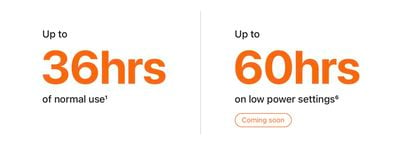
When Apple introduced the ‌Apple Watch Ultra‌ in September, one of the touted features was that it boasts the best battery life of any Apple Watch, capable of reaching up to 36 hours during normal use. Given that successive Apple Watch Series models have only ever officially offered up to 18 hours ("all-day") battery life in normal use, it was pretty big news.

While watchOS 9 brought a new Low Power Mode to Apple Watch Series 4 and later models that also offers up to 36 hours of battery, Apple promised to bring additional low-power settings to Apple Watch Ultra in the fall that would extend battery life even further and make it capable of reaching up to 60 hours.
ultra battery life
Since then, Apple has released watchOS 9.1 and the company has followed through on its promise, allowing Ultra owners to eke even more life out of their timepiece. The steps below explain how to enable it, but before you can make use of the new feature, you'll need to make sure your Apple Watch Ultra is updated to watchOS 9.1 or later.

In the Watch app on your iPhone, go to General -> Software Update. If you're not already up to date, wait for the update to appear, then tap Download and Install. Make sure your Apple Watch has at least 50% charge and is connected to its charger while the update process completes.

Get 60-Hour Battery Life on Apple Watch Ultra

To achieve the extended battery life, Ultra models must first have workout settings enabled for fewer heart rate and GPS readings. Here's how to enable them. (Note that these settings are also available on Apple Watch Series 8 and second-generation Apple Watch SE, but Apple has not stated that they will extend battery life on these models beyond the 36 hours offered by the system-wide Low Power Mode.)

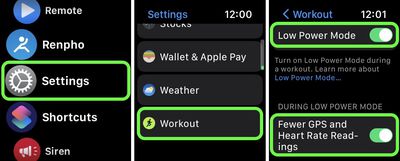
  1. Launch the Settings app on your Apple Watch Ultra.
  2. Scroll to the bottom and tap Workout.
  3. Toggle on the switch next to Low Power Mode.
  4. Below "During Low Power Mode," toggle on the switch next to Fewer GPS and Heart Rate Readings.
settings

Apple says that with the above settings enabled, Low Power Mode preserves battery life only during walking, running, and hiking workouts, by reducing the frequency of GPS and heart rate readings (heart rate readings are reduced to once per minute, while GPS readings are reduced to once every two minutes) and turning off alerts, splits, and segments. In other words, this means that to get the full 60 hours of battery life, you'll need to enable Low Power Mode outside of workouts as well.

When set up in this manner, Ultra users can expect to get "up to" 60 hours of battery life from their smartwatch. This number is calculated based on 15 hours of workout, over 600 time checks, 35 minutes of app use, 3 minutes of talk, and 15 hours of sleep tracking, over the course of 60 hours, according to Apple.

Related Roundup: Apple Watch Ultra 3
Related Forum: Apple Watch

Top Rated Comments

RandomTox Avatar
43 months ago
The average battery life on my Garmin Instinct is 20 days!
Score: 18 Votes (Like | Disagree)
TheYayAreaLiving ?️ Avatar
43 months ago
Loving my Apple Watch Ultra. Insane battery life.
Score: 17 Votes (Like | Disagree)
and 1989 others Avatar
43 months ago
Turn it off it will stay charged for a month. But thats not the point of one, is it.
Score: 17 Votes (Like | Disagree)
NightFox Avatar
43 months ago
This seems more like a way the proving that an advertised spec is achievable ("see, it can do it!"), rather than something that has much real life application. A bit like driving 200 miles on a motorway at 40mph to hit the manufacturer's fuel efficiency figures.
Score: 16 Votes (Like | Disagree)
t0rqx Avatar
43 months ago
This makes no sense at all. This Ultra low battery life is basically turning all the features off. It would be something new if we could gain 60 hours without turniing features off.
Score: 14 Votes (Like | Disagree)
gmanist1000 Avatar
43 months ago
Why would you do a workout without all the purposes you bought an Apple Watch for?
Score: 12 Votes (Like | Disagree)

Popular Stories

Aston Martin CarPlay Ultra Screen

Apple's CarPlay Ultra to Expand to These Vehicle Brands Later This Year

Sunday February 1, 2026 10:08 am PST by
Last year, Apple launched CarPlay Ultra, the long-awaited next-generation version of its CarPlay software system for vehicles. Nearly nine months later, CarPlay Ultra is still limited to Aston Martin's latest luxury vehicles, but that should change fairly soon. In May 2025, Apple said many other vehicle brands planned to offer CarPlay Ultra, including Hyundai, Kia, and Genesis. In his Powe...
Apple Logo Black

Apple's Next Launch is 'Imminent'

Sunday February 1, 2026 12:31 pm PST by
The calendar has turned to February, and a new report indicates that Apple's next product launch is "imminent," in the form of new MacBook Pro models. "All signs point to an imminent launch of next-generation MacBook Pros that retain the current form factor but deliver faster chips," Bloomberg's Mark Gurman said on Sunday. "I'm told the new models — code-named J714 and J716 — are slated...
Apple MacBook Pro M4 hero

New MacBook Pros Reportedly Launching Alongside macOS 26.3

Sunday February 1, 2026 5:42 am PST by
Apple is planning to launch new MacBook Pro models with M5 Pro and M5 Max chips alongside macOS 26.3, according to Bloomberg's Mark Gurman. "Apple's faster MacBook Pros are planned for the macOS 26.3 release cycle," wrote Gurman, in his Power On newsletter today. "I'm told the new models — code-named J714 and J716 — are slated for the macOS 26.3 software cycle, which runs from...
iOS 26

iOS 26.3 and iOS 26.4 Will Add These New Features to Your iPhone

Tuesday February 3, 2026 7:47 am PST by
We are still waiting for the iOS 26.3 Release Candidate to come out, so the first iOS 26.4 beta is likely still at least a week or two away. Following beta testing, iOS 26.4 will likely be released to the general public in March or April. Below, we have recapped known or rumored iOS 26.3 and iOS 26.4 features so far. iOS 26.3 iPhone to Android Transfer Tool iOS 26.3 makes it easier...
14 inch MacBook Pro Keyboard

Apple Changes How You Order a Mac

Saturday January 31, 2026 10:51 am PST by
Apple recently updated its online store with a new ordering process for Macs, including the MacBook Air, MacBook Pro, iMac, Mac mini, Mac Studio, and Mac Pro. There used to be a handful of standard configurations available for each Mac, but now you must configure a Mac entirely from scratch on a feature-by-feature basis. In other words, ordering a new Mac now works much like ordering an...













