File Icon Preview Thumbnails Not Showing in macOS Finder? How to Fix - MacRumorsOpen MenuShow RoundupsShow Forums menuVisit ForumsOpen Sidebar
Skip to Content

File Icon Preview Thumbnails Not Showing in macOS Finder? How to Fix

by

Most Mac users will be familiar with Finder's ability to display icon previews for file types that it recognizes. The Finder icon for a JPEG image for example will show a small thumbnail-sized version of the image, which is useful for identifying the file without having to open it.

finder

If Finder doesn't recognize an item (if it can't be matched with an installed application that can open it) or preview icons are turned off then it displays a generic icon for the file.
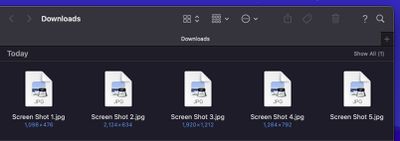
finder

This function can be turned on and off in Finder -> View -> Show View Options by checking the box next to Show Preview Icon, but in some cases it may not work even if you have the setting enabled. If you find yourself in this frustrating predicament, there's a fairly reliable method you can use that can quickly get it functioning again. The following steps show you how.

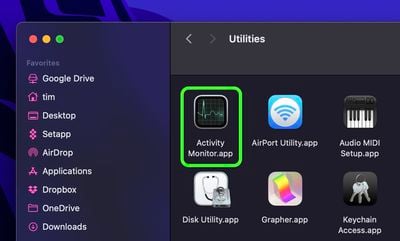
  1. Launch Activity Monitor on your Mac (Applications/Utilities/Activity Monitor).
    finder

  2. In Activity Monitor's menu bar, select View -> All Processes.
    activity monitor

  3. In the search field in the top-right corner of the Activity Monitor window, type com.apple.quicklook.ThumbnailsAgent and hit Enter.
  4. Select the process in the list, then click the Stop icon (the circled X) in the taskbar.
    activity monitor

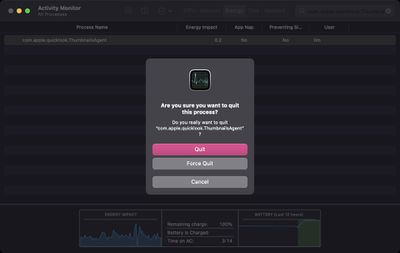
  5. Select Force Quit in the dialog prompt that appears.
    force quit

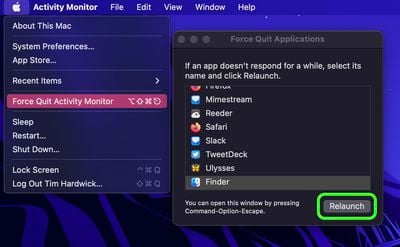
  6. Next, click the Apple () symbol in the menu bar and select Force Quit....
  7. Select Finder in the Force Quit Applications list and click the Relaunch button.
    relaunch finder

After following the above steps, Finder will be relaunched and your icon thumbnail previews should be reinstated in Finder windows and on your desktop.


Popular Stories

iPhone 18 Pro Deep Red Feature

iPhone 18 Pro Launching Later This Year With These 12 New Features

Wednesday March 18, 2026 7:39 am PDT by
While the iPhone 18 Pro and iPhone 18 Pro Max are not expected to launch for another six months or so, there are already plenty of rumors about the devices. It was initially reported that the iPhone 18 Pro models would have fully under-screen Face ID, with only a front camera visible in the top-left corner of the screen. However, the latest rumors indicate that only one Face ID component...
ios 26 4 yellow

Here Are Apple's Release Notes for iOS 26.4

Wednesday March 18, 2026 11:56 am PDT by
Apple provided developers and public beta testers with the release candidate versions of iOS 26.4 and iPadOS 26.4, which means we're going to see a public launch as soon as next week. The RC versions of the software include Apple's official release notes, giving us final details on what's included in the update. Apple Music - Playlist Playground (beta) generates a playlist from your...
Apple Logo Sketch Feature

Apple Has Now Unveiled Eight New Products This Month

Tuesday March 17, 2026 9:25 am PDT by
Apple has unveiled a whopping eight new products so far this March, including an iPhone 17e, iPad Air models with the M4 chip, MacBook Air models with the M5 chip, MacBook Pro models with M5 Pro and M5 Max chips, the all-new MacBook Neo, an updated Studio Display, a higher-end Studio Display XDR, and now the AirPods Max 2 this week. iPhone 17e features the same overall design as the iPhone...
Related Apple News: Buyers Guide | Opinion | Motoring | Health | South Africa