How to Fix Apple TV's Annoying Default Keyboard Layout - MacRumorsOpen MenuShow RoundupsShow Forums menuVisit ForumsOpen Sidebar
Skip to Content

How to Fix Apple TV's Annoying Default Keyboard Layout

by

If you've ever tried entering a complex password on your Apple TV, you know the pain. That default linear keyboard layout has you swiping endlessly left and right, hunting for characters like you're playing some sort of tedious game show.
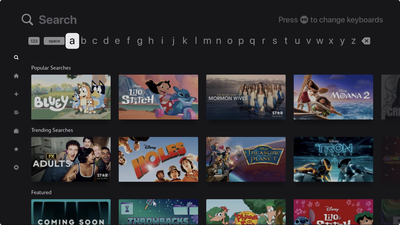
Apple TV Linear Keyboard Layout

The annoying default keyboard layout on Apple TV

Here's a secret that'll save your sanity: You can switch to a grid layout that actually makes sense. Head to Settings ➝ General ➝ Keyboard Layout and swap from Linear to Grid. After that, your on-screen keyboard will transform from a horizontal nightmare into a sensible square arrangement.

Perhaps you're asking "why didn't I know this sooner?" Indeed, it's one of those useful Apple TV settings that are hiding in plain sight. The grid layout feels infinitely more natural, especially if you're used to typing on literally any other device made in the past decade.

Of course, you've got other options too. Siri can handle voice dictation for most text entry, assuming you don't mind potentially shouting your Disney+ password across the living room. And if your iPhone or iPad is signed into the same Apple Account, you'll get a notification to type on your phone's keyboard instead.
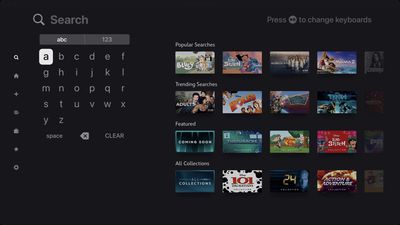
Apple TV Grid Keyboard Layout

The infinitely better Grid arrangement

But when you're stuck using the Apple TV remote itself, that grid keyboard is a game-changer. It's the kind of simple tweak that makes you appreciate Apple's attention to user experience, even if it doesn't explicitly tell you that an alternative exists.

The setting applies immediately, so you don't need to restart anything or jump through additional hoops. Just switch it once and forget about it.


Popular Stories

imac video apple feature

Apple Released Yet Another New Product Today

Friday March 20, 2026 2:39 pm PDT by
Apple has unveiled a whopping nine new products so far this March, including an iPhone 17e, iPad Air models with the M4 chip, MacBook Air models with the M5 chip, MacBook Pro models with M5 Pro and M5 Max chips, the all-new MacBook Neo, an updated Studio Display, a higher-end Studio Display XDR, AirPods Max 2, and now the Nike Powerbeats Pro 2. iPhone 17e features the same overall design as...
iPhone 18 Pro Deep Red Feature

iPhone 18 Pro Launching Later This Year With These 12 New Features

Wednesday March 18, 2026 7:39 am PDT by
While the iPhone 18 Pro and iPhone 18 Pro Max are not expected to launch for another six months or so, there are already plenty of rumors about the devices. It was initially reported that the iPhone 18 Pro models would have fully under-screen Face ID, with only a front camera visible in the top-left corner of the screen. However, the latest rumors indicate that only one Face ID component...
ios 26 4 pastel

iOS 26.4: Top 10 New Features Coming to Your iPhone

Friday March 20, 2026 2:44 pm PDT by
iOS 26.4 isn't the major update with new Siri features that we hoped for, but there are some useful quality of life improvements, and a little bit of fun with an AI playlist generator and new emoji characters. Playlist Playground - Apple Music has a Playlist Playground option that lets you generate playlists from text-based descriptions. You can include moods, feelings, activities, or...
Related Apple News: Business | World News | Reviews | Culture | Opinion