How to Find Your Apple TV Siri Remote Using Your iPhone - MacRumorsOpen MenuShow RoundupsShow Forums menuVisit ForumsOpen Sidebar
Skip to Content

How to Find Your Apple TV Siri Remote Using Your iPhone

by

In iOS 17 and tvOS 17 and later, Apple includes a feature that lets Apple TV users locate a misplaced Siri Remote using their iPhone. Keep reading to learn how it's done.
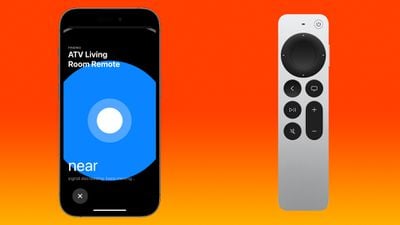
find siri remote iphone
Prior to the launch of the latest ‌Apple TV‌ 4K, there were rumors that Apple would build ‌Find My‌ functionality into the ‌Siri‌ Remote. That didn't happen. Instead, Apple introduced a new iPhone option that does essentially the same thing.

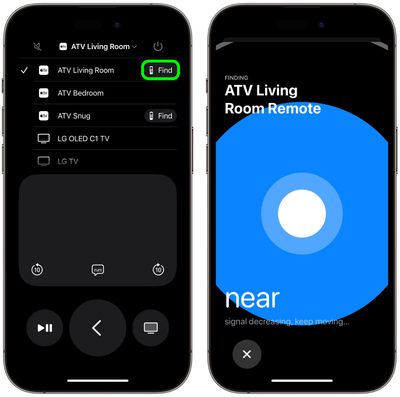
If a ‌Siri‌ Remote becomes lost, the ‌Apple TV‌ remote control available in the Control Center on an ‌iPhone‌ can be used to locate the missing remote. When enabled, users will see a Find My-like interface on their iPhone that guides them toward the remote, with an onscreen circle that changes in size to guide movement in the right direction.

Note that Find My for the ‌Siri‌ Remote is available on the second and third-generation ‌Siri‌ Remotes, and the feature is limited to the ‌Apple TV‌ 4K models released in 2021 and 2022 with updated firmware.

Find Your Siri Remote With Your iPhone

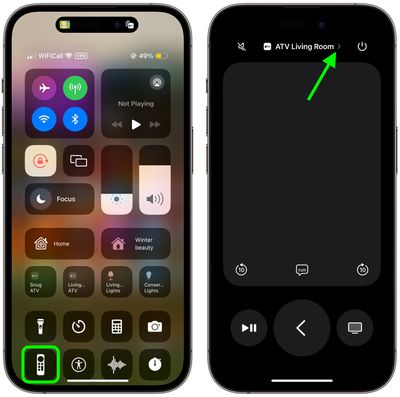
  1. Bring up the Control Center from your iPhone by swiping down from the upper right corner of the screen (on an ‌iPhone‌ with a Home button, swipe up from the bottom of the screen).
  2. Tap the Apple TV Remote button (if it's not there, you can manually add it to Control Center).
  3. Tap the chevron next to the name of the connected Siri Remote.
    control center

  4. Tap the Find button next to the misplaced Siri Remote.
  5. Use the onscreen Find My-like interface to locate the remote. The size of the circle increases to guide movement in the correct direction. When your iPhone is right next to the remote, the screen shows a solid white orb.
  6. Tap the X button to close the location interface.
    remote

In our experience, the proximity accuracy of the feature is equivalent to locating an AirTag with Find My, so it's really helpful for locating your Siri Remote even if it's just hidden between the sofa cushions.


Related Roundup: Apple TV
Buyer's Guide: Apple TV (Don't Buy)

Top Rated Comments

33 months ago
Here's another solution for all:

Score: 6 Votes (Like | Disagree)
George Dawes Avatar
33 months ago
Now this IS useful !

Well worth updating just for this tbh
Score: 6 Votes (Like | Disagree)
Muero Avatar
33 months ago

I was considering buying the newer version for this feature alone given how often my child misplaces our remote.
instead of replacing the remote, have you considered replacing the child?
Score: 5 Votes (Like | Disagree)
33 months ago
Have tested this on our older lightning remote.. works great.

So what is this black magic? How the hell does this work?
Score: 4 Votes (Like | Disagree)
33 months ago
Just tried it. It's so inaccurate it's practically useless. I asked someone to hide my remote and I couldn't find it using this feature.
Score: 4 Votes (Like | Disagree)
33 months ago
The Internet is going to explode. In my experience from various sources, this was the #1 requested feature.
Score: 4 Votes (Like | Disagree)

Popular Stories

imac video apple feature

Apple Released Yet Another New Product Today

Friday March 20, 2026 2:39 pm PDT by
Apple has unveiled a whopping nine new products so far this March, including an iPhone 17e, iPad Air models with the M4 chip, MacBook Air models with the M5 chip, MacBook Pro models with M5 Pro and M5 Max chips, the all-new MacBook Neo, an updated Studio Display, a higher-end Studio Display XDR, AirPods Max 2, and now the Nike Powerbeats Pro 2. iPhone 17e features the same overall design as...
iPhone 18 Pro Deep Red Feature

iPhone 18 Pro Launching Later This Year With These 12 New Features

Wednesday March 18, 2026 7:39 am PDT by
While the iPhone 18 Pro and iPhone 18 Pro Max are not expected to launch for another six months or so, there are already plenty of rumors about the devices. It was initially reported that the iPhone 18 Pro models would have fully under-screen Face ID, with only a front camera visible in the top-left corner of the screen. However, the latest rumors indicate that only one Face ID component...
ios 26 4 pastel

iOS 26.4: Top 10 New Features Coming to Your iPhone

Friday March 20, 2026 2:44 pm PDT by
iOS 26.4 isn't the major update with new Siri features that we hoped for, but there are some useful quality of life improvements, and a little bit of fun with an AI playlist generator and new emoji characters. Playlist Playground - Apple Music has a Playlist Playground option that lets you generate playlists from text-based descriptions. You can include moods, feelings, activities, or...
Related Apple News: Education | South Africa | Politics | Sport | Buyers Guide