How to View All Events as a List in Your Mac's Calendar App - MacRumorsOpen MenuShow RoundupsShow Forums menuVisit ForumsOpen Sidebar
Skip to Content

How to View All Events as a List in Your Mac's Calendar App

by

Some third-party calendar apps (Fantastical, for example) allow you to view all your upcoming events as a vertical list. Many users find this sort of viewing mode beats staring at the regular calendar interface, since it provides a quick at-a-glance summary of their entire schedule over the coming days and months.
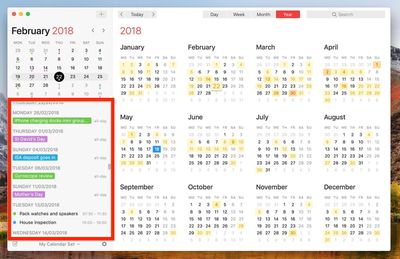
fantastical mac list view


On the face of it, Apple's Calendar for macOS lacks an equivalent feature. However, there is one way to force a list view that includes all your events, which we've detailed below. The trick even works with iCal going back at least to OS X Mountain Lion, which makes us wonder why Apple doesn't make the option a bit more obvious.

How to View All Events as a List in Calendar

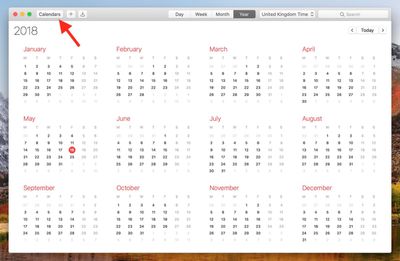
  1. Launch the Calendar app on your Mac.

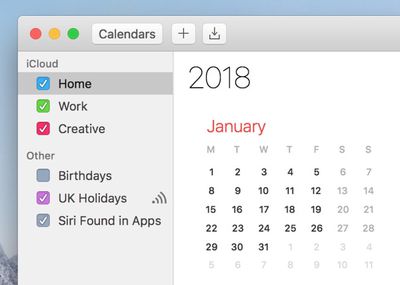
  2. Click the Calendar button.
    1 basic calendar view macos

  3. Select which calendars you want to include in the list view using the checkboxes.
    2 select calendars macos

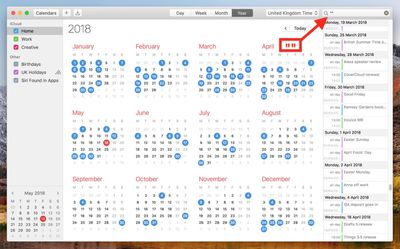
  4. Click the Search field in the upper right corner of the Calendar window and type two double quotes ("") to generate a list of all upcoming events.
    3 list view calendar macos

We find the list view makes it easier to copy multiple events and paste them into other apps in chronological order. For example, to copy several contiguous events, hold the Shift key, click the two outlying events bordering a given period, right-click (or Ctrl-click) an event in the selection, and select Copy from the contextual dropdown menu. You can then paste the events (including their details) straight into a document in date order.
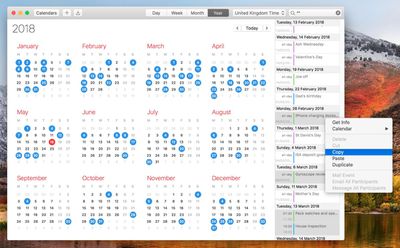
copy events in list view macos calendar
To copy non-contiguous events in your calendar, simply perform the same action but hold down the Command key instead of Shift. (Note that you can also open multiple event info boxes using the same method - just select Get Info from the contextual dropdown menu.)
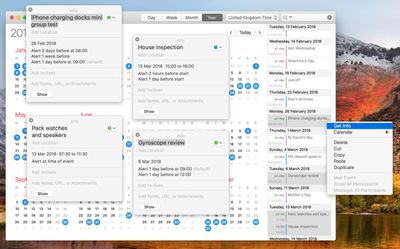

get info list view macos calendar

Top Rated Comments

oxfordrunner Avatar
104 months ago
I’ve been trying Fantastical 2 on the Mac App Store (21 day free demo). I am an airline pilot so scheduling events spanning multiple time zones is my life.

I want a calendar app that supports all Mac and iOS platforms with the SAME features such as UTC (GMT) time zones, floating time zone input, and events scheduled down to the minute (not rounded to the nearest 5), or events scheduled in different departure and arrival time zones (my personal preference, I could always just enter events in UTC and let the calendar app convert the times but sometimes that takes longer to input).

In short, neither Apple’s app or Fantastical 2 provide all of these features on ALL platforms and I can’t figure out why. Also, why do I have to know a specific city in a selected time zone to get that to populate the time zone field? I don’t want to have to use a “nearby” city that may or may not be in the correct time zone, I want the program to be smart enough to figure that out.

Going to try BusyCal next but I think some of the missing features are due to Apple’s calendar APIs used by developers. For example, you can’t do floating events on iOS; iOS rounds the times to the nearest 5, Mac OS will not let you choose a different time zone for the start and end of an event like iOS will.

Maybe I’m a lone wolf on wanting some of these features but I feel like the coding aspects aren’t too hard to fix, they just haven’t been done.
Score: 7 Votes (Like | Disagree)
104 months ago
Good tip and looks nice but why isn’t this just a standard view option. Looks silly having “” in the search bar and also, what if you want to use the search bar for, hmm... I don’t know, searching for something!?
Score: 3 Votes (Like | Disagree)
104 months ago
Sooooo intuitive ...
Score: 3 Votes (Like | Disagree)
104 months ago
I wish I could turn off autocomplete suggests for events in the Calendar app. I type one letter and out come 35 effing recommendations, not of which are remotely close to the event I’m trying to create. Super annoying.
Score: 3 Votes (Like | Disagree)
nnoble Avatar
104 months ago
These articles disclose superb little gems. This one I tried and can start putting it to good use instantly. Thanks.
Score: 2 Votes (Like | Disagree)
Mac Fly (film) Avatar
104 months ago
This method is not working on Sierra. I can bring up the list but Copying an event from it isn’t possible, let alone copying several events.
Score: 2 Votes (Like | Disagree)

Popular Stories

Apple Event Logo

Apple Just Released a New Accessory

Monday May 4, 2026 8:13 am PDT by
Apple today released a new Pride Edition Sport Loop for the Apple Watch. The band features a rainbow design with 11 colors of woven nylon yarns. The new Pride Edition Sport Loop is available to order now on Apple.com and in the Apple Store app in 40mm, 42mm, and 46mm sizes, and it will be available at Apple Store locations starting later this week. In the U.S., the band costs $49. There...
iOS 27 on iPhone 17 1

iOS 27 Will Add These New Features to Your iPhone

Saturday May 2, 2026 8:43 am PDT by
Apple is expected to unveil iOS 27 during its WWDC 2026 keynote on June 8, and there are already many rumored features and changes for iPhones. The first developer beta of iOS 27 will likely be available immediately following the keynote, and a public beta typically follows in July. Following beta testing, the software update should be released to all users with a compatible iPhone in...
Apple Announces 2026 Pride Band Watch Face and iPhone Wallpaper Article 2

iOS 26.5 Coming Soon With These New Features

Monday May 4, 2026 8:40 am PDT by
iOS 26.5 is expected to be released next week, following more than a month of beta testing. The update is relatively minor, but there are a couple of new features and changes across the operating system that we have recapped below. iOS 26.5 lays the groundwork for end-to-end encryption for RCS in the Messages app and ads in the Apple Maps app, and it will include a new Pride wallpaper and a...
Related Apple News: Ipad | Opinion | Iphone | Mac | Travel