How to Enable Dark Mode on Mac - MacRumorsOpen MenuShow RoundupsShow Forums menuVisit ForumsOpen Sidebar
Skip to Content

How to Enable Dark Mode on Mac

by

MacOS includes a Dark Mode option that works across the entire system, from the dock and menu bar to all of your apps.

Here's how to turn on ‌Dark Mode‌:

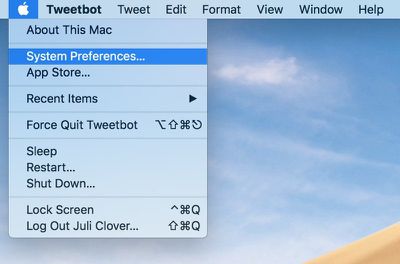
  1. Choose System Preferences on the menu bar. applesystempreferences
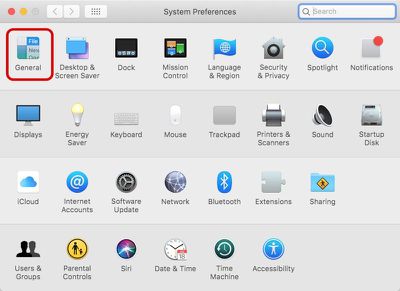
  2. Select General. systempreferences
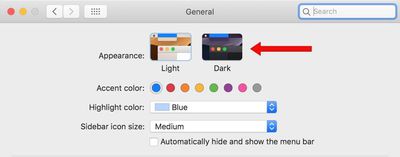
  3. In the "Appearance" section at the top of the window, click the "Dark" option. darkmodetoggle
Those are the only steps required to enable ‌Dark Mode‌. If you want to turn it off again, follow the same steps but this time choose the "Light" option.

While in Dark mode, the dock, menu bar, and all of your Apple apps, including Safari, Mail, Calendar, Notes, the Mac App Store, Messages, and more will feature darker colors and themes. ‌Dark Mode‌ will need to be built into third-party Mac apps that don't already offer a dark option when macOS Mojave is released.

Related Forum: macOS Mojave

Top Rated Comments

Internet Enzyme Avatar
101 months ago
What I don’t understand is why there isnt a keyboard shortcut or a menu bar toggle or an automatic night-shift esque switching into dark mode. I feel like those are all very obvious features that shouldn’t require a year for macOS 10.15 to be in the OS
Score: 12 Votes (Like | Disagree)
101 months ago
I don‘t understand why everyone seems to like dark mode. It does look cool, but my eyes are irritated after less than a minute when reading white text on dark background.
Dark mode is not meant for casual users, it meant to be use by individuals that spend a lot of time in front of an screen, developers, frontend dudes, designers, etc...adobe For example has a dark mode, most code IDE’s have a dark mode and it’s welcomed by everyone that uses them.
Score: 9 Votes (Like | Disagree)
m0sher Avatar
101 months ago
I’d rather have Dark mode option for iOS please.
Score: 6 Votes (Like | Disagree)
TantalizedMind Avatar
101 months ago
WHY IS THERE NO DARK MODE FOR iOS?!!!!!!
Score: 6 Votes (Like | Disagree)
MacHiavelli Avatar
101 months ago
Lots of dark applications on top of each other are very difficult to distinguish between: there is no sense of depth or layering (as yet).

And in light mode, it would be nice to still have an option for a dark menu bar and dock.
Score: 6 Votes (Like | Disagree)
kriebe Avatar
101 months ago
I'm really excited about this for many reasons, but the first thing that popped in my head was that I finally get back the black background for all of my photos that was lost from the switch from iPhoto to Photos. It's so much easier to look at a ton of photos on a black background compared to a white one. There's a reason why almost all TVs and Monitors have a dark bezel.
Score: 5 Votes (Like | Disagree)

Popular Stories

iPhone 18 Pro Deep Red Feature

iPhone 18 Pro Launching Later This Year With These 12 New Features

Wednesday March 18, 2026 7:39 am PDT by
While the iPhone 18 Pro and iPhone 18 Pro Max are not expected to launch for another six months or so, there are already plenty of rumors about the devices. It was initially reported that the iPhone 18 Pro models would have fully under-screen Face ID, with only a front camera visible in the top-left corner of the screen. However, the latest rumors indicate that only one Face ID component...
imac video apple feature

Apple Released Yet Another New Product Today

Friday March 20, 2026 2:39 pm PDT by
Apple has unveiled a whopping nine new products so far this March, including an iPhone 17e, iPad Air models with the M4 chip, MacBook Air models with the M5 chip, MacBook Pro models with M5 Pro and M5 Max chips, the all-new MacBook Neo, an updated Studio Display, a higher-end Studio Display XDR, AirPods Max 2, and now the Nike Powerbeats Pro 2. iPhone 17e features the same overall design as...
ios 26 4 pastel

iOS 26.4: Top 10 New Features Coming to Your iPhone

Friday March 20, 2026 2:44 pm PDT by
iOS 26.4 isn't the major update with new Siri features that we hoped for, but there are some useful quality of life improvements, and a little bit of fun with an AI playlist generator and new emoji characters. Playlist Playground - Apple Music has a Playlist Playground option that lets you generate playlists from text-based descriptions. You can include moods, feelings, activities, or...
Related Apple News: Entertainment | Mac | Motoring | Education | Health