Apple is introducing a set of AI features in iOS 18.1 and iPadOS 18.1 under the banner "Apple Intelligence." These features are officially only currently available in beta to developers in the US, but it's actually pretty easy to get it up and running on iPhones and iPads in most other locations with the exception of the European Union and China.
The main reason Apple has limited access to Apple Intelligence is that it only supports US English at this time, but if you can work with that – and you have a compatible device – then there's no technical reason why you can't start exploring the new AI features.
Supported Devices
Apple Intelligence encompasses a range of capabilities, including composing text and emails, automating actions across various apps, generating images, summarizing documents and texts, and more. However, these features require a lot of on-device computing power, so before you do anything, it's worth checking if your device is compatible. iPhone users need either an iPhone 15 Pro or iPhone 15 Pro Max to run Apple Intelligence, while only iPads powered by M1 or later Apple silicon processors are compatible.
Install Beta Software
If your device is supported, the first thing you need to do is install the latest developer beta for your device. Once you've followed the instructions provided in the linked article and your device is up and running with the latest beta (the third beta as of writing), follow these steps on your iPhone or iPad.
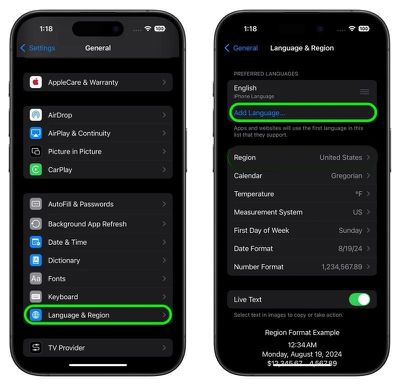
- Open Settings, then tap through to General ➝ Language & Region.
- Tap Add Language.. and choose English (US).

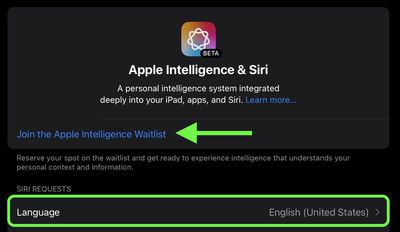
- Return to the main Settings menu and tap Apple Intelligence & Siri.
- Tap Language and choose English (United States).
- You will now be able to join the Apple Intelligence waitlist, which in most cases gets accepted in just a few minutes. Under the Apple Intelligence header text, tap Join Waitlist.
- After what should hopefully be a short wait, the message will change to Turn On Apple Intelligence. Tap it, and a welcome message should appear, indicating you have sucessfully enabled the AI features on your device.
You can learn more here about all of the Apple Intelligence features available in the iOS 18.1 developer beta. Note that some of the Apple Intelligence additions won't be coming until later.